Modern teams thrive on coordination, not just individual effort. However, work slows down when tasks and discussions scatter across too many tools. Visibility drops. Choosing the right platform is now critical. It aligns your team and ensures accountability. This guide compares TaskOPad and Plaky. We look at how each fits your workflow and team size. Whether you need simple tracking or structured daily management, we’ll help you decide.
Why is Team Collaboration Tool the Backbone of Modern Business?
Work today rarely happens in isolation. Most projects involve many people. Managers plan the timelines. Designers create the assets. Developers build the features. Meanwhile, clients expect regular updates.
Without a dedicated shared system, information can easily get scattered across multiple platforms like emails, chats, spreadsheets, and personal notes.This leads to more than just confusion. It creates slower execution across the board.
A dedicated team collaboration tool acts as the single source of truth. Everyone associated with the project knows what needs to be done, who owns it, and when it is due. Managers don’t need to ask for updates and entire teams can see progress instantly.
Modern businesses rely on collaboration tools for three major reasons:
- Visibility across the team
Work often lives in too many places. Managers then spend time chasing updates rather than managing. A tool provides real-time status updates. You can see what is completed, in progress, or blocked without constant follow-ups. - Clear accountability
Missed deadlines often stem from unclear ownership. People aren’t necessarily careless; they are just confused. Assigning tasks and setting priorities removes this ambiguity. It directly improves team reliability. - Faster decision making
Discussions attached directly to tasks reduce back-and-forth communication. Teams don’t need to search emails or chats to understand context. Everything stays connected to the work itself.
Collaboration tools also help organizations grow. A system for five people usually fails at twenty. Processes require structure, reporting, and repeatability. A proper system helps new members understand workflows immediately. They won’t have to rely on verbal instructions alone.
These tools are no longer just simple trackers. They have become full operational platforms. Teams use them for client work, internal operations, and approvals. They also handle documentation and performance monitoring in one place.
In short, communication increases as a company grows. Complexity multiplies faster than productivity without a structured system. The right tool changes that dynamic. Communication stays organized. Progress becomes measurable. Teams spend less time talking and more time executing.
TaskOPad vs Plaky – A Quick Comparison
Both TaskOPad and Plaky are designed to help teams stay organized and collaborate better. However, they are built with slightly different goals in mind. Plaky focuses on simplicity and visual task tracking, while TaskOPad aims to support structured workflows and growing team operations.
The table below gives a quick, practical overview so you can understand where each tool fits best:
| Aspect | TaskOPad | Plaky |
| Primary Purpose | End-to-end work management & team operations | Simple project and task tracking |
| Best For | Growing teams, agencies, process-driven businesses | Small teams, basic collaboration needs |
| Learning Curve | Slightly structured but easy to adopt | Very easy and quick to start |
| Task Organization | Hierarchical structure (projects, tasks, subtasks, priorities) | Board & card based organization |
| Collaboration | Assignments, discussions, accountability tracking | Comments and team coordination on boards |
| Workflow Management | Custom workflows, repeatable processes | Basic status tracking |
| Reporting & Insights | Productivity reports, progress tracking, performance visibility | Minimal reporting |
| Time Tracking | Built-in time tracking & work monitoring | Not a primary focus |
| Scalability | Designed to support growing teams and multiple departments | Works best for smaller teams |
| Client & Operations Use | Suitable for internal + client workflows | Mainly internal task coordination |
| Automation & Control | Structured processes and better operational control | Manual task movement |
| Pricing Philosophy | Value-focused for long-term team usage | Free and simple entry point |
What is TaskOPad?
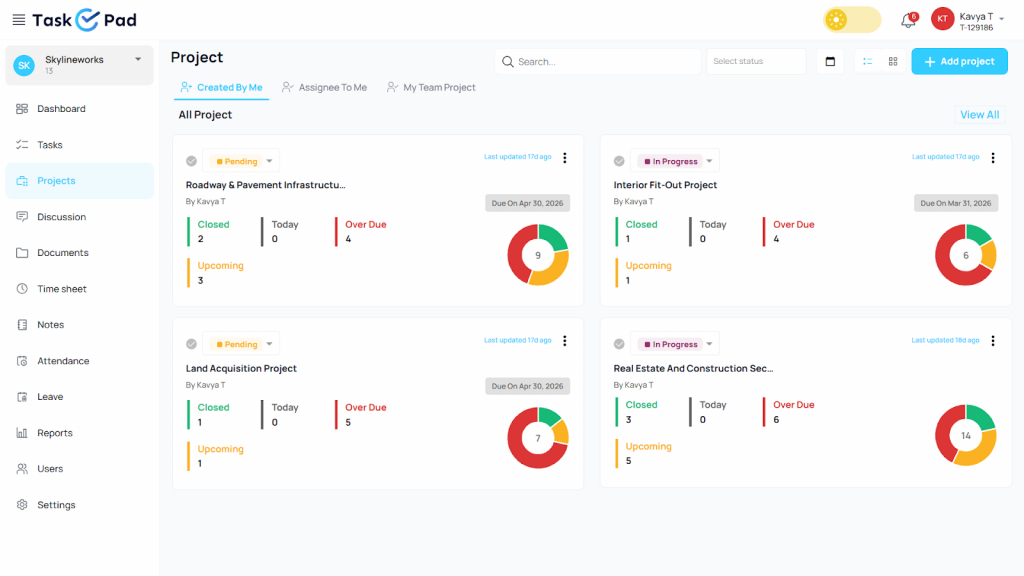
TaskOPad is a team collaboration and work management platform designed to help businesses organize, track, and complete work in a structured way. With TaskOPad, teams don’t need to manage tasks across various platforms like emails, chats, and spreadsheets. They can plan projects, assign responsibilities, and monitor progress from a single place.
The platform focuses on clarity and accountability. Every task has an owner, priority, and deadline. It also shows a clear status. Everyone knows what needs attention right now. They also see what is already finished. This reduces the need for constant follow-ups. Work keeps moving without heavy supervision.
Who Uses TaskOPad?
Growing teams often use TaskOPad to handle multiple projects. It fits many industries well:
- Agencies and IT organizations
- Manufacturing and CA firms
- Legal and hospitality services
- Operations and support teams
- Freelancers and Solo users
- Hotels and hospitality Sector
- Medical and healthcare industry
- Real estate and construction sector
It goes beyond simple task tracking. It supports custom workflows and time tracking. It also provides reporting and collaboration features. This helps teams coordinate work and understand their performance.
The Core Goal
The goal of TaskOPad is simple. It turns daily work into a visible, manageable process. New team members quickly learn how work flows. Managers track progress without micromanaging. Teams maintain consistency even as they scale.
In short, TaskOPad isn’t just a place to list tasks. It is a complete system. It helps teams plan, execute, and improve how they work together.
Key TaskOPad Collaboration Features
TaskOPad stands out because it goes beyond simple task lists. It creates total operational clarity. Many tools focus only on visual boards. TaskOPad focuses on the actual interactions that drive work forward.
Here are the key features that keep teams in sync:
1. Centralized Communication Hub
Stop digging through endless email chains. Don’t search for messages in personal WhatsApp chats. TaskOPad provides a dedicated discussion section for every task. All files and feedback stay where the work happens. New members can just scroll through the task history. This eliminates the need for “catch-up” meetings.
2. Integrated Attendance & Leave Management
Knowing who is available is vital for a growing business. TaskOPad integrates attendance and leave tracking into the workflow. Managers see in real-time who checked in. The system uses geo-fencing or facial recognition for accuracy. This stops you from assigning urgent work to someone who is out of the office.
3. Real-Time WhatsApp & Email Alerts
Teams aren’t always staring at a dashboard. TaskOPad bridges this gap with seamless integrations. It sends alerts through WhatsApp and email. Members get instant updates when a task is assigned or a deadline nears. This “push” system ensures urgent work never gets buried.
4. Daily Progress Reports (DPR)
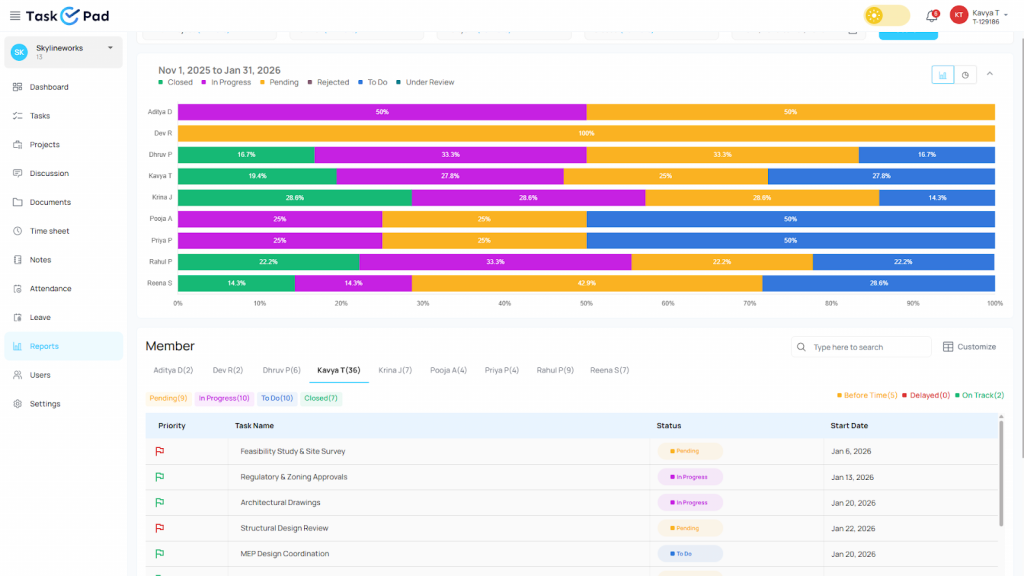
Transparency builds trust. TaskOPad’s reports automatically summarize the day’s wins. They also list pending items. Managers don’t have to manually ask for status updates anymore. These reports provide a clear view of team productivity. They help find bottlenecks before they become major issues.
5. Multi-User Assignment & Sub-tasks
Complex projects require a team effort. TaskOPad lets you assign one task to multiple users. You can also break it down into detailed sub-tasks. Each sub-task gets its own owner. This ensures everyone knows their specific piece of the puzzle. It eliminates the “I thought he was doing it” confusion.
What is Plaky?
Plaky is a visual project and task management tool. It helps teams organize their work using boards and cards. The approach is simple. Projects are divided into boards. Tasks appear as cards that move through different stages of progress.
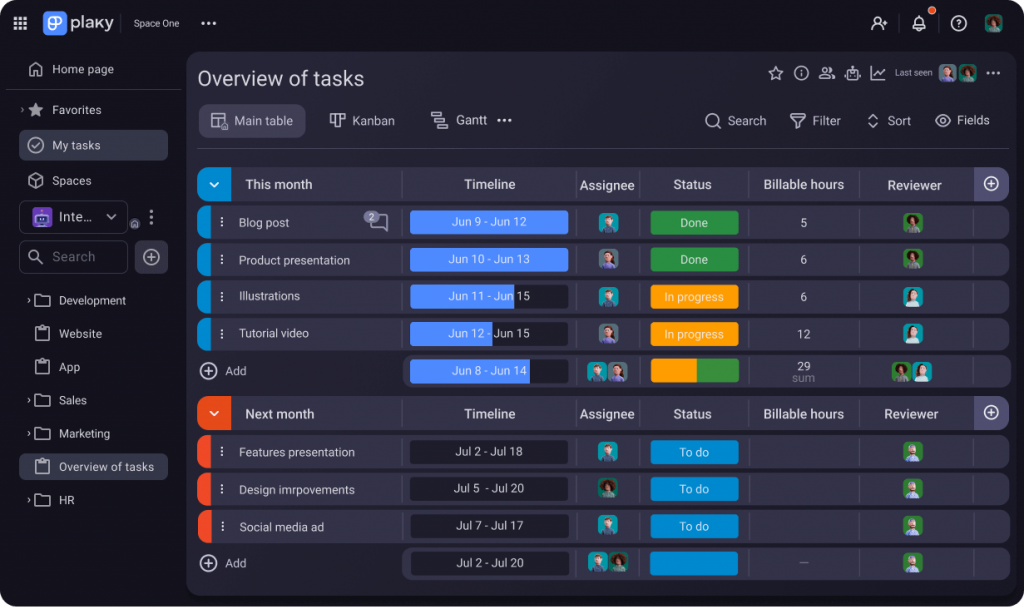
The platform focuses heavily on ease of use. Teams can quickly create tasks and assign members. They can add comments, attach files, and track status. There is very little need for setup or training. Because of this, small teams often prefer Plaky. It offers a lightweight way to coordinate daily work.
The layout makes it easy to understand your workload. You can see what is pending, in progress, or completed at a glance. This style works well for straightforward workflows. It is great for content planning, internal to-do lists, or small projects. It keeps collaboration very simple.
A Starting Point for TeamsPlaky is built for basic coordination. It is not designed for detailed operational management. It helps teams stay aligned without adding extra complexity. This makes it a practical starting point for many. It is perfect for those moving away from spreadsheets or chat-based tracking.In short, Plaky provides a clean way to manage tasks visually. It keeps everyone on the same page with an approachable design.
Plaky Core Features
Plaky has built a strong reputation in project management. It focuses on high visibility and an “unlimited” philosophy. The tool is designed as a flexible workspace. Teams can quickly organize thoughts and tasks. They don’t get bogged down by complex configurations.
Here are the core features that define the Plaky experience:
1. Multiple Board Views (Kanban & Table)
Plaky’s strength lies in its visual flexibility. Users can toggle between two main styles. There is a traditional Table view for spreadsheet lovers. There is also a Kanban board for visual learners. This lets you see the status of all work at a glance. It helps you identify bottlenecks in your pipeline quickly.
2. Highly Customizable Boards
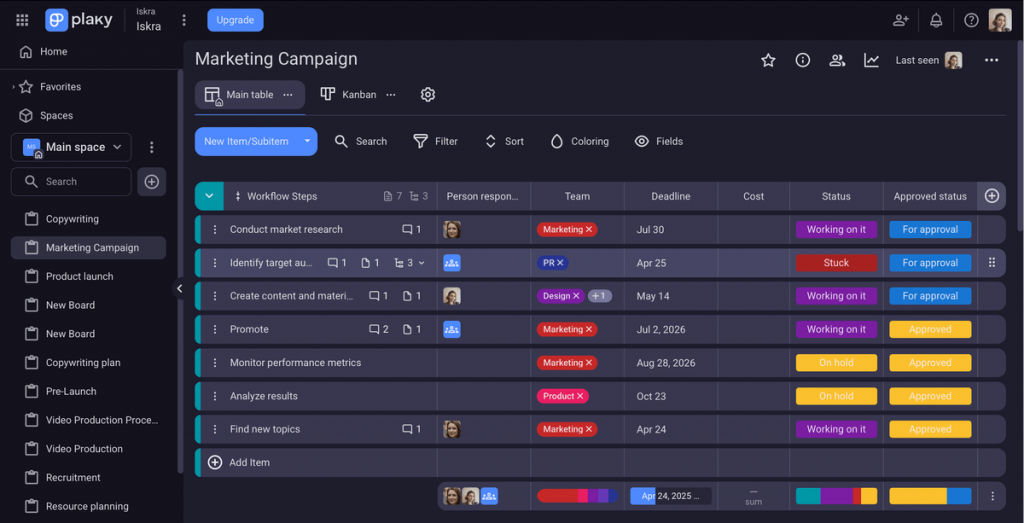
Plaky acts as a “blank canvas.” It offers a high degree of customization through Custom Fields. You can add specific data points to your tasks. Use dropdown menus, date pickers, or priority labels. This fits your unique project requirements. Whether managing a marketing calendar or a software sprint, you can mold the board to your liking.
3. Contextual Communication
Plaky keeps teamwork organized with a dedicated Comment Section. This lives within every task card. Team members can @mention colleagues to get their attention. They can reply in threads to keep discussions focused. Emojis allow for quick feedback. This ensures project conversations stay attached to the work. They don’t get lost in external chat apps.
4. Ready-to-Use Templates
Some teams don’t want to start from scratch. Plaky offers a library of industry-specific templates for them. These cover HR onboarding, sales pipelines, and product roadmaps. The templates provide a pre-built structure. This helps new users get up and running in minutes.
5. Unlimited Foundations
A standout highlight is Plaky’s “unlimited” free tier. It allows for unlimited users and unlimited boards. This makes it an attractive “no-risk” option. It is great for startups and small teams. It helps them digitize their workflow without immediate costs.
Plaky is Highly Visual, but Why do Teams Prefer TaskOPad?
There is no denying that Plaky is an excellent tool for teams that love a clean, visual aesthetic. Its “blank canvas” approach is perfect for creative brainstorming and simple project tracking. However, as a team grows, “visual” isn’t always enough. Businesses often reach a point where they need more than just a beautiful board, they need a system that understands their daily operational reality.
Here is why many teams are making the switch to TaskOPad:
1. Beyond Tasks: Integrated Business Operations
Plaky focuses on the “project,” but TaskOPad focuses on the entire office workflow. While Plaky tells you what needs to be done, TaskOPad tells you who is actually available to do it. With built-in Attendance and Leave Management, managers don’t have to switch between an HR tool and a task tool to check if a team member is in the office before delegating an urgent task.
2. Proactive Communication (The WhatsApp Edge)
Visual tools usually require you to stay logged into the dashboard to see updates. TaskOPad acknowledges that busy managers and teams are often on the move. By integrating WhatsApp and Email alerts, TaskOPad pushes critical updates directly to you. You don’t have to “check the board” to know if a deadline is missed; TaskOPad ensures the information finds you.
3. Discipline Over Flexibility
Plaky’s greatest strength, its total flexibility, can sometimes become a weakness for process-driven teams. Without a set structure, boards can quickly become messy. TaskOPad provides a structured framework designed for accountability. Features like Daily Progress Reports (DPR) and automated performance tracking instill a sense of discipline that helps SMBs and professional firms maintain high standards as they scale.
4. Dedicated Local Support
For many businesses, having a partner is better than just having a provider. TaskOPad offers personalized, direct human support (often via call or chat), ensuring that you aren’t just a ticket number in a global queue. For teams that want a tool that understands their specific business culture and local requirements, TaskOPad feels like a tailored solution rather than a one-size-fits-all platform.
This is why many teams focus on achieving project management KPIs through structured task tracking and accountability systems.
How TaskOPad Supports Growing & Process-Driven Teams
As a business moves past the startup phase, simply “getting things done” is no longer enough. You need a way to repeat success at scale. TaskOPad is built specifically for this transition. It provides the structure that process-driven teams need. This helps you maintain quality without the chaos.
Instead of just tracking individual tasks, TaskOPad helps you build standardized workflows. Features like task dependencies are crucial here. They ensure that Team B doesn’t start until Team A finishes. This prevents overlapping work and wasted time.
For growing teams, our Resource Management tools provide a bird’s-eye view. You can see everyone’s workload at once. This makes it easy to identify who is over-leveraged. It also shows who can take on more responsibility.
TaskOPad combines daily accountability with automated reporting. This ensures your processes stay tight as your team gets bigger. Everything remains transparent and, most importantly, scalable.
TaskOPad vs Plaky — Pricing & Real User Value
Pricing Comparison
| Feature | TaskOPad | Plaky |
| Paid Plan Price | ~ $4.00 /user/month (all features included) | Pro: ~$3.99 /user/month (Basic plan with limited features) |
| Free Trial | 15-day full-feature trial | Free plan with limited capabilities |
| Minimum Users | 1 User (no restriction) | No minimum users |
| Time Tracking | Included | Not included |
| Workflow Management | Structured workflows | Basic status tracking |
| Reporting & Insights | Productivity & progress reports | Limited reporting |
| Task Hierarchy | Projects, tasks, subtasks | Boards and cards only |
| Resource Planning | Workload visibility | Not available |
| Operational Use | Suitable for daily business operations | Basic task coordination |
| Need for Additional Tools | Minimal | Often required as teams grow |
| Best Fit | Growing teams & process-driven work | Small teams & simple collaboration |
TaskOPad User Reviews
TaskOPad provides end to end solution to manage my team and workers from one place and having a bird eye view on many sites which are running at different locations in city. I can track the progress easily of task/work given to managers and employee of my firm and thanks to the features like Project management , service and clients which helps to sort out the things conveniently at single click.
- Jimit (Capterra)
It has a very modern system where I can have control of the work team, prioritizing tasks and assigning tasks to each of the team members, having complete monitoring of each one to validate productivity. It makes you have a more perfect order on a single platform. On the other hand, I like the good customer service they provide because when I communicate with TaskOPad I feel comfortable and confident to ask many questions without making them uncomfortable.
- Dylan C (G2 Review)
Plaky User Reviews
I like how there are different types of boards and templates that can be used for different scenarios. There’s a bit of a learning curve for new users to this type of software but with experience and time, it’s very easy to use. Plaky should have a chat interface that syncs with Pumble so there’s no need switch between apps. There should also be an option to customize the homepage where it’ll go directly to your main board or the option to choose how to set up the home page when logging in.
- Kevin S. (G2)
Plaky has helped us manage tasks, organize the projects we are working on with great ease. Price & Functionality is easy and user friendly. Support is great. Reporting can be better and copying sorting simpler.
- Mandy (Capterra)
Which Tool Should You Choose?
Deciding between TaskOPad and Plaky comes down to whether you need a simple digital board or a complete business management engine. Both tools are excellent for staying organized, but they serve different stages of business growth.
Plaky is a fantastic “entry-level” tool. If you are a small creative team or a startup that just needs a visual “blank canvas” to see tasks at a glance, Plaky’s visual simplicity is a great place to start. It handles the “what” of your projects with ease.
However, if you are a growing business that needs to scale, TaskOPad is the superior choice. TaskOPad doesn’t just track tasks; it manages your entire operational workflow. While Plaky provides a board, TaskOPad provides a disciplined framework. With built-in attendance tracking, automated WhatsApp reminders, and detailed daily progress reports, TaskOPad ensures your team stays accountable and your processes stay tight. It is the better solution for managers who want to spend less time following up and more time driving results.
Get Started with TaskOPad
Transitioning to TaskOPad is seamless and designed to show you value from day one. You can sign up today to explore our comprehensive suite of collaboration features and see how they fit your team’s unique needs.If you would prefer a guided tour, we invite you to book a free demo with our experts. We will walk you through our advanced reporting, attendance tracking, and WhatsApp integration, ensuring you have everything you need to scale your business with confidence. Let’s streamline your operations together!