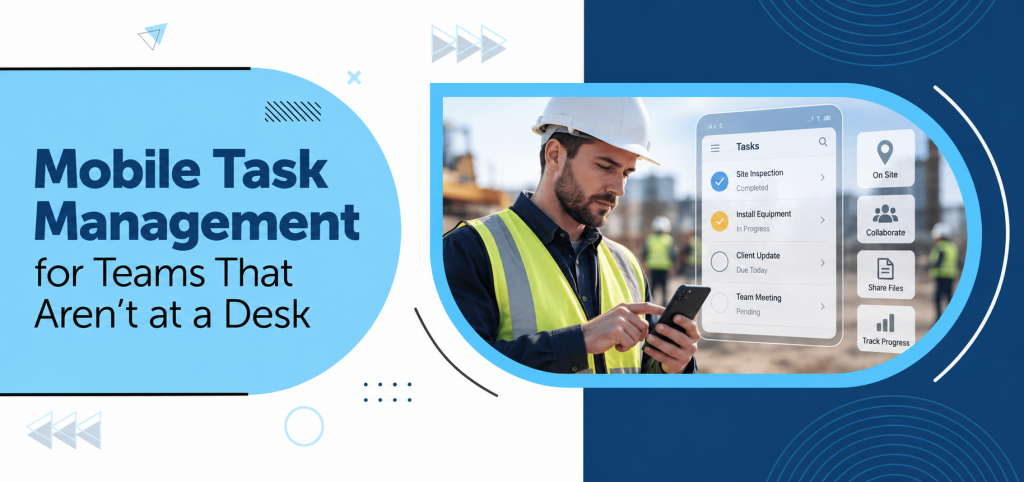
Not every employee spends their working day sitting at a desk.
Sales representatives visit clients, technicians work at different sites, healthcare teams move between departments, supervisors walk through facilities, and event teams manage activities on the ground. For these employees, waiting until they return to a computer to check or update a task can slow everything down. For these teams, the ability to access and update tasks while working remotely can be just as important as having the right tools at a desk.
This is where mobile task management becomes valuable.
A mobile task management system allows employees to access tasks, check deadlines, share updates, and communicate with their teams while they are away from their desks. Instead of making location a barrier to productivity, teams can stay connected to their work wherever it takes them.
Why Deskless Teams Need a Different Approach
Traditional task management often assumes employees have regular access to a desktop or laptop. That may work well for office-based teams, but it does not always fit the reality of deskless employees.
Consider a maintenance technician who receives a new service request while already at a customer location. They may need to know:
- What needs to be completed?
- Who assigned the task?
- How urgent is it?
- When does it need to be completed?
- Are there any notes or documents attached?
- Does someone need to approve the work?
If the information is sitting in an office computer or buried inside an email thread, responding quickly becomes difficult. Mobile access brings the task directly to the person doing the work.
What is Mobile Task Management?
Mobile task management allows employees to manage their assigned work through a mobile device.
Depending on the system, employees can:
- View assigned tasks.
- Check deadlines.
- Update task status.
- Add comments.
- Access relevant documents.
- Communicate with team members.
- Record work progress.
- Receive notifications.
The objective is simple: make work accessible wherever the work happens.
The Benefits of Mobile Task Management
1. Access Tasks From Anywhere
Deskless employees should not have to return to a computer simply to check their next assignment.
A mobile task management system gives employees access to their work while they are:
- Visiting customers.
- Working on-site.
- Moving between departments.
- Attending meetings.
- Supervising operations.
- Travelling between locations.
This makes task information available when it is actually needed.
2. Faster Task Updates
A task may change several times during the day.
A field employee could complete one activity, encounter a problem with another, and receive a new priority from their manager.
Without mobile access, these updates may only happen once the employee returns to their desk. A mobile task tracking approach can help teams record progress as the work happens.
With a mobile system, employees can update the status immediately.
For example:
Task: Equipment inspection
Status: Completed
Comment: Inspection completed. Replacement part required.
The manager can see the update without waiting for a phone call or end-of-day report.
3. Better Communication Between Field and Office Teams
Deskless teams often depend on office-based colleagues for information, approvals, and coordination. Clear task assignment helps make sure the right employee knows what needs to be done and who is responsible for the next step.
This can create delays when communication happens through disconnected channels.
Mobile task management keeps conversations closer to the work itself.
An employee can post an update against the relevant task, while a manager can respond without having to start another conversation elsewhere. Keeping task-related communication with the work itself can make follow-ups easier to find and reduce the need to repeat information across separate channels.
This creates better continuity between teams working in different locations.
Mobile Task Management vs. Traditional Task Tracking
| Traditional Task Tracking | Mobile Task Management |
| Often depends on desktop access | Accessible through mobile devices |
| Updates may happen later. | Updates can happen immediately |
| Field employees may rely on calls or messages. | Task information stays in one place. |
| Progress updates may be delayed until employees return to a computer | Progress is visible sooner. |
| Information may be spread across channels. | Task details stay connected |
The difference is particularly noticeable when teams spend most of their working hours away from a desk.
4. Keep Managers Updated Without Constant Calls
Managing a mobile workforce does not mean calling employees throughout the day for progress updates. A central task system can provide visibility without constant interruptions.
Managers can check:
- Which tasks are completed.
- Which tasks are still in progress.
- Which employees have pending work.
- Where delays are occurring.
- Which activities require attention.
This allows managers to focus on exceptions rather than chasing every routine update.
5. Make Priorities Clear
Deskless employees often deal with changing priorities. A sales representative may need to respond to a high-value client. A technician may receive an urgent service request. A site supervisor may need to address an unexpected issue.
A mobile task management system can help employees see which work requires immediate attention. Using clear priority levels makes it easier to distinguish between:
High Priority: Needs immediate action
Medium Priority: Important but not urgent
Low Priority: Can be handled later
This helps employees organize their day even when their schedule changes.
6. Keep Important Documents Accessible
Tasks often depend on supporting information.
This could include:
- Product specifications.
- Client documents.
- Checklists.
- Project briefs.
- Images.
- Reports.
- Approval documents.
If employees have to search through emails to find these files, valuable time can be lost. Keeping relevant documents connected to the task gives employees easier access to the information they need to complete their work.
7. Improve Accountability
Mobile access does not simply make work more convenient. It can also improve accountability.
When employees can update tasks immediately, managers have greater visibility into what has been completed and what is still pending.
This creates a clearer record of:
- Assigned work.
- Task progress.
- Updates.
- Comments.meetings,
- Completion.
Employees also have a clearer understanding of what they are responsible for.
Examples of Teams That Benefit From Mobile Task Management
- Field Service Teams: Technicians can receive assignments, check job details, and update progress from customer locations.
- Sales Teams: Sales representatives can track follow-ups, client meetings and pending activities while travelling.
- Construction Teams: Site teams can monitor project activities, coordinate with office teams, and update progress from the worksite.
- Healthcare Teams: Staff can coordinate administrative activities, schedules, and departmental tasks while moving between different areas.schedules,
- Event Management Teams: Event staff can coordinate vendors, logistics, schedules and last-minute requirements while working at the venue.
- Manufacturing Teams: Supervisors and production teams can track operational activities without being tied to a desk.
A Simple Example
Imagine a property management company handling maintenance requests across several buildings.
Without mobile task management:
- A maintenance request reaches the office.
- The coordinator calls the technician.
- The technician visits the property.
- They call the office with an update.
- Someone manually updates the spreadsheet.
- The manager checks the spreadsheet later.
Now consider a mobile workflow:
- The request is created as a task.
- A technician is assigned.
- The technician receives the task on their mobile device.
- They review the instructions and visit the property.
- They update the task after completing the work.
- The manager sees the updated status.
The work itself has not changed. The flow of information has.
What Should You Look for in a Mobile Task Management Tool?
Not every mobile application will suit every team.
Businesses should consider whether the platform provides:
- Easy Task Access: Employees should be able to quickly find their assigned work.
- Simple Status Updates: Updating a task should not require several complicated steps.
- Notifications: Important changes and assignments should be visible without employees constantly checking the platform.
- Task Comments: Employees should be able to communicate updates and questions within the relevant task.
- Document Access: Important files should remain connected to the work they support.
- Team Visibility: Managers should have a clear view of progress across employees and projects.
- Cross-Device Accessibility: Teams should be able to move between devices without losing access to their work.
Why Simplicity Matters for Deskless Teams
A mobile task management system is only useful if employees actually use it.
Deskless workers often need to update information quickly between activities. A complicated interface can discourage adoption.
The best approach is to keep everyday actions simple:
Open → Check → Update → Complete
Employees should not need extensive training just to change a task status or leave a comment.
How TaskOPad Supports Mobile Work
For teams that work across locations, TaskOPad brings task assignment, progress tracking, and collaboration into one workspace. Its Task Tracker helps teams keep track of assigned work and progress, while the mobile app gives employees the flexibility to stay connected to their tasks while working away from a desk. Teams can also keep task-related updates and communication connected to the work, helping reduce the need to rely on separate channels for routine progress information.
This can be particularly useful for businesses managing field teams, travelling employees, site-based staff, and hybrid workforces. For deskless teams, the value is not simply having tasks available on a phone; it is having the people, tasks, and relevant information connected as work moves from one location to another.
Best Practices for Managing Deskless Teams
Technology works best when supported by clear processes. A mobile task management system is most effective when teams agree on how tasks should be assigned, updated, and communicated.
Businesses can improve mobile task management by:
- Giving every task a clear owner.
- Setting realistic deadlines.
- Using consistent priority levels.
- Keeping instructions within the task.
- Encouraging employees to update work as it happens.
- Reviewing overdue tasks regularly.
- Avoiding duplicate communication across multiple channels.
These practices make mobile working more structured without making it restrictive.
Final Thoughts
The workplace is no longer limited to desks, offices, and fixed working hours. Employees increasingly work from customer locations, construction sites, production floors, hospitals, events, and other environments where a computer may not always be available.
Mobile task management helps businesses adapt to this reality.
When employees can access tasks, update progress, communicate with colleagues, and find important information from wherever they are working, teams spend less time waiting for updates and more time completing work. For deskless teams in particular, keeping these actions connected can make everyday work easier to organize and keep visible.
For deskless teams, mobility is not simply a convenience. It can be an important part of keeping everyday work organized, visible, and connected.
Frequently Asked Questions
Who can benefit from mobile task management?
Field service teams, sales employees, construction teams, healthcare staff, event teams, manufacturing teams, and other deskless employees can benefit from mobile task management.
How does mobile task management improve productivity?
Employees can access instructions, update task progress, and communicate with their teams without waiting to return to a computer, helping reduce delays.
Can managers track deskless employees’ tasks?
A task management system can give managers visibility into assigned tasks, current status, deadlines, and updates without requiring constant calls or messages.
Why is mobile access important for field teams?
Field employees often work away from computers. Mobile access allows them to receive assignments, check information, and report progress from their actual place of work.