How many emails does it take to complete one simple task? Sometimes, a single request can turn into a long chain of replies, forwarded messages, attachments, and follow-ups. By the time the work is completed, finding the original instruction or the latest update can be harder than doing the task itself.
Email remains useful for many forms of business communication. However, it is not always the best place for conversations directly related to tasks and projects. This is where task comments can make a difference.
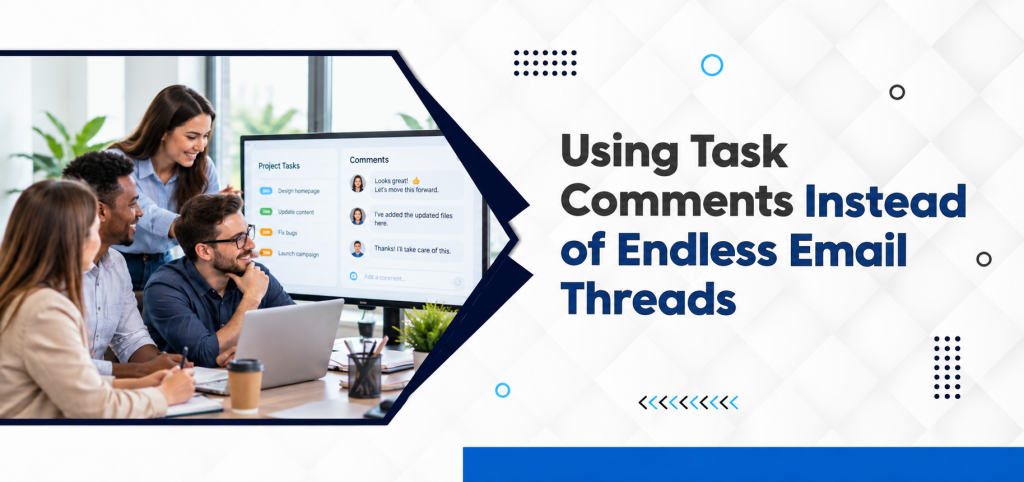
Instead of discussing a task across multiple email threads, teams can keep questions, updates, feedback, and decisions attached to the task itself. Everyone involved can see the relevant conversation in the same place, without searching through their inbox.
For growing teams managing multiple projects at once, this simple change can make everyday collaboration much easier. For task-specific communication, using comments directly within a task can keep conversations connected to the work while reducing the need for long email threads and repeated follow-ups.
Why Email Threads Become Difficult to Manage
Email works well when communication is straightforward. The problem begins when a conversation becomes connected to an ongoing piece of work.
A typical project email might include:
- The original task request
- Several replies
- Different people added to CC
- Multiple file attachments
- Questions from team members
- Changes to the original instructions
- Approval messages
- Follow-up reminders
After several days, the latest information may be buried somewhere in the middle of the thread. This creates a simple but frustrating problem: the conversation exists, but the context is difficult to find.
What Are Task Comments?
Task comments are messages posted directly within an individual task.
Instead of sending an email such as
“I’ve updated the document. Please check and let me know if any changes are required.”
A team member can add the update directly to the relevant task.
Anyone with access to the task can then see the conversation alongside:
- Task description
- Assigned owner
- Due date
- Priority
- Attachments
- Current status
The communication stays connected to the work it relates to. This approach is particularly useful when a task involves multiple updates, feedback, or approvals, because everyone can refer to the same conversation instead of searching through separate email messages.
Task Comments vs. Email: What’s the Difference?
| Email Threads | Task Comments |
| Conversation sits in an inbox. | Conversation stays with the task |
| Information can be spread across messages. | Updates remain in one location. |
| Attachments may be difficult to trace | Files can stay connected to the task. |
| Requires searching through threads | Context is immediately visible |
| People may miss CC updates. | Relevant team members can follow the task |
| Previous decisions can be difficult to find. | Task history provides useful context. |
The goal isn’t to eliminate email completely. It’s to use the right communication channel for the right type of information. The aim is not to replace email completely. Instead, task comments provide a dedicated space for conversations that are directly connected to a specific task or project.
Keep Task-Specific Conversations With the Task
One of the biggest advantages of task comments is context.
Imagine a designer receives a task to create a social media campaign. The marketing manager later requests a change to the headline.
If the discussion happens through email, the designer may need to search for the correct message before making the change.
With task comments, the instruction can sit directly beneath the task.
The designer can see:
Task: Create social media campaign
Owner: Design Team
Deadline: Friday
Comment: Update the headline to match the approved campaign message.
There is little room for confusion.
Reduce Unnecessary Follow-Ups
“Any update?”
“Did you see my email?”
“Is this completed?”
“Can you send the latest version?”
These messages may seem harmless individually, but they consume a considerable amount of time when repeated across multiple projects.
Task comments provide a more visible way to share progress.
For example: “First draft completed. Waiting for client approval.”
That single comment tells the team what has happened and what is preventing the task from moving forward. Managers can check the task instead of repeatedly asking employees for updates.
Keep Decisions Easy to Find
Project decisions often get lost in conversations.
A manager may approve a design in an email on Monday, discuss a modification through WhatsApp on Tuesday, and mention another change during a meeting on Wednesday. Now the team has to remember which instruction is the latest one. Keeping decisions within the relevant task creates a clearer record.
For example:
Comment: “Approved. Please proceed with Version B.”
Later, another team member can review the task and understand what was agreed upon without asking the entire team again. Keeping this decision within the task also gives the team a clear reference point if questions arise later.
Make Feedback More Actionable
Feedback is much easier to act on when it is connected to the work. Consider a content project.
Instead of receiving an email containing “Please make some changes to the article.”
A task comment could say, “Please shorten the introduction, add the updated pricing information, and review the final CTA.”
The second version is specific and actionable. It tells the person exactly what needs to change without requiring another round of clarification.
Keep Attachments Connected to the Conversation
Files are another reason project communication can become messy.
A document may be:
- Attached to an email.
- Replaced with another version.
- Forwarded to another employee.
- Downloaded and edited.
- Sent back through a different email.
Eventually, team members may not know which file is the latest version. When files and comments are connected to the relevant task, the conversation becomes easier to follow. With the discussion kept alongside the relevant task, team members can understand why a file was shared or changed without searching through older email messages for the surrounding context.
Instead of asking, “Which document should I use?”
The team can refer to the latest update within the task.
Improve Collaboration Between Departments
Task comments become particularly useful when several departments work together.
Consider a product launch involving:
- Marketing
- Sales
- Design
- Product
- Customer Support
Each department may have different responsibilities, but their work is connected.
A task comment can keep everyone informed without forcing every person into lengthy email chains.
For example:
Marketing: “Campaign copy is ready for review.”
Product: “Product specifications confirmed.”
Sales: “Sales team briefing document uploaded.”
Everyone can follow the progress without creating separate conversations.
Comments Can Help Remote and Hybrid Teams
Remote teams don’t always have the opportunity to walk over to someone’s desk and ask a quick question. This makes visible, contextual communication even more important.
Instead of sending a direct message that disappears into a separate chat, employees can add the information to the task. This gives other team members access to the same context, even if they weren’t part of the original conversation.
A task management system can therefore become a shared workspace where communication and work stay connected.
When Should You Use Task Comments?
Not every conversation needs to happen inside a task.
A simple rule is
Use task comments for:
- Task-specific questions
- Progress updates
- Feedback
- Approvals
- File-related discussions
- Clarifications
- Project decisions
- Status updates
Use email for:
- Formal external communication
- Official business correspondence
- Communication with people outside the project system
- Information that does not belong to a particular task
This approach keeps communication organized without trying to replace every existing business communication channel.
How Task Management Software Supports Better Communication
A task management platform can bring task ownership, deadlines, progress, and communication together in one workspace.
With features such as Chat Discussions, teams can exchange ideas and updates without separating every conversation from the work being discussed.
Similarly, Project Management tools can help teams maintain visibility across larger projects while individual tasks carry their own discussions and updates.
The result is a more structured way of working where employees don’t need to rely on inbox searches to understand what needs to happen next. TaskOPad brings these capabilities together in one workspace, helping teams keep task-related conversations, updates, and project information connected to the work. This can reduce unnecessary email chains while making important communication easier to find and follow.
The Bigger Benefit: Less Searching, More Doing
The real value of task comments isn’t simply reducing the number of emails.
It’s reducing the time employees spend looking for information.
When task instructions, feedback, files, decisions, and progress updates are connected, employees can spend less time asking:
- “Where is the latest update?”
- “Who approved this?”
- “Which version should I use?”
- “What did the manager say?”
- “When is this due?”
And more time actually completing the work.
Final Thoughts
Email isn’t going anywhere, nor should it. But not every task-related conversation needs another email thread.
When discussions, feedback, approvals, and updates remain connected to the tasks they belong to, teams gain better context and visibility. Employees know what needs to happen, managers can follow progress more easily, and important decisions are less likely to disappear inside crowded inboxes.
The objective isn’t to communicate more. It’s to make every piece of communication easier to find, understand, and act on. For teams managing multiple projects and deadlines, replacing unnecessary email chains with contextual task comments can be a small change that makes everyday work considerably more organized.
Frequently Asked Questions
Are task comments better than email?
For task-specific communication, task comments can be more effective because the conversation stays connected to the relevant work, owner, deadline, and files.
Should businesses stop using email for internal communication?
No. Email remains useful for many forms of communication. Task comments are best suited to discussions directly related to specific tasks and projects.
How do task comments improve accountability?
They keep updates and decisions connected to the task, making it easier to see who has responded, what has been agreed upon, and what action is required next.
Can task comments replace team chat?
Not necessarily. Team chat is useful for broader conversations, while task comments are more useful for discussions that need to remain connected to a particular piece of work.
Why do email threads cause project delays?
Important instructions, feedback, and decisions can become buried within long threads, making it harder for employees to identify the latest information and required action.