President Dwight D. Eisenhower once observed that what is important is seldom urgent, and what is urgent is seldom important. It is a deceptively simple idea and it became the foundation of one of the most widely used productivity frameworks in the world.
If your task list feels like an endless, undifferentiated pile of obligations, the Eisenhower Matrix gives you a clear, systematic way to sort through the noise. It won’t tell you to work harder. It will tell you to work on the right things.
In this guide, you will learn what the Eisenhower Matrix is, how its four urgency-importance quadrants work, how to apply it step-by-step, and how a task management platform like TaskOPad can help you put the framework into daily practice.
What is Eisenhower Matrix?
The Eisenhower Matrix also called the Eisenhower priority matrix, is a time management framework that helps you categorize tasks based on two dimensions: urgency and importance.
At its core, the matrix is a four-quadrant to-do list. Each quadrant is defined by a combination of urgency and importance, and each quadrant prescribes a different action: Do, Schedule, Delegate, or Eliminate.
Why does this matter? Because most people spend the majority of their time reacting – handling urgent things whether or not they are important. The Eisenhower Matrix forces you to make a conscious distinction between what demands attention right now and what genuinely moves the needle.
Understanding the Four Quadrants of the Eisenhower Matrix
The matrix is structured like a four quadrant to do list, helping you visually categorize your tasks.
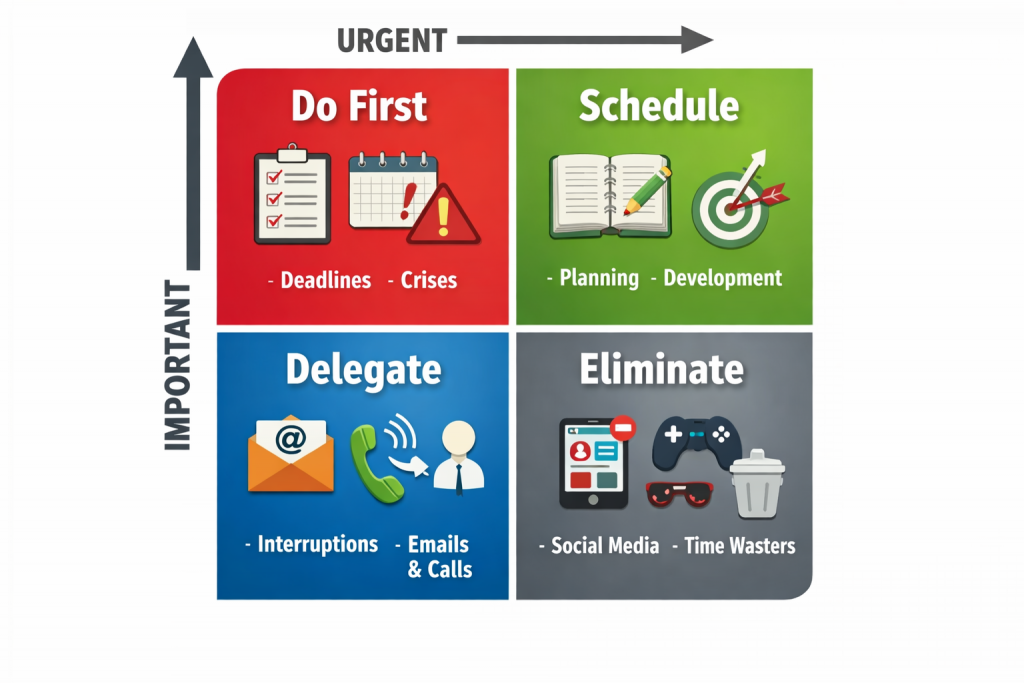
1. Urgent and Important (Do First)
These tasks fall into the urgent and important quadrants and require immediate attention, as they have serious consequences if not completed on time.
Examples:
- Meeting deadlines
- Handling crises
- Fixing critical issues
This is often referred to as the urgent priority matrix because these tasks must be handled right away.
2. Important but Not Urgent (Schedule)
These tasks contribute to long-term success but do not require immediate action.
Examples:
- Planning
- Skill development
- Relationship building
This quadrant is key to effective Eisenhower time management, as it helps prevent future urgent situations.
3. Urgent but Not Important (Delegate)
These tasks demand attention but do not necessarily require your personal involvement.
Examples:
- Interruptions
- Some emails or calls
- Routine approvals
This is often called the urgent not important matrix, where delegation is the best strategy.
4. Not Urgent and Not Important (Eliminate)
These tasks do not add value and should be minimized or removed.
Examples:
- Excessive social media use
- Unproductive meetings
- Time-wasting activities
This part of the urgent matrix helps you identify distractions and reduce inefficiency.
Why Use the Eisenhower Matrix for Task Management?
Using the Eisenhower matrix for task management helps you focus on what truly matters instead of reacting to everything. It works even better when combined with proven productivity methods. Read our guide on productivity techniques for the workplace to discover practical ways teams can manage time better, stay focused, and reduce distractions.
Key Benefits:
- Improves decision-making
- Reduces stress and overwhelm
- Enhances productivity
- Encourages better time allocation
- Helps achieve long-term goals
It turns a chaotic task list into a structured task matrix, making it easier to act with clarity, especially when combined with modern project management software for better organization and execution.
Eisenhower Matrix vs Other Time Management Techniques
While the Eisenhower Matrix is highly effective, it’s not the only time management method available. Comparing it with other popular techniques can help you better understand its unique advantages.
| Technique | Core Idea | Best For | Strengths | Limitations |
| Eisenhower Matrix | Prioritizes tasks based on urgency and importance | Daily task prioritization | Simple, visual, improves decision-making | Requires judgment to classify tasks correctly |
| To-Do List | Lists tasks to be completed | Basic task tracking | Easy to create and use | Lacks prioritization, can feel overwhelming |
| Pomodoro Technique | Work in focused intervals (25 min + breaks) | Improving focus and avoiding burnout | Boosts concentration and productivity | Doesn’t help with prioritizing tasks |
| Time Blocking | Assigns specific time slots to tasks | Structured daily planning | Helps manage time effectively | Can be rigid if plans change |
| Getting Things Done (GTD) | Organize tasks into actionable steps | Complex workflows and projects | Reduces mental clutter, highly structured | Can be time-consuming to implement |
As you can see, each method has its own strengths, but this framework stands out for its simplicity and focus on prioritization. Now, let’s look at how you can apply it step by step in your daily routine.
How to Use the Eisenhower Matrix Effectively
Applying the matrix is simple but requires discipline.
Step 1: List All Your Tasks
Start by writing down everything you need to do — big or small.
Step 2: Categorize Tasks
Place each task into one of the four quadrants based on urgency and importance.
Step 3: Take Action Accordingly
- Do urgent and important tasks immediately
- Schedule important but non-urgent tasks
- Delegate urgent but less important tasks
- Eliminate non-essential tasks
Step 4: Review Regularly
Your priorities can change, so revisit your matrix frequently to stay aligned.
Common Mistakes to Avoid
While the Eisenhower priority matrix is simple, people often misuse it.
1. Confusing Urgent with Important
Not all urgent tasks are important. Many urgent tasks are distractions.
2. Ignoring the Second Quadrant
Focusing only on urgent tasks leads to burnout. The second quadrant is where real growth happens.
3. Overloading the Matrix
Too many tasks can defeat the purpose. Keep it realistic and actionable.
Using the Eisenhower Matrix in TaskOPad
Applying this method becomes much more effective when supported by the right tool. With TaskOPad, a powerful task planner app, you can seamlessly organize, prioritize, and manage your tasks using this framework.
Instead of manually sorting tasks, TaskOPad allows you to structure your work digitally, making it easier to stay focused and productive.
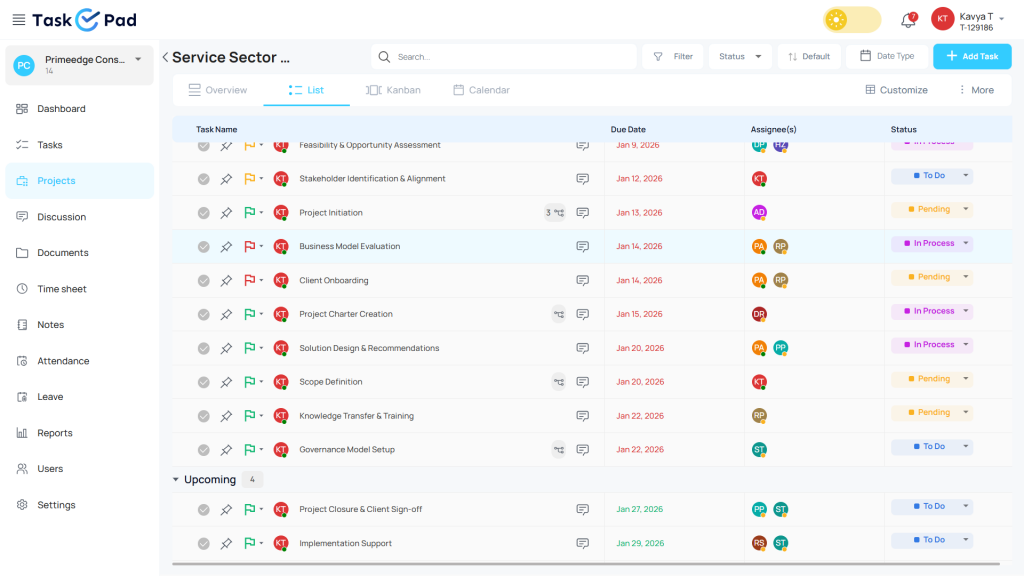
How TaskOPad Helps You Apply the Eisenhower Matrix:
- Organize Tasks EfficientlyCreate and categorize tasks based on urgency and importance, ensuring nothing slips through the cracks.
- Prioritize with ClarityClearly identify what needs immediate attention and what can be scheduled, delegated, or eliminated.
- Improve Team CollaborationAssign tasks, track progress, and ensure everyone is aligned on priorities.
- Visualize Your WorkflowGet a clear overview of your tasks, helping you make better decisions and stay in control of your workload.
- Boost ProductivityFocus on high-impact tasks while reducing time spent on low-value activities.
By combining this method with TaskOPad, you turn a simple prioritization method into a powerful productivity system that helps you work smarter, not harder.
Practical Example of the Eisenhower Matrix
Let’s use a realistic example – a team lead at a mid-sized accounting firm, managing multiple client deadlines, a growing team, and ongoing process improvement work.
Task list for the week:
| Task | Urgent? | Important? | Quadrant | Action |
| Submit GST filing for Client A — due today | Yes | Yes | Q1 | Do now |
| Review and sign off on junior staff reports | Yes | No | Q3 | Delegate to senior associate |
| Plan Q3 team training on new compliance rules | No | Yes | Q2 | Schedule for next Thursday |
| Reply to general inquiry emails | Yes | No | Q3 | Batch and delegate |
| Build a standard operating procedure for onboarding | No | Yes | Q2 | Schedule for Friday afternoon |
| Browse LinkedIn for industry news | No | No | Q4 | Eliminate or cap at 10 minutes |
| Fix a calculation error flagged by a client | Yes | Yes | Q1 | Do now |
This simple exercise transforms an overwhelming task list into a clear action plan. The team lead now knows exactly what to do personally, what to hand off, what to schedule, and what to stop doing.
Who Should Use the Eisenhower Matrix?
The matrix is a versatile tool that works across industries and roles. It is especially valuable for:
Professionals and managers who need to balance operational firefighting with strategic thinking — including project managers, operations leads, and department heads.
CA firms and legal professionals who manage overlapping client deadlines, compliance filings, and team coordination simultaneously. TaskOPad is widely used in this vertical, and the matrix maps directly onto how these teams prioritize client work vs. internal development.
Marketing and agency teams juggling client campaigns, content calendars, reporting deadlines, and creative work — all with different urgency profiles.
Manufacturing and operations teams where Quadrant 1 (machine downtime, production delays) and Quadrant 3 (routine approvals) are constant realities.
Freelancers and solo operators who have no manager setting priorities for them — making a personal prioritization framework essential.
Students and individuals managing academic commitments, personal goals, and daily life.
Tips to Get the Most Out of the Eisenhower Matrix
- Start small — don’t overcomplicate it
- Be honest about task importance
- Use digital tools for better organization
- Review your priorities daily or weekly
- Focus more on important tasks than urgent ones
Final Thoughts
The Eisenhower matrix is one of the simplest yet most effective frameworks for managing your time and tasks. By organizing your work into clear categories, you gain better control over your day and avoid unnecessary stress. If you want to take your productivity to the next level and manage your tasks more efficiently, try using a smart tool that supports structured prioritization.
Ready to apply the Eisenhower Matrix with your team? TaskOPad gives you the priority labels, assignment features, Kanban views, and deadline reminders to make this framework a daily habit — not just a one-time exercise.
Book your free demo now and discover how you can eliminate routine work and focus on what truly matters.