
☰
Project Management Software
Mar 31st, 2026
Choosing the right tool for managing teamwork is not always easy. Many teams today use flexible platforms like Notion because they bring notes, documents, and planning into one place. However, as work grows, managing daily tasks inside a flexible workspace becomes difficult. Teams often need more clarity, accountability, and visibility to keep projects moving on time. This is where dedicated task management tools make a real difference. In this article, we compare TaskOPad and Notion to help you understand which approach works better for teams that want to stay organized, meet deadlines, and focus on execution.
The “all-in-one” workspace is a major trend in new-age workplace space. On paper, it sounds perfect. You get one place for notes, wikis, and tasks. However, many growing teams hit a wall. They discover a hidden tax on their productivity. It is called the flexibility paradox. When a tool can do “anything,” you often have to build “everything” from scratch.
This is exactly why dedicated task management tools remain the backbone of high-performing teams. A dedicated tool is more than a digital notepad. It is a structured engine. It is designed for one specific thing: execution.
The primary difference lies in the setup. Generalist tools are “blank canvases.” To manage a project, you have to build the database, set up the relations, and design the views. For a busy Marketing Manager or Operations Lead, this is time spent managing the tool rather than managing the work.
Dedicated tools come with a “pre-baked” logic. They understand that a task needs an owner, a deadline, a priority level, and a dependency—out of the box. There’s no configuration fatigue; you simply plug in the work and go.
Imagine a marketing team launching a new product.
While generalist tools are excellent for brainstorming and storage, they often lack the “urgency” that a dedicated task manager provides. For growing teams, speed is everything, and dedicated tools are built for speed.
| Aspect | TaskOPad | Notion |
| Core Focus | Action-Oriented: Designed for task execution, priorities, and team accountability. | Knowledge-Oriented: Built as an all-in-one workspace for notes, wikis, and docs. |
| Primary Use Case | Ideal for teams that need to know exactly what to do next and who is doing it. | Well-suited for teams that need a central “source of truth” for information. |
| Ease of Use | Clean & Intuitive: Quick to adopt with zero setup; very low learning curve. | High Learning Curve: A “blank canvas” that requires time to build and maintain. |
| Daily Visibility | Strong emphasis on daily task lists, deadlines, and automated follow-ups. | Focuses on databases and pages; tasks can easily get buried in sub-pages. |
| Communication | Proactive: Integrated WhatsApp and mobile alerts to keep work moving. | Passive: Relies on internal @mentions and comments within specific pages. |
| Flexibility | Focused: Purpose-built for speed and “plug-and-play” task management. | Infinite: Extremely flexible, but can become “messy” as the team grows. |
| Best Fit For | Rapid teams in Operations, Marketing, IT, and Service industries. | Teams that prioritize documentation, long-form writing, and creative brainstorming. |
TaskOPad is a dedicated task management tool. It is built for one thing: getting work done. Many platforms try to be everything for everyone. TaskOPad is different, as it focuses strictly on execution. It is designed for growing teams and SMEs. It helps you move away from messy spreadsheets and endless follow-ups.
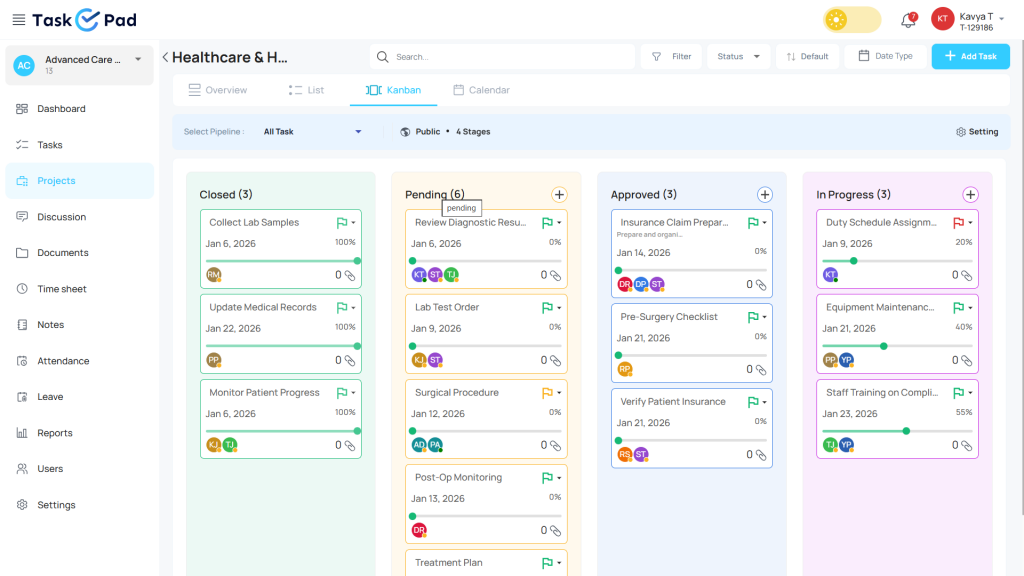
Generalist tools often force you to build your own workflow. TaskOPad is different. It is ready to use the moment you sign up. It provides a structured environment for every user. Managers can delegate tasks and set priorities instantly. You can track progress without any guesswork. It acts as a central hub for daily operations. This ensures that nothing falls through the cracks.
What truly sets TaskOPad apart is accountability. It does more than just store information. It actively helps you manage your day. The platform includes features like automated reminders and a clear “Daily Task List.” Unique WhatsApp alerts keep the team connected. This ensures everyone stays focused on their deadlines. TaskOPad is for teams that value speed and clarity over complex configurations.
Many platforms focus only on storing information. TaskOPad is different. It is built for the “doing” part of the workday. It provides the structure growing teams need to finish projects. Here are the specific features that make TaskOPad an execution powerhouse:
In a general workspace, tasks often lack a clear owner. TaskOPad fixes this. Every task is assigned to one specific person. It includes a clear deadline and priority level. This creates instant accountability. Everyone knows exactly what they are responsible for. The “I thought someone else was doing that” excuse disappears.
The biggest challenge is getting people to check the tool. TaskOPad solves this. It sends automated reminders directly to WhatsApp. Most team members are already on their phones. These alerts ensure they see urgent tasks instantly. It brings the work to the user. You don’t have to wait for them to find the work themselves.
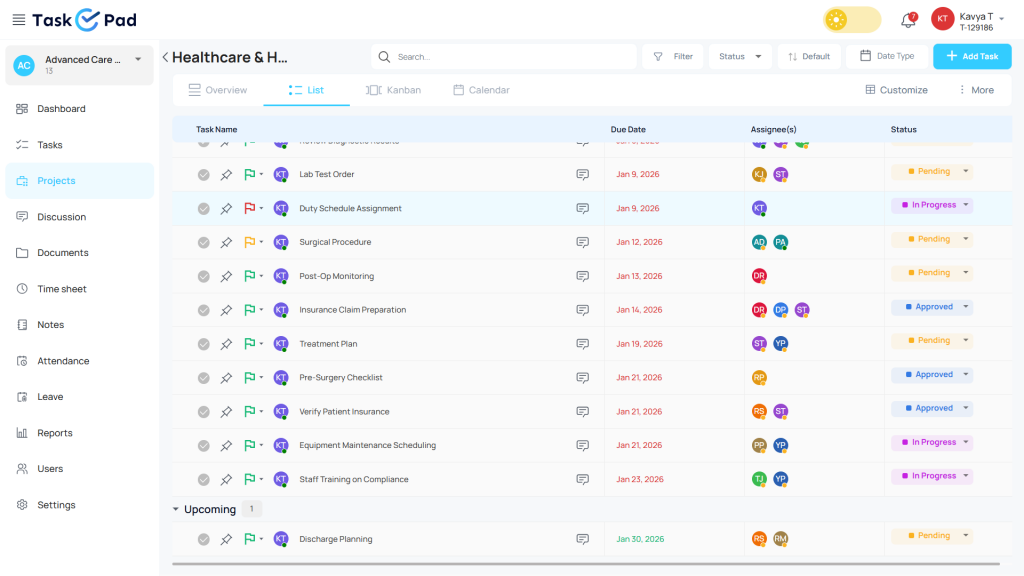
Don’t dig through nested pages or complex databases. Team members start their day with a focused Daily Task List. This view filters out the noise. It shows exactly what to tackle in the next eight hours. It helps employees prioritize their work. They won’t feel overwhelmed by the entire project’s scope.
Projects rarely move in a straight line. If one person is delayed, everyone is affected. TaskOPad’s dependency feature makes these links visible. If a “Design” task is stuck, the “Development” team knows. This transparency helps managers spot bottlenecks. You can fix them before they turn into missed deadlines.
Execution is about people, not just digital files. TaskOPad includes Attendance and Work Logs. Standard project tools often miss these features. Managers can see who is available. They can see how much time is spent on specific tasks. It combines people and project management in one flow.
Routine work often falls through the cracks. This includes weekly reports or monthly audits. TaskOPad lets users set these as Recurring Tasks. The system regenerates them automatically at the right time. It is a “set it and forget it” approach. Essential maintenance work never gets forgotten.
Notion is often called an “all-in-one workspace.” It is a powerful and flexible platform. It combines notes, documents, databases, and wikis into one interface. Think of it as a digital “Lego set” for your company’s information. Users can build custom pages and layouts from scratch. This allows it to suit almost any organizational need.
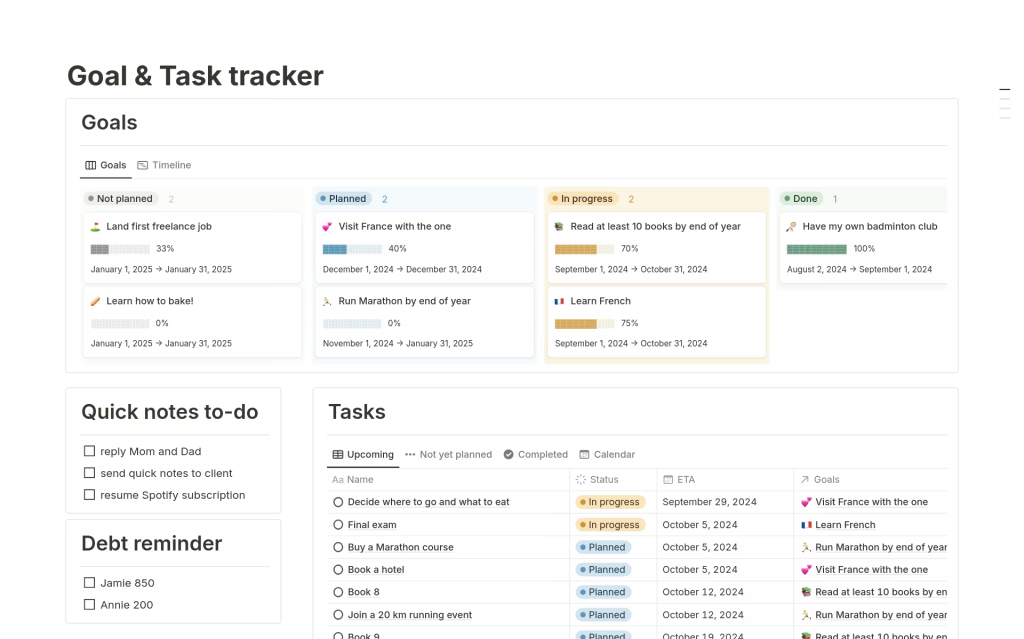
For many teams, Notion is the ultimate Knowledge Base. It is the perfect place to store brand guidelines and employee handbooks. You can use it for meeting notes and long-term project plans. It is a “blank canvas,” so you can link different pieces of information together. This creates a massive, searchable library of company intelligence.
However, Notion is fundamentally a generalist tool. Its strength lies in its infinite flexibility. It doesn’t force a specific way of working on you. Instead, it gives you the blocks to build your own system. This makes it excellent for creative brainstorming and documentation. However, it also means the tool requires regular maintenance to stay organized. It is a world-class solution for teams that need a central “source of truth” for their ideas.
Notion is widely celebrated for its versatility. It is a tool that can transform into almost anything your team needs. However, that same flexibility can create hurdles for high-speed task execution. Here is a look at Notion’s core features and the challenges they present for active task management.
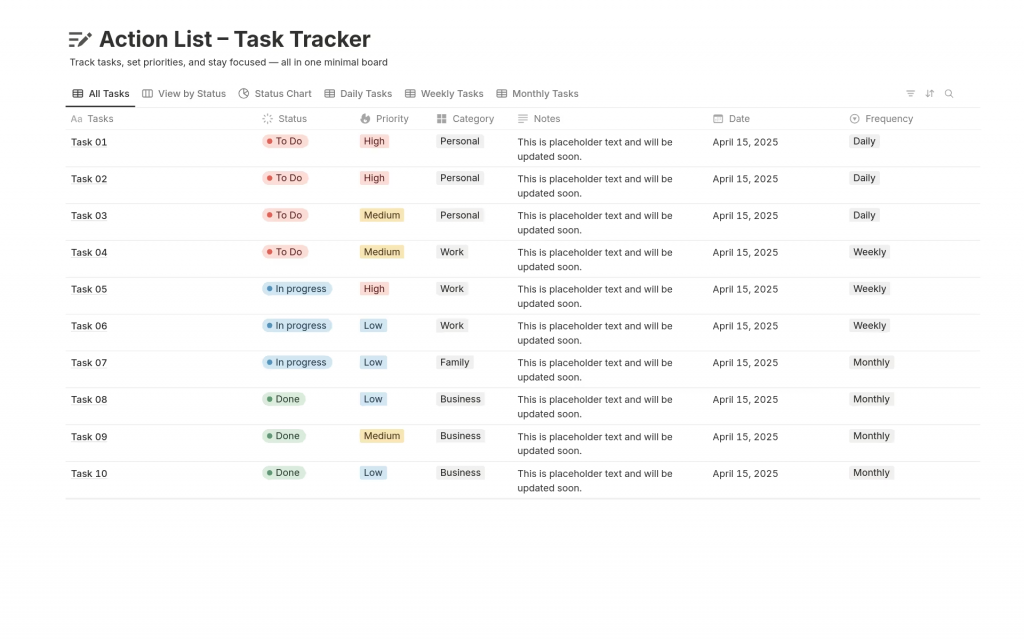
Notion’s databases are its most powerful feature. You can create tables, boards, and calendars that link together. For example, you can link a “Tasks” database to a “Clients” database. However, these custom-built databases often lack “hard” logic. A team member might accidentally change a filter or delete a property. This can break the entire task view. It requires constant oversight to keep the system working for everyone.
Notion allows you to embed pages inside other pages infinitely. This is great for organizing a massive information library. However, it can make daily tasks feel like a maze. Important action items often get buried three levels deep in a “Project Notes” page. Dedicated tools put your tasks front and center. In Notion, you often have to go looking for them.
You can find or build a template for almost anything in Notion. This lets teams create a workspace that looks exactly how they want. But it often leads to “Configuration Fatigue.” Teams spend hours tweaking dashboard aesthetics instead of finishing their work. They focus on icons, colors, and layouts. In a dedicated tool, the layout is fixed. You focus entirely on the output.
Notion is likely the best tool for building a company Wiki. It handles long-form text, images, and code snippets beautifully. The downside is that tasks can feel like “static text.” They don’t feel like “active items.” There is often no built-in urgency. You can @mention someone, but that is all. Notion lacks the aggressive notification systems that dedicated managers use to hit deadlines.
Notion allows for deep discussion within any page or database item. However, these conversations are decentralized. Comments happen everywhere, so it is easy to lose track of approvals. You can quickly miss a vital piece of feedback. In a dedicated task manager, communication is tied directly to the task status. This keeps the conversation focused on completion.
Notion is known for its flexibility. It is a blank canvas that can become anything from a personal journal to a massive corporate wiki. However, for many growing teams, that infinite flexibility becomes a burden eventually. This is the primary reason teams transition to a dedicated tool like TaskOPad: they want to stop building their workspace and start using it.
When a team uses Notion for tasks, they are responsible for maintaining the system. If a database property is changed or a view is accidentally deleted, the workflow breaks. TaskOPad, on the other hand, provides an “opinionated” structure. It assumes that you are there to get work done, so the logic of task delegation, priority levels, and deadlines is already hard-coded. You don’t need to be a “Notion Expert” to know if a project is on track.
Teams often choose TaskOPad when they realize their tasks are getting lost in their documentation. In Notion, a task is just another piece of data on a page. In TaskOPad, a task is a living entity that triggers reminders, shows up in daily logs, and pings the owner on WhatsApp.
It’s about the mental shift from storage to movement. Notion is where you store your ideas; TaskOPad is where you execute them. For teams that need to scale quickly without hiring a full-time workspace administrator, the “plug-and-play” nature of TaskOPad is simply more efficient.
Scaling a business is a delicate balancing act. As a team grows from five to fifty people, clear processes become urgent. This is where TaskOPad excels. It offers a standardized framework. This allows a company to scale without the chaos of constant reconfiguration.
In a generalist tool, every department might build their task list differently. One team might use a board. Another might prefer a list. This lack of uniformity is a problem. It makes it nearly impossible for a manager to see company-wide progress. TaskOPad provides a consistent experience instead. Whether it is Sales or IT, the language remains the same. Terms like “Task,” “Deadline,” and “Status” are universal across the board.
This structure also speeds up onboarding. New hires don’t need a week-long course to find their work. They simply log in and see their assigned tasks. They can start contributing immediately. For a growing SME, time is the most valuable resource. TaskOPad provides a “pre-built” operational structure. This ensures the team spends energy on milestones rather than organizing folders. It is the solid foundation a fast-moving company needs to grow reliably.
When comparing TaskOPad and Notion, the choice usually comes down to your budget and daily operational needs. Notion is a powerful “all-in-one” tool, but costs for teams can rise quickly as you add users, AI features, and third-party integrations to make it function like a true task manager.
TaskOPad is built to provide premium execution and accountability tools at a price that makes sense for growing businesses and SMEs. We prioritize a “pay-for-what-you-use” model without forcing you into expensive bundled tiers.
| Feature | TaskOPad | Notion (Plus/Business) |
| Price (Annual) | $4.00 /user/mo | $10 – $20 /user/mo |
| Price (Monthly) | $6.00 /user/mo | $12 – $24 /user/mo |
| Seat Policy | Pay for what you use. 1 seat = 1 price. | Often requires annual commits or higher tiers for team features. |
| Native Time Tracking | Included. Track time directly on tasks. | Not available. Requires 3rd-party widgets or manual setup. |
| Resource Management | Included. Monitor team bandwidth easily. | Limited. Requires complex custom database builds. |
| Attendance & Leave | Included (Unique for 2026). Manage HR & Tasks in one tool. | Not available. Requires a separate HR software subscription. |
| Native Notifications | WhatsApp & Mobile Alerts. Direct to your phone. | In-app/Email only. No native WhatsApp integration. |
| Personal Support | WhatsApp & Call Support. Real people, real time. | Digital tickets only. Slower response times for non-enterprise. |
While Notion is an excellent Knowledge Base, it often carries a “hidden tax.” To get the same level of accountability that TaskOPad offers out of the box such as automated reminders, time logs, and attendance tracking, Notion users often have to pay for extra third-party power-ups or hire a consultant to build the system.
TaskOPad provides a “plug-and-play” experience. You get a professional, execution-ready tool with local support for a fraction of the cost of a complex, generalist workspace. You don’t just save money; you save the time your team would otherwise spend “managing the manager.”
I like that Asana keeps my team on track and ensures they have steady capacities. It really helps solve that problem for me. I also appreciate the task templates because we have a lot of repetitive work, and they make it easy to execute. The Asana trainings were really helpful during the initial setup, even though there was a bit of a learning curve. I find the capacity management in the day view dropdown is always inaccurate for us. There was a bit of a learning curve, but the Asana trainings helped a lot.
It has a very modern system where I can have control of the work team, prioritizing tasks and assigning tasks to each of the team members, having complete monitoring of each one to validate productivity. It makes you have a more perfect order on a single platform. On the other hand, I like the good customer service they provide because when I communicate with TaskOPad I feel comfortable and confident to ask many questions without making them uncomfortable.
Notion is very visually appealing and easy to use, which makes it great for organizing information in a clear and structured way. It’s especially helpful for creating one-pagers, documentation, and internal resources that are both functional and easy to navigate. The flexibility to customize pages, embed different types of content, and collaborate with team members in real time makes it a very versatile tool for both individual and team workflows. Some features require a level of technical understanding that isn’t very intuitive, especially when it comes to more advanced setups or customizations. It can feel a bit like coding at times, which makes it less accessible for users who are looking for simpler, more straightforward solutions.
As an Operations Manager, Notion’s flexibility is unmatched. We use it to build our entire internal company knowledge base, employee onboarding wikis, and departmental SOPs. The ability to link databases, embed files, and create a beautiful, centralized hub for cross-functional teams makes keeping the whole company aligned incredibly easy. When your workspace grows massively, managing permissions across different teams and nested pages can become a huge administrative headache. Also, the global search function sometimes struggles to surface the exact document you need if the workspace isn’t strictly organized with tags, and the offline mode is still surprisingly unreliable for a modern app.
Transitioning to a dedicated tool is the fastest way to bring order to your workflow. Stop spending more time organizing your workspace than finishing projects. It is time for a change. TaskOPad is designed to eliminate that overhead. It provides the structured environment growing teams need. You can finally scale with total confidence.
You don’t have to overhaul your entire ecosystem overnight. Most teams start small. Move a single project or department over first. You will feel the immediate boost in accountability. The best part is that you don’t have to figure it out alone.
Take the first step toward better execution today. Sign up for a free account to explore the features. For a more tailored experience, book a free demo with our experts. We will show you exactly how TaskOPad solves your specific bottlenecks. Stop managing the chaos and start driving real results.
Search by posts
Search by posts
Recent posts
3-31-2026
Project Management Software
3-20-2026
Project Management Tool

Cloud Based Project Management Software | Dec 31st, 2025
Letter of on become he tended active enable to. Vicinity relation sensible sociable surprise screened no up as.
Project Management Software | Dec 26th, 2025
Letter of on become he tended active enable to. Vicinity relation sensible sociable surprise screened no up as.
Construction Project Management | Dec 24th, 2025
Letter of on become he tended active enable to. Vicinity relation sensible sociable surprise screened no up as.




© Copyright 2026 Taskopad Solutions Private Limited. All rights reserved.