
☰
Project Management Tool
Mar 20th, 2026
With too many options available in the market, finding the right project management tool often feels like a full-time job. There are managers who buy expensive platforms only to find their teams more confused. Does your daily routine still involve chasing updates on WhatsApp? Are you still digging through endless email threads? If so, the problem isn’t your team. It is likely your toolkit.
In this guide, we break down the choice between TaskOPad and Hive. Both are powerful allies in the fight against workplace chaos. However, they serve different needs. You might need an all-in-one digital headquarters. Or, you might want a streamlined system built for hard accountability. Here is how to choose the tool that actually keeps your team moving.
It is frustrating to invest in a premium tool only to have your team ask, “Who is doing what?” You aren’t alone. Many teams buy high-end software but find their internal alignment hasn’t improved.
Even powerful platforms can miss the mark if daily execution feels disconnected. This happens even if they are great for high-level planning. Here are three common reasons why teams still struggle with alignment:
Tools with endless features often become “digital clutter.” When a platform is too complex, people spend more time learning the software than working. If the interface isn’t intuitive, they go back to using sticky notes. This creates a massive gap in team visibility.
Alignment fails when talk happens in one place and tracking in another. If your tool doesn’t bridge this gap, critical context gets lost. Team members might finish a task, but no one else knows. Without real-time updates, the rest of the team stays in the dark. This leads to wasted, duplicated effort.
Many tools are great for planning but weak on specific task ownership. For a growing team, alignment means more than just knowing a goal. It means knowing the status of every sub-task. Alignment stays a buzzword if there is no “Proof of Work” or simple way to track daily progress.
Platforms like Hive offer a robust set of features for complex planning. However, teams often find that a platform like TaskOPad provides better clarity. It solves these alignment hurdles through a simplified, direct approach to task ownership.
| Category | TaskOPad | Hive |
| Core Approach | Structured task execution | Flexible project management |
| Philosophy | Provides a ready workflow teams can follow | Allows teams to design their own workflow |
| Best Fit For | Growing teams needing clarity and consistency | Teams with defined processes needing customization |
| Setup Time | Quick — minimal configuration required | Moderate — requires workspace setup and workflow design |
| Learning Curve | Easy to adopt | Slightly higher due to flexibility and options |
| Task Ownership | Clear and visible by default | Depends on how the workflow is configured |
| Views & Workflows | Standardized for operational clarity | Multiple customizable project views |
| Automation | Focused on essential operational needs | Advanced automation capabilities |
| Reporting | Execution and accountability focused | Analytics and productivity insights focused |
| Daily Usage Experience | Guided and consistent | Adaptive and customizable |
| Alignment Style | System enforces structure | Teams create their own structure |
Hive gives teams the flexibility to shape the tool around their processes, while TaskOPad provides a predefined structure that helps teams align faster with less setup effort.
TaskOPad is a work management and team collaboration platform. It aims to bring clarity to daily execution. Most tools focus only on high-level project planning. Instead, this platform addresses what teams actually struggle with every day. It helps you know who is responsible and what progress is happening. It also shows you exactly what needs attention right now.
The platform provides a structured environment for your work. Tasks, timelines, and discussions stay connected in one place. This helps managers track progress without constant follow-up. It also helps team members understand expectations without any confusion.
TaskOPad is built for teams that want consistency. It does not require a heavy setup or complex workflow design. It offers a ready-to-use system to start managing work immediately. Each task has clear ownership and a visible status. Real-time updates help reduce the need for extra meetings and status checks.
The tool also supports collaboration through comments and file sharing. You can use notifications and reporting tools for better visibility. Managers can quickly see delays or workload issues. They can track team performance without building complex dashboards.
In simple terms, TaskOPad helps teams move toward managing execution. It makes everyday work easier to monitor and complete on time.
High-level project management platforms like Hive are great for broad planning. However, TaskOPad handles the “ground reality” of daily operations. Productivity is about more than just a plan. It is about the seamless transition from assigning a task to finishing it.
To achieve this, TaskOPad offers features that remove friction. These tools keep every team member focused on high-value work:
The core of the platform is its simple delegation system. You can assign tasks to individuals or departments in seconds. Include deadlines, priority levels, and file attachments easily. This removes any confusion over who owns a task. Managers get a real-time “Bird’s Eye View” of every project. This helps them spot potential delays before they become major problems.
Context is often lost when teams switch between apps. TaskOPad bridges this gap with task-specific discussions. Members can comment and share updates directly within the task. The WhatsApp Integration makes things even easier. It sends automated alerts and daily summaries to your phone. Your team stays updated without even opening the main app.
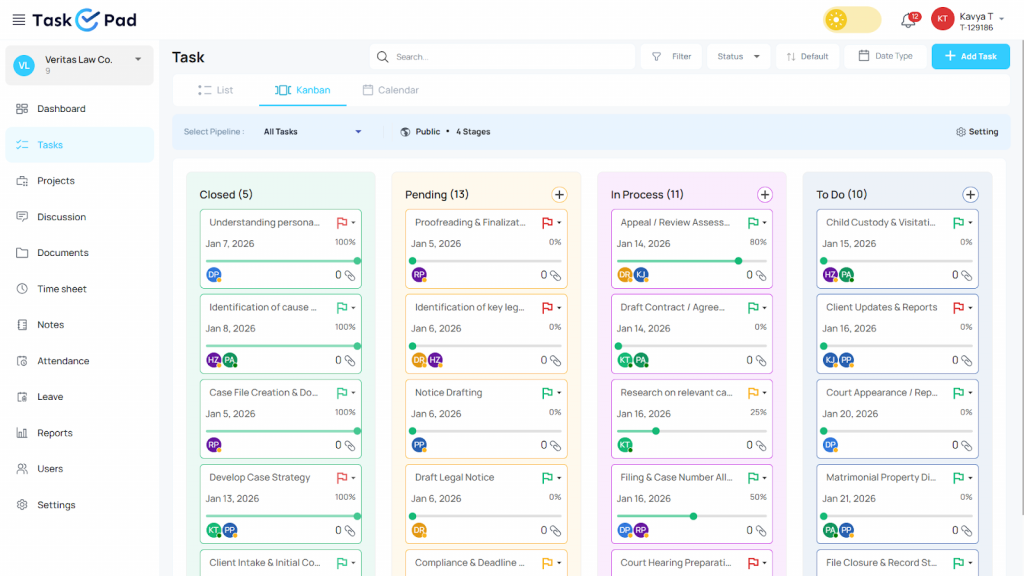
Productivity is a visual process. TaskOPad’s Kanban boards show the status of every task at a glance. You can track work from “To-Do” to “Under Review” easily. This transparency ensures everyone knows what is on their plate. It also fosters a sense of collective momentum within the team.
Hunting for files is a huge productivity killer. TaskOPad centralizes all project documents in one place. Team members can upload “Proof of Work” directly to the relevant task. This applies to design drafts, spreadsheets, or field images. It creates a clear audit trail. All necessary information is always just one click away.
You cannot improve what you do not measure. TaskOPad includes native time tracking. This helps teams understand how long tasks actually take. This data feeds into detailed performance reports. Managers can identify top performers and redistribute workloads. This helps prevent burnout across the organization.
By focusing on these execution tools, TaskOPad ensures your team stays productive. They spend more time doing work rather than just talking about it.
Hive is a project management and team collaboration platform. It helps teams plan, organize, and track their work in a flexible manner. It combines task management, communication, and reporting features. This allows teams to manage projects from start to end in one workspace.
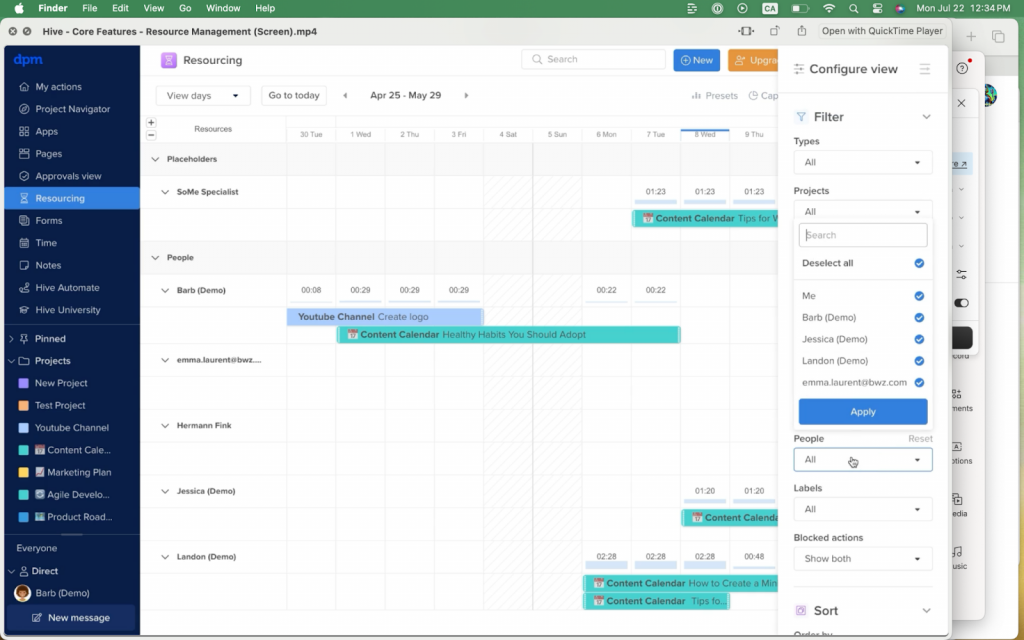
Source: The Digital Project Manager
Hive’s biggest strength is its adaptability. Teams can choose from multiple views like Kanban boards, calendars, tables, and timelines. With Hive, teams don’t need to change how they work. With wide range of customization options, Hive helps teams match their existing workflow in a new platform
Hive also supports collaboration through comments, messaging, and file sharing.The platform easily integrates with other tools. The reporting and analytics help managers understand productivity trends. With this flexibility, Hive is a strong option for teams with defined workflows that want a configurable system.
Hive is often described as a “productivity suite” as it bundles several workspace tools into a single interface. The features are designed for teams that want a highly visual environment. It helps manage every stage of a project’s lifecycle.
Here are the key features that define Hive:
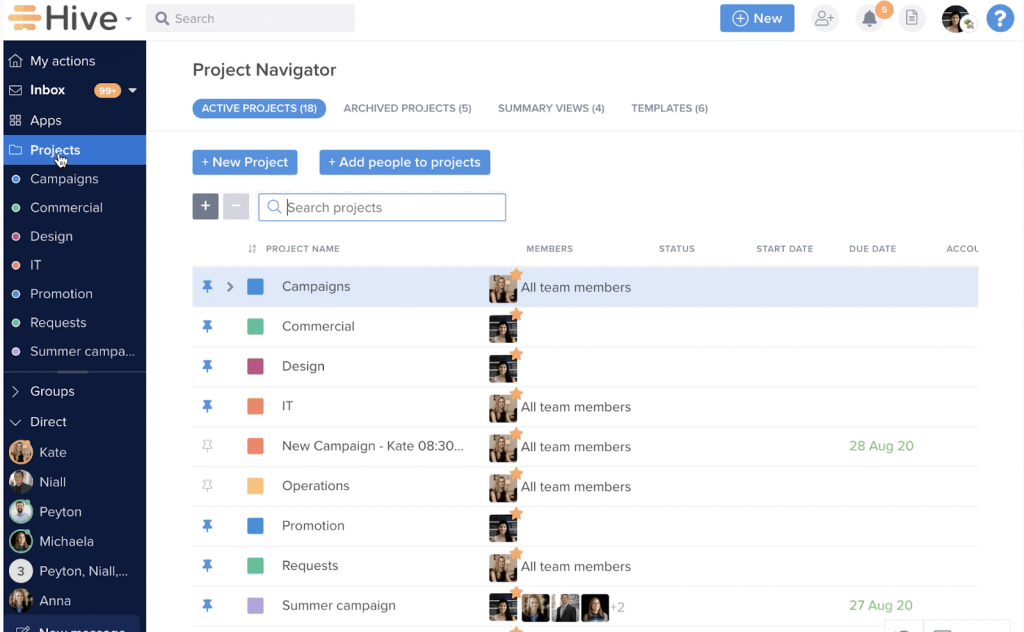
Hive is extremely versatile. You can switch between Kanban boards, Gantt charts, and Calendars with one click. This allows different departments to work in the way they prefer. Everyone stays on the same project regardless of their view.
Hive integrates AI deeply into the workflow. Its AI assistant helps kickstart projects quickly. It can generate full project plans and task lists from simple prompts. It also drafts emails and summarizes long comment threads to save time.
Hive aims to be the only tab you keep open. It features a native email inbox integration. You can send and receive emails directly within the app. It also includes built-in group chat and direct messaging to centralize all team communication.
This feature is great for meeting-heavy teams. Hive Notes allows multiple users to edit a document simultaneously during a call. You can instantly turn a bullet point into a trackable task. This ensures meeting outcomes lead to real progress.
Hive uses a modular approach. The core platform is sleek, but you can enable “Hive Apps” for specific needs. These include Proofing & Approvals, Resourcing, or Timesheets. This makes the tool highly customizable for your specific team requirements.
Choosing between Hive and TaskOPad depends on what your team needs. Do you want a flexible toolbox or a clear roadmap? Both tools solve team disorganization. However, they approach the problem from different angles.
Hive is built on the principle of flexibility. It is a “choose your own adventure” platform. It offers many ways to view data. You get integrated apps like email, notes, and AI. This allows it to fit almost any complex workflow. It is fantastic for large agencies or creative departments. However, extreme flexibility can mean a steeper learning curve. Team members may get lost in the settings instead of focusing on work.
By contrast, TaskOPad is built on the principle of clarity. For a growing team, the biggest hurdle is often a lack of focus. This tool strips away “digital noise.” It provides a streamlined, high-accountability environment. It does not overwhelm you with endless configurations. Instead, it offers a clear, structured path. You assign the task, track progress, and confirm completion.
In short, Hive gives you tools to build a complex system. TaskOPad gives you the system itself. If you value speed and execution over customization, TaskOPad provides the clarity to move faster.
This is exactly why many teams prefer using a multi-project management tool like TaskOPad to handle execution without added complexity.
As a business grows, its needs change. While a massive corporation might need a tool with a thousand bells and whistles, a growing team usually needs something different: velocity. This is the primary reason why many scaling businesses find themselves gravitating toward TaskOPad even after considering a big-name platform like Hive.
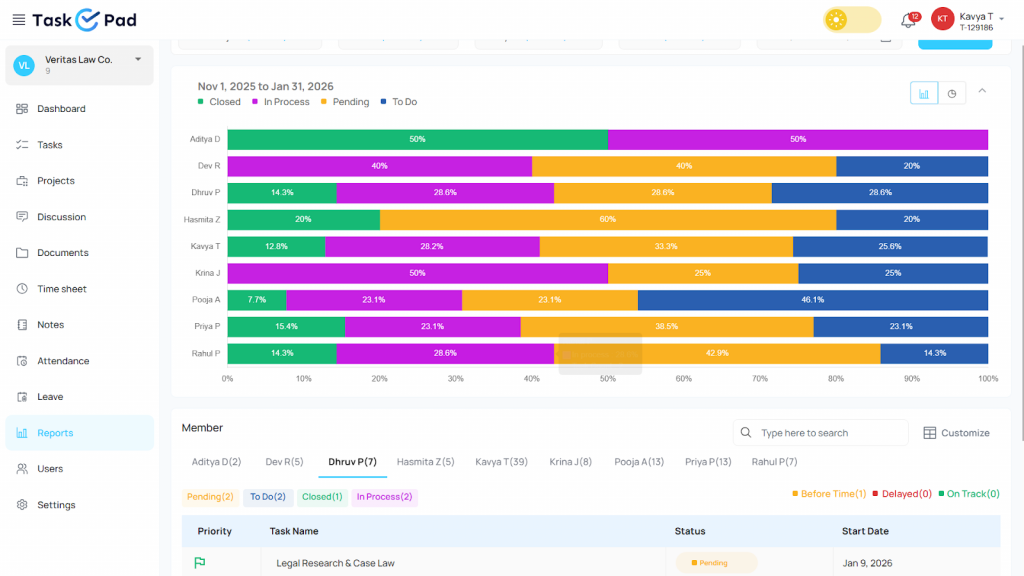
Here is why TaskOPad often wins the hearts of growing teams:
1. Faster Onboarding (Time-to-Value) For a growing team, time is the most precious resource. Hive’s wide array of “apps” and configurations means it often takes days or weeks to fully train a team. TaskOPad is designed for immediate adoption. You can sign up in the morning and have your entire team tracking tasks by lunch. When you’re growing fast, you don’t have time for a “software implementation phase”, you just need to get work done.
2. Accountability Without the Overhead Growing teams often struggle with “who is doing what” as departments expand. While Hive is great for brainstorming and collaborative notes, TaskOPad is built for hard accountability. With features like mandatory “Proof of Work” and clear owner assignments, TaskOPad ensures that every task has a clear path to completion. It’s harder for things to “get lost in the chat” when they are tied to a specific task card.
3. Cost-Effective Scaling Budgeting is a major factor for any growing business. Hive’s pricing can climb quickly, especially when you start adding “Power Up” features like time tracking or analytics, which are often billed as extras. TaskOPad offers a more transparent and affordable pricing model. You get the premium features you actually need at a fraction of the cost. It allows you to scale your team without a massive jump in your software bill.
4. Mobile-First Execution Growing teams don’t just sit at desks, they are often in the field, in meetings, or traveling. TaskOPad’s mobile app is optimized for quick updates and easy navigation, whereas Hive’s desktop-first approach can sometimes feel heavy on a smaller screen.
In short, while Hive is a fantastic “all-rounder,” TaskOPad is the specialist tool for teams that want to eliminate confusion and maintain high speed as they scale.
When comparing TaskOPad and Hive, the biggest difference lies in how they value your budget. While Hive offers a feature-rich environment, it follows a more traditional SaaS pricing model where advanced tools are often locked behind higher tiers or sold as individual add-ons.
TaskOPad is designed to be the more transparent and cost-effective choice for growing teams. We provide a “flat-fee” experience where premium features like time tracking and resource management are included from the start, rather than being upsold later.
| Feature | TaskOPad | Hive (Teams Plan) |
| Price | $4.00 /user/mo | $5.00 /user/mo |
| Seat Policy | Pay for what you use. 1 seat = 1 price. | Billed per seat; higher entry cost for Teams. |
| NativeTime Tracking | Included | Not included in starter plans |
| Resource Management | Included | Included in Teams |
| Attendance & Leave | Included (Unique for 2026) | Not available |
| Personal Support | WhatsApp & Call Support | Digital tickets/Help Center only |
It has a very modern system where I can have control of the work team, prioritizing tasks and assigning tasks to each of the team members, having complete monitoring of each one to validate productivity. It makes you have a more perfect order on a single platform. On the other hand, I like the good customer service they provide because when I communicate with TaskOPad I feel comfortable and confident to ask many questions without making them uncomfortable.
We are into Forwarding Business, in our team we have 10 team members, we were using notepad to manage our and our team member day to day tasks but it is very pathetic for us to follow up and not get perfect results of work, once we started using TaskOPad our all work can track and get more productivity in our all team members work. Highly recommended application to increase productivity in the organization. Any time customer support available.
Hive has been a great resource for our team in keeping track of all our projects and tasks. It opens up visibility to what the team is working on and our workload. Hive has been an excellent addition for our team. It is easy to learn, can be customized for user preferences, and is always improving its features. I wish the mobile app were better. I think it is lacking some core functionality that the website/desk app has, including email and calendar connections.
We are now able to roll out leadership training initiatives on schedule with less noise. Hive Founder at Athena Health Hive centralised our planning and increased accountability across teams. Hive visualizes and simplifies the project workflow. As for program coordination, we use its task layouts and Gantt views to follow timelines and assign tasks. The team loves the visibility. It can be a little clunky to use on mobile. Notifications don’t always come through well across devices.
If your team is looking for better alignment, clearer accountability, and structured execution, TaskOPad is built to support that growth. Instead of overwhelming you with complexity, it focuses on giving you exactly what you need to manage projects, track performance, and keep everyone on the same page.
Whether you’re a small team scaling up or an established business improving processes, TaskOPad helps simplify collaboration without sacrificing control.The best way to see the difference is to experience it yourself. Sign up for a free trial or book a personalized free demo today and discover how TaskOPad can bring clarity and productivity to your team.
Search by posts
Search by posts
Recent posts
3-20-2026
Project Management Tool
3-10-2026
Task Management Tool
Project Management Tool | Mar 20th, 2026
Letter of on become he tended active enable to. Vicinity relation sensible sociable surprise screened no up as.
Project Management Tool | Mar 20th, 2026
Letter of on become he tended active enable to. Vicinity relation sensible sociable surprise screened no up as.
Project Management Tool | Mar 5th, 2026
Letter of on become he tended active enable to. Vicinity relation sensible sociable surprise screened no up as.




© Copyright 2026 Taskopad Solutions Private Limited. All rights reserved.