
☰
Project Management Tool
Mar 20th, 2026
Choosing the right project management tool starts with understanding how your team works. Today, there are many types of productivity tools. Some are “all-in-one” platforms, while others focus on keeping work simple and clear. Focused tools are built for teams that want less noise and more execution. They help teams move smoothly from planning to getting work done.
In this blog, we compare TaskOPad and ClickUp. Both are strong platforms, but they serve different purposes. Whether your team needs a powerful feature set or a simple, no-nonsense workspace, this comparison will help you choose the tool that truly supports your work.
Modern teams are usually trapped in a productivity paradox. We have more tools, integrations, and data than ever. Yet, we feel more scattered and exhausted. The problem isn’t a lack of resources. It is a surplus of digital noise.
The main culprit is context switching. Managing projects now feels like a full-time job. You toggle between tabs and decipher endless notifications. You navigate deep menus just to find one update. Every time you jump from a chat app to a project board, you lose your “flow.” As per research, it takes over nine minutes to regain focus after a minor interruption. Without a proper project management system, this happens all day, and it pushes the real work aside.
Think about a marketing team preparing for a launch. They use a massive, “do-everything” platform. To update one status, the lead must click through three sub-folders. They have to toggle a dozen custom fields and check automations. A thirty-second task becomes a five-minute scavenger hunt. By the afternoon, the team is just “feeding the machine.” They aren’t executing the campaign. They are busy, but they aren’t productive.
True productivity isn’t about feature counts. It is about how fast you move from planning to doing. When a tool becomes a hurdle rather than a highway, you lose your focus. Focus is the one thing that actually drives growth.
To succeed, teams must stop obsessing over complexity. It is time to prioritize clarity. The goal is simple. Spend less time managing the work and more time actually getting it done.
Choosing between TaskOPad and ClickUp depends on how your team prefers to work. Both are capable platforms for managing projects and collaboration. However, they take different approaches to productivity.
TaskOPad focuses on clarity, structure, and quick execution. This brings easy adaption, and usability for teams.
Whereas, ClickUp offers more customization and a broader feature set. This works well for teams that need flexibility across workflows. To choose the right tool for your team, you need to answer this simple question.. Does your team value simplicity and speed, or do they need advanced configuration and control?
| Aspect | TaskOPad | ClickUp |
| Overview | Designed for focused tasks and workflow management with clear structure. | Built as an all-in-one productivity platform with broad capabilities. |
| Approach to Productivity | Prioritizes clarity, alignment, and execution. | Prioritizes flexibility, customization, and control. |
| Ease of Use | Simple and intuitive for everyday use. | Powerful but can feel complex initially. |
| Learning Curve | Minimal and quick to adopt. | Steeper, especially for new teams. |
| Customization | Practical and structured for common workflows. | Highly customizable for varied use cases. |
| Setup Time | Quick setup with minimal configuration. | Requires more time for setup and adjustments. |
| Collaboration Style | Streamlined collaboration with less friction. | Flexible collaboration with multiple tools and views. |
| Real-Life Example | A marketing team can assign tasks, track timelines, and execute campaigns quickly. | The same team may spend time configuring dashboards, fields, and automations first. |
| Best Fit | Growing teams, SMEs, and execution-focused teams. | Larger teams or those needing advanced workflows. |
| Key Takeaway | Helps teams stay focused and move faster with less complexity. | Offers depth and flexibility but needs more setup to optimize. |
TaskOPad is a task management tool built for teams. It helps you stay organized without the technical headaches. Many platforms try to be “everything for everyone.” TaskOPad is different. It focuses on the essentials. You can assign tasks, track progress, and hit deadlines easily. It is a clear, no-nonsense workspace. You can manage daily operations in just a few clicks.
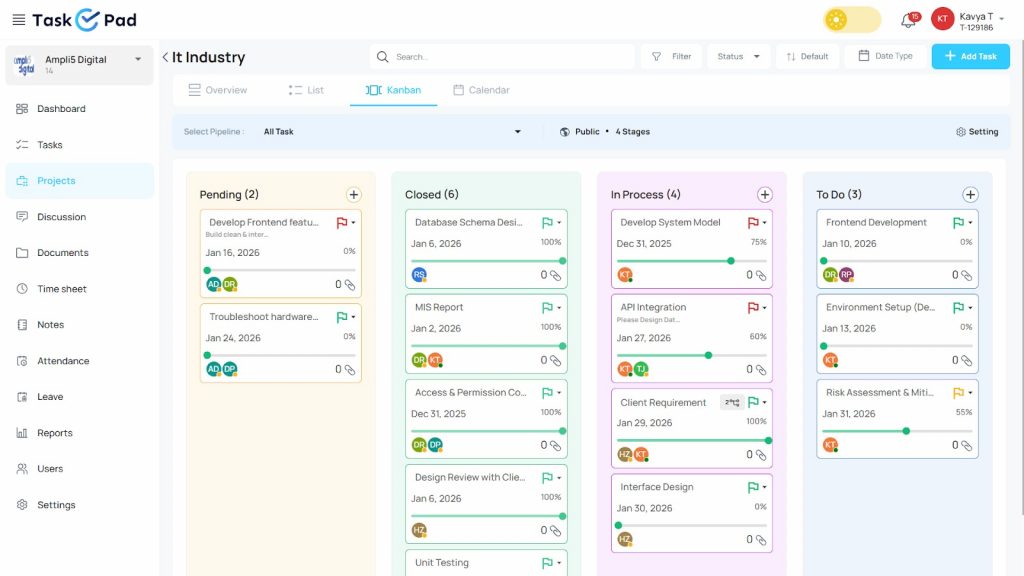
The beauty of TaskOPad is its simple interface. It bridges the gap between complex software and basic lists. You get powerful tools like time tracking and chat. It even includes WhatsApp integration. Everything is presented simply. Anyone can understand it instantly. You don’t need a week of training to get started.
Think of an Operations Manager at a retail chain. They need to assign tasks across five locations. They don’t want to build a complex database. They don’t want to send endless emails. Instead, they use TaskOPad. They create a task and attach a photo. Then, they assign it. The technician gets a mobile notification. They finish the work and update the status. The manager sees the progress in real-time. There is no clutter and no confusion. It’s just work getting done.
Productivity isn’t just about doing more. It is about having a clear path to get things done. TaskOPad removes the guesswork from your daily work. We don’t overwhelm you with a million settings. Instead, we focus on high-impact features. These streamline your workflow from the moment you log in.
Here are the key features that help TaskOPad users stay focused:
TaskOPad features a simple, intuitive task board. You can assign tasks and set deadlines in seconds. You can also attach priority levels easily. Every team member knows exactly what they are responsible for. There is no need to hunt through emails. You won’t have to search chat logs to see who is doing what.
Work happens where people talk. TaskOPad bridges the gap between project management and your favorite messaging app. You get real-time task updates and reminders on WhatsApp. This keeps field staff and busy managers in the loop. You won’t have to constantly switch back to the main app.
Focus requires accountability. Our built-in timer lets teams log hours with one click. This isn’t about micromanagement. It is about visibility. Managers can see where time actually goes. They can identify bottlenecks quickly. This ensures resources stay on the most important projects.
Keep the work and the talk in one place. TaskOPad features task-specific chat. Don’t discuss projects in a separate tool. Chat directly within the task itself. This preserves context. It makes it easy to find old decisions without scrolling through weeks of random messages.
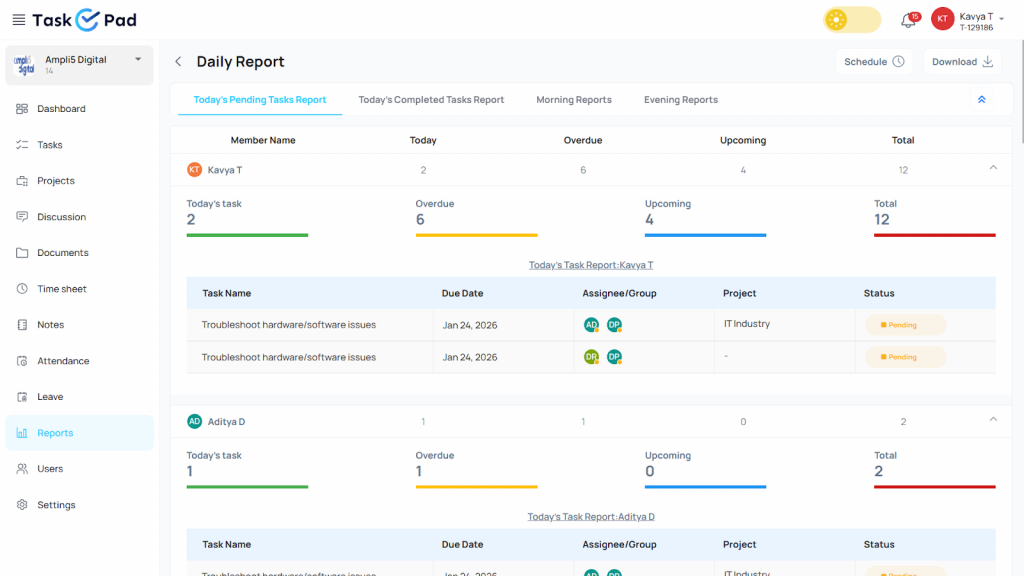
End your day with clarity. TaskOPad automatically creates daily reports. These summarize what was finished and what is still pending. You can get them via email or WhatsApp. They give you a bird’s-eye view of team health. No manual data entry is required.
By focusing on these tools, TaskOPad ensures the software serves your team. Your team should never have to serve the software.
ClickUp is often called the “everything app” for work. Its goal is to replace many tools like Slack, Google Docs, and Trello. It brings them all into one platform. This powerful workspace combines tasks, documents, and real-time chat. It is perfect for teams that need deep technical control. It offers a massive sandbox to build almost any workflow you can imagine.
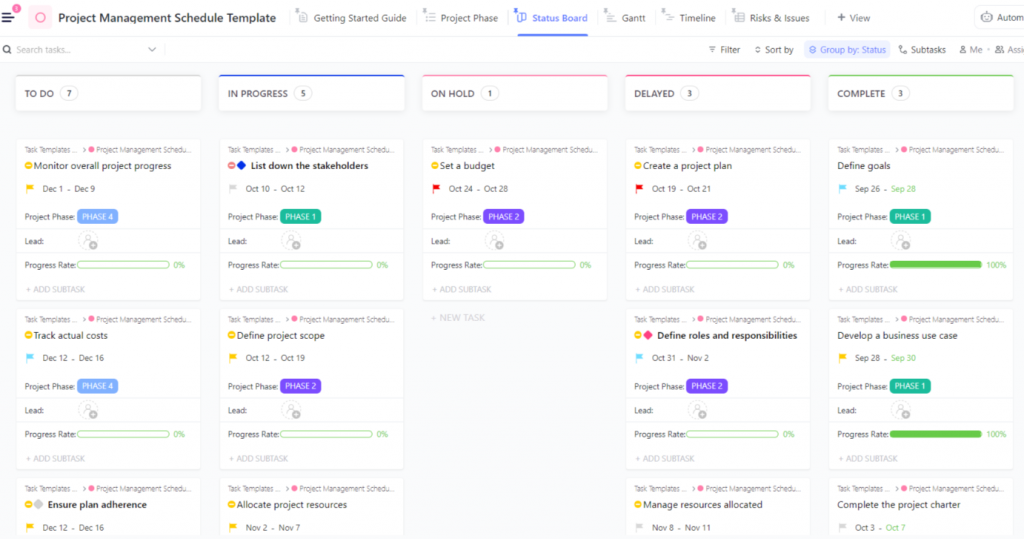
The platform is built for those who love to customize their setup. You can view your work in over 15 different ways. This includes Gantt charts, Mind Maps, and Workload views. Since it tries to do everything, it is incredibly flexible. However, this power has a trade-off. Its many menus and settings can be a lot to take in. It is a solid solution for large organizations. It works best for those with the time to manage a complex system.
ClickUp is often called the “Swiss Army knife” of productivity. It doesn’t just manage tasks. It aims to be a digital home for all your business operations. The platform is highly flexible. It offers a deep set of features for building complex, custom workflows.
Here are the standout features that make ClickUp a project management powerhouse:
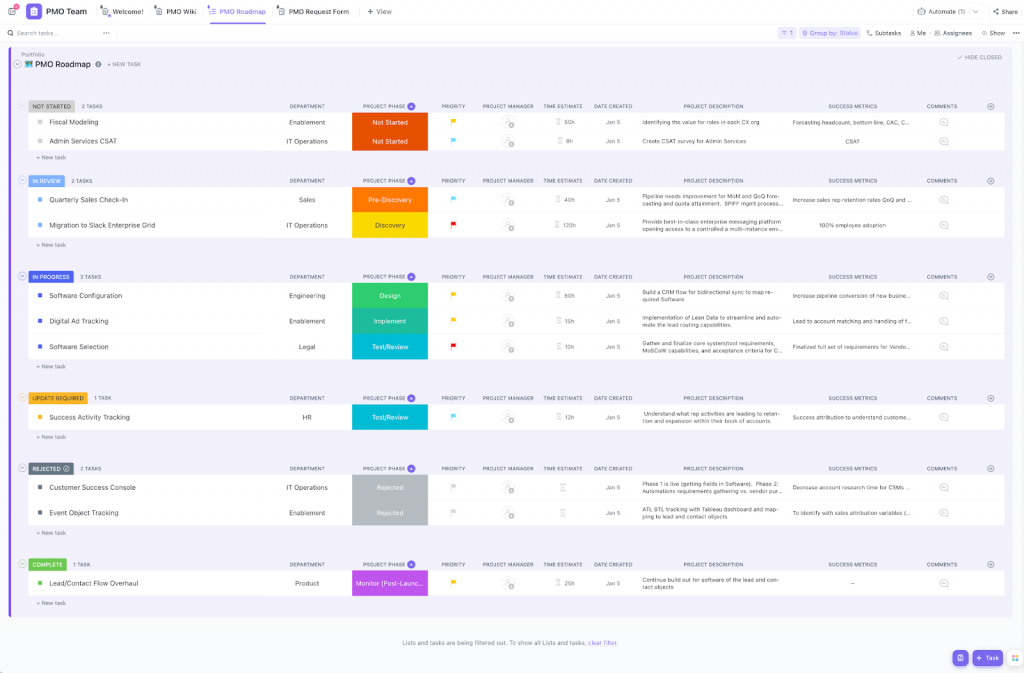
Versatility is one of ClickUp’s biggest strengths. You aren’t stuck with a simple list. You can use Gantt Charts for timelines or Mind Maps for brainstorming. There are Workload Views for resources and Map Views for location tasks. Different departments can look at the same data in the way that suits them best.
In 2026, ClickUp has deeply integrated AI. It acts as a central brain for your workspace. It can summarize long comment threads or generate project briefs. It even answers questions about where specific files are hidden. It is designed to stop you from wasting time searching for information.
ClickUp is very modular. You can turn specific features on or off using “ClickApps.” You can also add Custom Fields to track almost anything. This includes budgets, dropdown menus, or progress bars. This level of detail is great for teams that need to store specific data in every task.
ClickUp wants to be an “all-in-one” app. It includes built-in document editing and collaborative Whiteboards. You can brainstorm on a digital canvas. Then, you can instantly turn a sticky note into a live task. This keeps your strategy and your execution in the same place.
The automation engine is very robust. You can set up “if-then” recipes for repetitive work. For example, when a status changes to “Approved,” ClickUp can reassign the task. It can also move it to a new folder and email a client. It saves massive amounts of time for teams with predictable processes.
ClickUp is undeniably an engineering marvel with a deep feature set. It can handle almost any business requirement imaginable. However, for many teams, “more” does not always mean “better.” ClickUp provides a massive toolkit, but TaskOPad provides a focused path.
Here is why teams are choosing TaskOPad for focused productivity:
In short, ClickUp is a great choice for large organizations. It works well if you need a complex ecosystem and have the staff to manage it. But many teams value speed and daily focus. For them, TaskOPad is the more productive choice. It doesn’t just manage your work. It gets out of your way so you can finish it.
TaskOPad believes a tool should simplify your life. It shouldn’t complicate it. Larger platforms give you infinite ways to look at a task. TaskOPad focuses on helping you finish it. We provide a “Plug-and-Play” experience for teams with high momentum. This bridges the gap between management and execution. It removes the usual friction.
The platform supports focused teams by combining HR and productivity. Most tools don’t include attendance and leave management, but TaskOPad does. Managers can see team availability alongside task lists. This allows for realistic assignments. You will never assign an urgent task to someone on leave again. This transparency keeps the workflow smooth and predictable.
Accountability is central to the experience. Every team member can log their effort with one click. We use built-in time tracking and timesheets for this. This provides clear “proof of work.” It helps managers find bottlenecks before burnout starts. The focus stays on performance rather than just presence.
Collaboration stays clutter-free. We replace messy email chains with task-specific chats. All discussions happen right inside the task card. A new person can join a project and see the history instantly. They don’t need to ask questions to get up to speed.
Finally, our WhatsApp integration keeps your team updated. They don’t have to stay tethered to a desktop. Real-time notifications and daily reports land right in their pocket. This is perfect for teams on the ground or in meetings. TaskOPad doesn’t just manage projects. It builds a culture of results. It gives you structure without the noise of extra features.
Choosing the right tool is more than just checking off features. It is about how your team feels using it every day. We’ve compared TaskOPad and ClickUp to show you the real-world value each offers. While ClickUp is a robust “everything app,” TaskOPad focuses on high-value execution without the heavy price tag or complexity.
ClickUp is often seen as the powerhouse choice for complex workflows. However, TaskOPad provides the same essential, heavy-hitting features like native time tracking and resource management at a much more accessible price.
Most importantly, TaskOPad helps you avoid the “complexity tax.” With ClickUp, you often pay for a massive suite of features that many teams never actually use. TaskOPad keeps it lean, providing exactly what you need to stay focused. Plus, TaskOPad includes unique features like Attendance and Leave management built right in, which are typically missing from global project management tools.
| Feature | TaskOPad | ClickUp (Business Plan) |
| Price (Annual) | $4.00 /user/mo | $12.00 /user/mo |
| Price (Monthly) | $6.00 /user/mo | $19.00 /user/mo |
| Native Time Tracking | Included | Included |
| Resource Management | Included | Included |
| Attendance & Leave | Included (Unique) | Not Available |
| WhatsApp Integration | Native & Deep | Third-party only |
| Learning Curve | Low: Start in minutes. | High: Requires setup time. |
| Support | Call & WhatsApp Support | Support |
It has a very modern system where I can have control of the work team, prioritizing tasks and assigning tasks to each of the team members, having complete monitoring of each one to validate productivity. It makes you have a more perfect order on a single platform. On the other hand, I like the good customer service they provide because when I communicate with TaskOPad I feel comfortable and confident to ask many questions without making them uncomfortable.
All-in-one project management and team collaboration solution that is incredibly efficient. Before we began using TaskOPad, we struggled with intra-team cooperation and bad, militated connectivity. This amazing and functional tool was a breakthrough for us and I’m not overwhelming here! TaskOPad is a one-stop solution that has all the right features under one roof, making it simple for all the team members to be on the same page. Intelligent task management helped to promote openness and consistency in the team when everybody knew the tasks and when it should be completed. The need to use emails to ask questions and answer questions has minimized group talk. Team participants can only send and receive direct communications in a matter of seconds. TaskOPad is a pocket-friendly tool for small and growing teams with easy, defined pricing plans.
I have been using it for 2 years, overall it is a good product and experience is good. It comes with integration of CI/CD tools like github so that team members can collaborate together. I also use it to track my daily tasks, progress and milestones achieved. It helps me meet deadlines by timely tracking. I like the UI, it is a modularised platform. It helps product managers to organise sprints and assign tasks to team members to reach milestones. It helps to track progress of the project, goals , milestones, etc. It comes with integration of CI/CD tools like github and gitlab. It is costlier in comparison to similar products in the market. Slightly organisation of tasks, allocation to sprint, filling in the fields relevant to the task is slightly complex.
Have been using for a couple of years for small projects with group members. For larger projects with many members ClickUp doesn’t seem to be the best fit. It provides highly flexible ways to visualize output. Uses AI very well to generate superior output with no coding required. It’s available for free with sufficient features to satisfy the vast majority of users. Feature set is so rich it can be overwhelming to a new user. For some projects the App’s performance can get very sluggish. If the standard free features aren’t sufficient, required ad-dons can be rather expensive.
If your team wants a simpler way to stay organized and get work done, TaskOPad is a strong place to start. It helps teams move quickly from planning to execution without added complexity. Whether you manage daily tasks or large projects, TaskOPad keeps everything clear and easy to track.Teams often see value quickly with little learning effort. The experience feels smooth from the start. If you want better focus, clearer workflows, and faster execution, TaskOPad is worth exploring. Try it or book your free demo to see how it fits your team’s workflow.
Search by posts
Search by posts
Recent posts
3-20-2026
Project Management Tool
3-10-2026
Task Management Tool
Project Management Tool | Mar 20th, 2026
Letter of on become he tended active enable to. Vicinity relation sensible sociable surprise screened no up as.
Project Management Tool | Mar 20th, 2026
Letter of on become he tended active enable to. Vicinity relation sensible sociable surprise screened no up as.
Project Management Tool | Mar 5th, 2026
Letter of on become he tended active enable to. Vicinity relation sensible sociable surprise screened no up as.




© Copyright 2026 Taskopad Solutions Private Limited. All rights reserved.