
☰
Team Management Tool
Mar 24th, 2026
Organizing a growing team is more than just a task list. Projects multiply and teams expand quickly. Clarity on roles, deadlines, and communication becomes vital. Without a solid system, talented teams struggle. They waste time hunting for info or syncing updates. Confusion over ownership can stall progress. This is where project management tools help.
TaskOPad and Basecamp are two popular options. Both help teams structure their work effectively. However, they use very different approaches. This comparison looks at how each platform works. We will help you decide which fits your specific workflow.
In a startup’s early days, “organization” is simple. It is often just shouting across a room or a flurry of WhatsApp messages. This chaotic style works—until it doesn’t. Once you scale, that informal mess becomes a bottleneck. It will eventually stall your growth.
As a team grows from five to fifty, complexity doesn’t just double. It multiplies. At this stage, organizational clarity is vital. It is the gap between a high-performing firm and one that is always putting out fires.
Without a project management system, teams rely on “mental mapping.” They try to remember who said what during a meeting. When clarity fails, three major issues arise:
Scaling isn’t just about hiring more people. It is about ensuring those people know exactly what to do. Every team member should be able to answer three questions instantly:
1. What is my highest priority today?
2. Who is waiting on my work to start theirs?
3. Where is the latest version of the info I need?
When a team is organized, “accountability” becomes a reality. It is no longer just a buzzword. Deadlines are met because the workflow is visible to everyone. You might prefer a minimalist style or a feature-rich tool. Either way, the goal is the same: strip away the noise so your team can focus on execution.
In this blog, we compare how TaskOPad and Basecamp tackle this challenge. We will help you decide which philosophy fits your team’s unique DNA.
Both TaskOPad and Basecamp help teams organize work. They allow you to collaborate efficiently and keep projects moving. They share a common goal of boosting productivity. However, their methods differ slightly.
TaskOPad focuses on structured tasks and workflow visibility. It helps teams track responsibilities, timelines, and progress. It is a top choice for those managing many projects. These teams often need better control over organization and reporting.
Basecamp takes a different path. It is known for a simple, communication-first approach. It puts discussions, files, schedules, and lists in one place. This makes collaboration feel straightforward and easy to manage.
The table below highlights the key differences between these two platforms.
| Feature / Aspect | TaskOPad | Basecamp |
| Primary Focus | Structured tasks with clear workflows | Communication-led simple lists |
| Best For | Teams needing strong organization | Teams prioritizing simple coordination |
| Task Management | Advanced tasks, priorities, and subtasks | Basic to-do lists and simple tracking |
| Workflow Visibility | Detailed progress and activity updates | Focuses on chats over deep tracking |
| Time Tracking | Built-in tools to monitor work | No native time tracking feature |
| Reporting | Performance reports and insights | Limited reporting capabilities |
| Communication | Task-based comments and files | Strong message boards and group chats |
| Ease of Use | Balanced structure and simplicity | Famous for a minimal interface |
| Scalability | Great for many projects and growth | Best for smaller or simpler setups |
Both tools aim to improve how you work together. They simply cater to different styles. Basecamp highlights easy communication. TaskOPad focuses on structured management and operational clarity.
TaskOPad is a complete task management tool. It removes the guesswork from daily operations. Many platforms focus only on talking. TaskOPad is built for rigorous execution. It acts as a centralized “command center.” Managers and teams can collaborate and track progress here. You can meet deadlines without constant follow-up meetings.
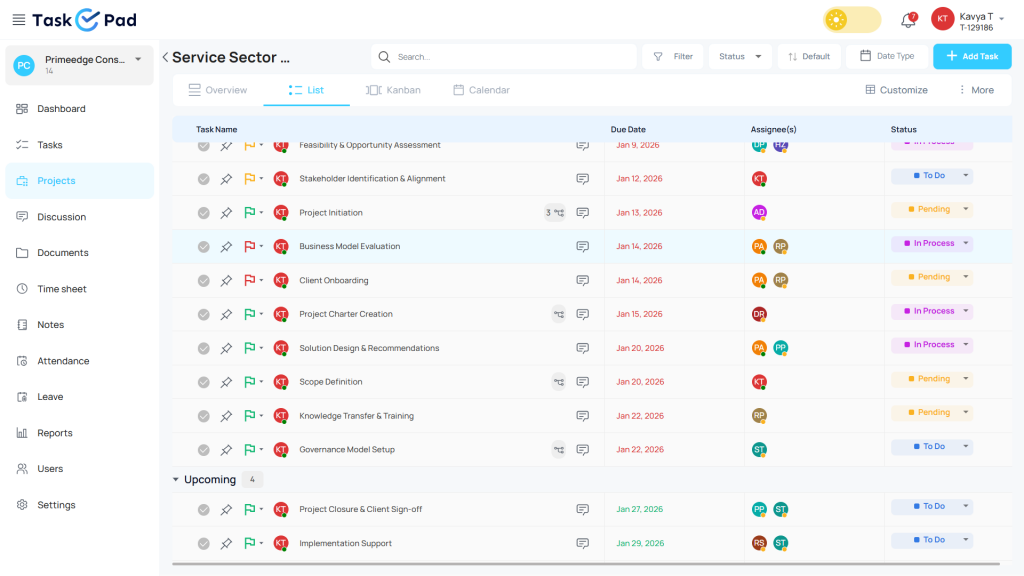
TaskOPad is made for growing teams. These teams have outgrown simple to-do lists. They need a structured approach to their workflow. It provides a clear roadmap for every project. Every team member knows their specific tasks and due dates. It integrates assignments, time tracking, and resource management. This helps businesses move from “organized chaos” toward data-driven accountability.
Many tools focus on general collaboration. TaskOPad is engineered for workflow precision. It provides the detail managers need and the clarity employees want. These core features form the structural backbone of your organization:
Organization starts by breaking big goals into small steps. TaskOPad allows a clear hierarchy with subtasks and dependencies. This ensures no small detail is lost. Team members understand exactly which “brick” they are laying to build the “wall.”
Team burnout is a major threat to organization. TaskOPad’s Resource Management gives a bird’s-eye view of every plate. You can see who is overloaded or who has extra capacity. This lets you balance the workload in real-time. It keeps the entire team moving at a sustainable pace.
To be organized, you must know where time goes. TaskOPad includes built-in Time Tracking. Employees log hours directly against specific tasks. This data fills your Timesheets automatically. Managers gain insights to find bottlenecks and improve future project estimates.
Teams do not always have the dashboard open. TaskOPad integrates with the tools you already use. WhatsApp and Email notifications provide real-time updates. You get alerts for task assignments, deadlines, and feedback. This keeps everyone organized and responsive while on the move.
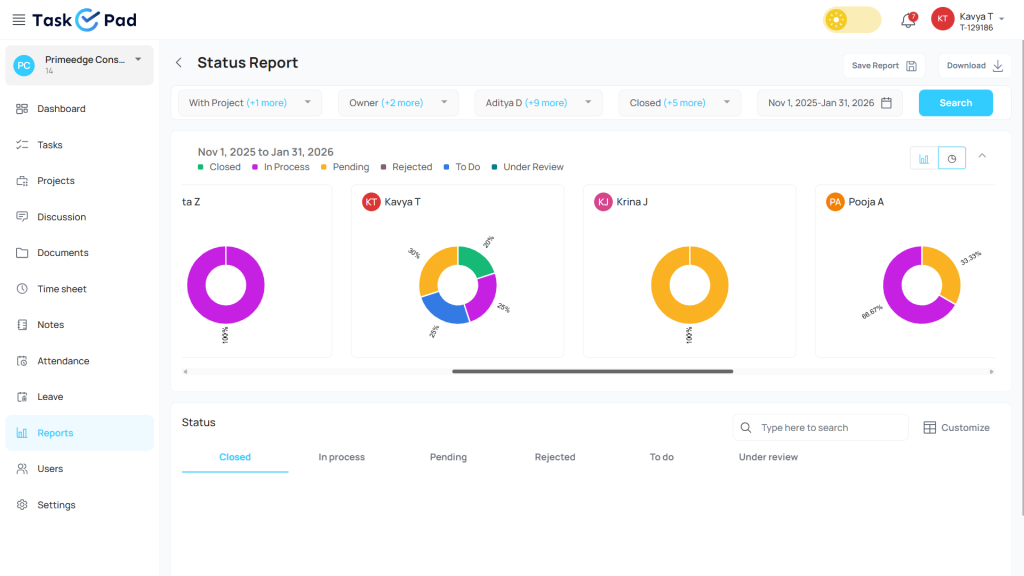
You cannot manage what you do not measure. TaskOPad’s Reporting module creates data-driven insights. You can see project progress and team performance. It also tracks overdue tasks. These reports turn raw activity into a clear strategy for informed decisions.
TaskOPad uniquely integrates HR-centric features. It includes Attendance and Leave Management. It uses facial recognition and location-based check-ins. Having this in your task manager is efficient. You don’t have to jump between apps to see if someone is available for an urgent task.
Basecamp is a project management and team collaboration tool. It helps teams organize work and communicate in one spot. It combines to-do lists, team discussions, and schedules. You also get file sharing and group chat in a single platform.
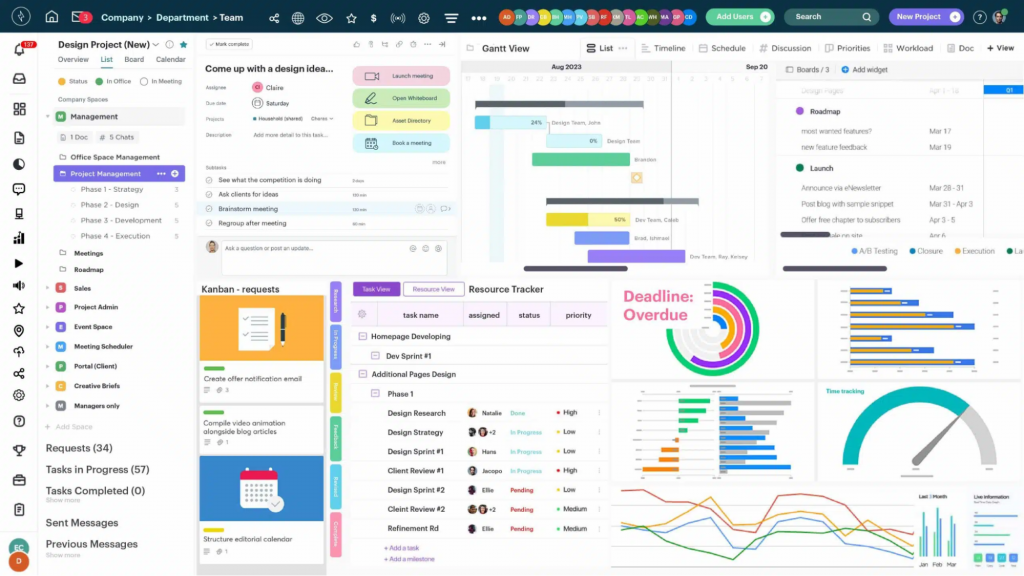
The core idea behind Basecamp is simplicity. It avoids offering too many complex features. Instead, it focuses on a clear space for coordination. Teams can create projects and add task lists easily. You can share files, post updates, and stay organized through message boards.
Its straightforward design makes it a favorite for small teams. Startups and remote groups often prefer it too. It offers a simple way to stay connected without complex workflows. Many teams use it as a central hub for all project discussions and files.
Basecamp follows the “less is more” philosophy. It does not overwhelm you with complex menus. Instead, it provides five core tools for every project. This “all-in-one” style creates a calm environment. Everyone knows exactly where to find information.
Here are the defining features of the Basecamp experience:
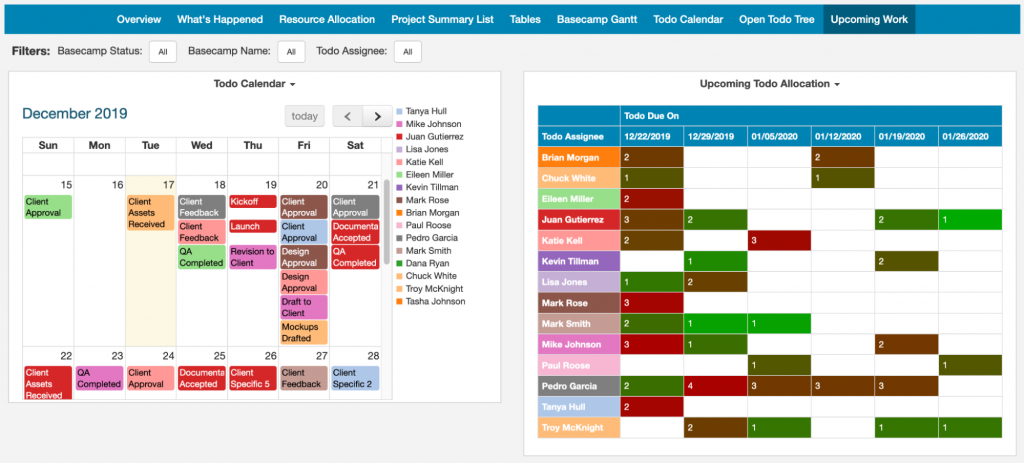
The Message Board is the heart of Basecamp’s communication. Important decisions don’t get buried under GIFs or “hellos.” It is built for structured, long-form posts. Use it for big announcements or pitching new ideas. Every post has its own thread and comments. New members can catch up on history without scrolling through weeks of chat.
Basecamp’s task management is intentionally lean. You create lists for different project phases and add tasks. It avoids complex layers like sub-tasks or priority levels. However, it excels at clarity. You can assign tasks to multiple people and set due dates. It answers one question quickly: “What needs to happen next?”
Basecamp includes Campfire to replace external apps like Slack. It handles group discussions while Pings work for private messages. Campfire acts as a “watercooler” for quick questions or brainstorming. This keeps casual chats inside the project ecosystem. It makes referencing those conversations much easier later.
Hill Charts are unique to Basecamp. They move away from traditional percentage bars. They show work in two phases: “uphill” and “downhill.” Uphill is for figuring out unknowns. Downhill is for certain execution. Managers can see at a glance if a project is “stuck.” It provides a “gut-feeling” update that raw data often misses.
Basecamp helps you cut down on status meetings. Use Automatic Check-ins for recurring questions. You can ask, “What did you work on today?” or “What is on your plate for next week?” The tool pings the team at a set time. It then collects all responses in one thread. This keeps everyone informed without a 30-minute Zoom call.
Basecamp has a massive following because it champions simplicity. For many, it is the gold standard for high-level collaboration. It helps keep a “calm” digital office. However, as teams grow, projects become more complex. In these cases, “simple” can sometimes feel “limited.” This is why many organizations move to TaskOPad.
The preference for TaskOPad usually comes down to a need for granularity. Basecamp offers a flat to-do list. In contrast, TaskOPad allows you to dive much deeper. Growing teams often need to break one task into five sub-tasks. They may also need to set specific dependencies. For example, Task B cannot start until Task A is finished. In Basecamp, a task is either on the list or it isn’t. In TaskOPad, that task has a lifecycle and a clear priority. It occupies a specific place in a larger workflow.
Accountability through data is another major factor. Basecamp is great for talking about work. However, TaskOPad is built for tracking the execution of that work. Features like built-in Time Tracking and Resource Management are often the “missing pieces” for managers. You might need to know exactly how many hours a client module took. You may need to see if a specific team member is currently over-leveraged. TaskOPad provides those answers instantly. Basecamp’s “minimalist” approach leaves these features out to avoid clutter. For a manager overseeing 20+ people, that data is essential to stay organized.
Finally, TaskOPad bridges the gap between the office and the field. It uses WhatsApp and Email integrations to keep everyone connected. Basecamp encourages you to stay inside their app for updates. TaskOPad meets you where you already are. This ensures urgent updates reach you even if you haven’t logged into the dashboard yet.
While Basecamp excels at providing a unified “space” for conversation, TaskOPad is designed to provide a unified engine for execution. For teams where “being organized” means more than just knowing where the files are, TaskOPad offers a level of structural integrity that simplifies complex management.
Here is why TaskOPad stands out as the strategic choice for teams focused on systematic growth:
Ultimately, TaskOPad is for the team that wants to spend less time “talking about work” and more time “perfecting the process.” It’s not just a place to store information, it’s a tool designed to drive results.
When it comes to the bottom line, the two tools offer very different financial models. Basecamp is famous for its flat-rate “Pro Unlimited” plan, which is a great deal for massive corporations but can be quite expensive for a growing team of 15 or 20.
TaskOPad focuses on a “Pay-as-you-grow” model. We believe you shouldn’t pay for 50 seats if you only have 10 employees. By offering a more affordable per-user rate that includes high-end features like native time tracking and HR tools—which usually require expensive third-party integrations in other apps—TaskOPad provides superior ROI for scaling businesses.
| Feature | TaskOPad | Basecamp (Plus Plan) |
| Price (Annual) | $4.00 /user/mo | $15.00 /user/mo |
| Price (Monthly) | $6.00 /user/mo | $15.00 /user/mo |
| Seat Policy | Pay for what you use. 1 seat = 1 price. | Per-user OR flat $299/mo (Unlimited). |
| Native Time Tracking | Included | Requires $50/mo Add-on* |
| Resource Management | Included | Not available |
| Attendance & Leave | Included (Unique for 2026) | Not available |
| Personal Support | WhatsApp & Call Support | Email/Ticket based |
It is very good for collaborative projects. It has multiple features to share tasks, collaborate on projects and communicate regarding the work. I can integrate with multiple other tools eaisly. It is availbale for almost all platforms so client can install eaisly. Its UI is simple so all clients and team members can eaisly use. Overall TaskOPad has solved issues with task management. It helps to organize task, timeline, set priority also collaborative features for progress of projects and pointing tasks to be acheived are made simpler.
I had recreated what we had with our previous app, applied additional features to our everyday process, and taught three of my team members on how to use it in less than five minutes, with the same response from them: immediate adoption and deployment. We’re still on the free edition, but I’m sure it won’t be long until we update, if only for the sake of convenience and feature set expansion rather than need! This is a sure-fire winner.
It’s much easier to manage everything in one place. It feels like a blend of Trello and Slack, which makes it simple to stay organized and keep communication together. What makes it easy is also what makes it weak. The UI still isn’t all that easy to navigate or sort through. Beyond the software itself, I don’t like the direction the company is heading. It feels disorganized and managed by another mess, which makes it hard for me to trust it as something to rely on long term.
Basecamp excels at keeping communication clear and tasks organized. What I like best about basecamp is its simplicity and focus on collaboration. The ability to create and assign tasks with due dates, mange dependencies and use drag and drop for quick adjustments makes day to day project coordination smooth. Notifications ands and audit trials help maintain accountability without adding complexity. It lacks advanced project management features. For eg, there is no built in resource management or capacity planning which makes it hard to allocate people and materials effectively.
Users generally agree: Basecamp is the “Modern Digital Office”; it’s a calm, beautiful space for conversation and file sharing, perfect for teams that just want a quiet place to “hang out” and work.
TaskOPad, however, is the “High-Performance Control Room.” It’s built for the rugged terrain of growing businesses that need to track every detail, from sub-tasks and dependencies to real-time employee bandwidth. While Basecamp gives you a seat at the table, TaskOPad gives you the dashboard to drive the entire engine, offering built-in features like Time Tracking and Resource Management that usually cost extra elsewhere.
If your team wants a clear and structured way to manage tasks, TaskOPad is a great choice. It helps you organize projects and assign duties. You can track progress and stay aligned without any unnecessary mess.
Getting started with TaskOPad is easy. You can sign up and create your first project in minutes. Once you begin, you will see better results. You will gain visibility into workloads and timelines. It also helps you track overall productivity.
You can explore how TaskOPad fits your unique workflow. Consider booking a free demo with us. Our team will walk you through the key features. We want to help you get the most out of the platform.
Search by posts
Search by posts
Recent posts
3-31-2026
Project Management Software
3-20-2026
Project Management Tool

Team Management Software | Feb 7th, 2023
Letter of on become he tended active enable to. Vicinity relation sensible sociable surprise screened no up as.
Team Management Tool | Jan 18th, 2022
Letter of on become he tended active enable to. Vicinity relation sensible sociable surprise screened no up as.




© Copyright 2026 Taskopad Solutions Private Limited. All rights reserved.