☰
Task Management Tool
Mar 10th, 2026
Projects rarely fail because teams don’t create tasks. They fail because of a lack of ownership. Tasks often get lost when updates stay buried in chats and emails. In such cases, managers spend more time chasing people than focusing on progress. This highlights the gap between project management and true accountability.
Both TaskOPad and SmartTask help teams organize work and track results. However, they approach management from different angles. One focuses on coordinating workflows. The other ensures responsibilities are visible and consistently met.
In comparison, we explore how each platform supports accountability. We will help you find the best fit for your team’s unique style.
Many project managers believe “tracking a task” is the same as “ensuring accountability.” From the wide view, they both look similar. Both involve to-do lists and checkboxes. However, the difference often separates high-performing teams from those constantly firefighting.
Task tracking is purely administrative. It tells you what is happening and when it is due. It is a record of activity. You can track a thousand tasks and still fail. This happens because tracking ignores ownership, quality, and the “why” behind the work.
Team accountability is a cultural shift. It means every team member takes psychological ownership of their results. Accountable teams don’t just “check a box” to move a task to Done. They ensure the work meets high standards. They proactively flag roadblocks. They also understand how their own delays impact their colleagues.
Why does this distinction matter for your business?
Tools like SmartTask offer great ways to visualize tasks. They help you see the roadmap clearly. However, at TaskOPad, we believe a tool should go further. It shouldn’t just be a passive observer of your work. It should be a framework. It must encourage every member to step up and own their piece of the puzzle.
Below is a side-by-side comparison of both tools. Each platform helps teams organize work efficiently. However, their primary focus differs. TaskOPad emphasizes ownership and accountability. In contrast, SmartTask focuses more on workflow organization and project coordination.
| Aspect | TaskOPad | SmartTask |
| Core Purpose | Designed to improve team accountability and performance visibility | Designed to organize workflows and manage projects across teams |
| Best Suited For | Teams that need clear ownership, monitoring, and follow-up reduction | Teams that need collaboration, workflow automation, and CRM-style tracking |
| Work Tracking Approach | Tracks responsibility, effort, and progress together | Tracks project progress and task movement across stages |
| Task Ownership Clarity | Strong — clearly shows who worked, how long, and status history | Clear assignment, but focuses more on task status than effort |
| Performance Visibility | Individual and team performance reporting available | Project and pipeline progress reporting available |
| Manager Follow-ups | Reduced due to automated reporting and visibility | Managers still review boards and request updates when needed |
| Collaboration Style | Accountability-driven communication | Collaboration-driven communication |
| Remote Team Support | Built for monitoring distributed teams and daily productivity tracking | Built for coordination and communication across teams |
| Automation & Workflows | Focused on reminders, tracking, and reporting | Strong workflow automation and process pipelines |
| Reporting Type | Productivity, effort, and performance reports | Project progress and workflow reports |
| Learning Curve | Simple and structured — easy for execution teams | Flexible — useful for teams managing multiple workflows |
| Overall Strength | Ownership transparency and team performance clarity | Workflow organization and cross-team coordination |
SmartTask helps teams manage how work flows. TaskOPad helps teams understand how work actually gets done. Both tools solve real problems, the better choice depends on whether your priority is coordinating projects or ensuring clear accountability within the team.
TaskOPad is an end-to-end task management solution. It is designed to simplify team collaboration. Many project management tools try to be “everything to everyone.” In contrast, TaskOPad is built for growing teams. These teams need to bridge the gap between planning and execution. It is not just a place to store tasks. It is a productivity hub. It ensures every member knows their responsibilities. It also shows exactly when they must deliver.
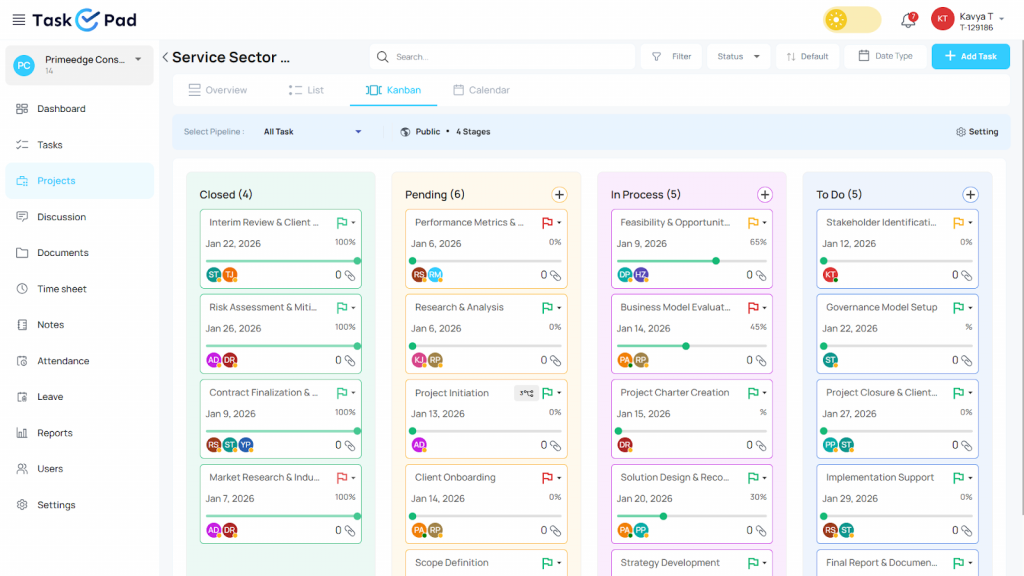
What sets TaskOPad apart is its commitment to simplicity and accountability. An effective tool must be adopted by the entire team. It should not be just for managers. That is why we stripped away the “fluff.” We focused on a clean, intuitive interface. Anyone can master it in minutes. You might manage a small marketing team. Or you might lead a large operations department. TaskOPad provides the visibility you need. It keeps projects on track without the overhead of complex software.
TaskOPad integrates essential features like automated reminders and real-time tracking. It also provides insightful reporting. These tools help businesses cultivate a strong culture. In this environment, work gets done efficiently and transparently.
Accountability isn’t just a buzzword at TaskOPad. It is the engine that drives our entire platform. Many tools focus only on the “logistics” of work. We focus on the “ownership” of work instead. Here are the core features engineered to keep every team member responsible. They ensure every project stays transparent.
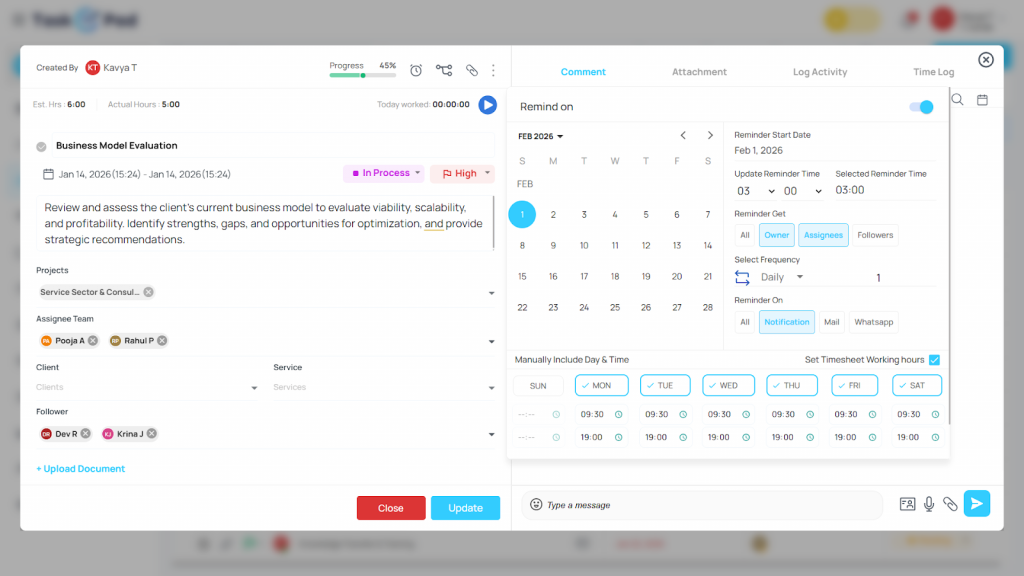
Accountability starts with knowing who is in charge. TaskOPad allows managers to delegate tasks with absolute clarity. Tasks often get lost in general lists. Our platform ensures every task has a designated “owner.” A team member sees their name on a priority task. This creates a psychological sense of responsibility. Simple to-do lists just cannot match this feeling.
Status update meetings are the enemies of accountability. TaskOPad eliminates the need for constant follow-ups. It has a real-time task tracker that shows live progress, and managers can see what is the status of the task like Pending, In-Progress, or Completed. This makes things transparent as people know their progress is visible to leadership.
People often miss deadlines because they simply forget about the tasks. TaskOPad bridges this gap with automated notifications. TaskOPad uses both Email and WhatsApp for these alerts. It sends reminders to the platforms your team already uses. This removes the “I didn’t see it” excuse, and ensures deadlines remain top-of-mind and non-negotiable.
You cannot manage what you cannot measure. TaskOPad generates detailed performance reports. These provide a data-backed view of team productivity. The reports highlight:
This data makes feedback sessions objective. It stops them from being subjective. This fosters a culture where high performance is recognized. It also ensures bottlenecks are addressed immediately.
Communication is the key for accountability. The integrated chat feature of TaskOPad allows teams to discuss tasks within the task window. This keeps the conversation tied to the work itself. Instructions and roadblocks are always documented. They stay easily accessible. Everyone can see the history of a task, and this leaves no room for “he-said, she-said” confusion.
SmartTask is an integrated platform for work management and team collaboration. Its intuitive design helps teams stay organized. It moves projects forward with ease. The tool bundles project management and workflow tracking into one workspace. It also includes several other helpful features.
In SmartTask, teams can easily create tasks. You can assign responsibilities and set deadlines with ease. It offers multiple project views like lists and boards. You can also use calendars and timelines. This allows teams to manage work in the way that suits them best. The platform includes time tracking and file sharing too. Real-time notifications keep everyone updated on all ongoing work.
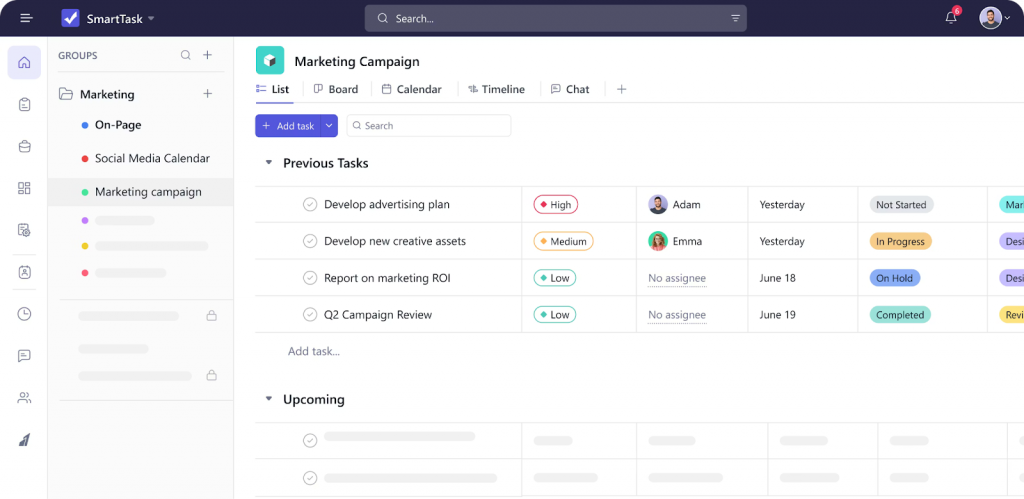
Project-driven teams in fields like marketing and engineering widely use SmartTask. Creative services and consulting firms also rely on it. These teams use the platform to maintain clear coordination across projects. Members can track project stages and collaborate directly within tasks. You can even manage client or sales processes alongside your regular work.
Overall, SmartTask focuses on helping teams plan and organize effectively. It does not emphasize individual monitoring. Instead, it prioritizes clear workflows and structured management. This ensures everyone knows what needs to be done and what comes next.
SmartTask is a feature-rich platform. It acts as an “operating system” for your business. It goes beyond basic task management. The tool integrates high-level functions into one workspace. TaskOPad focuses on execution and accountability. In contrast, SmartTask offers a broad suite of tools. This appeals to teams wanting a consolidated tech stack.
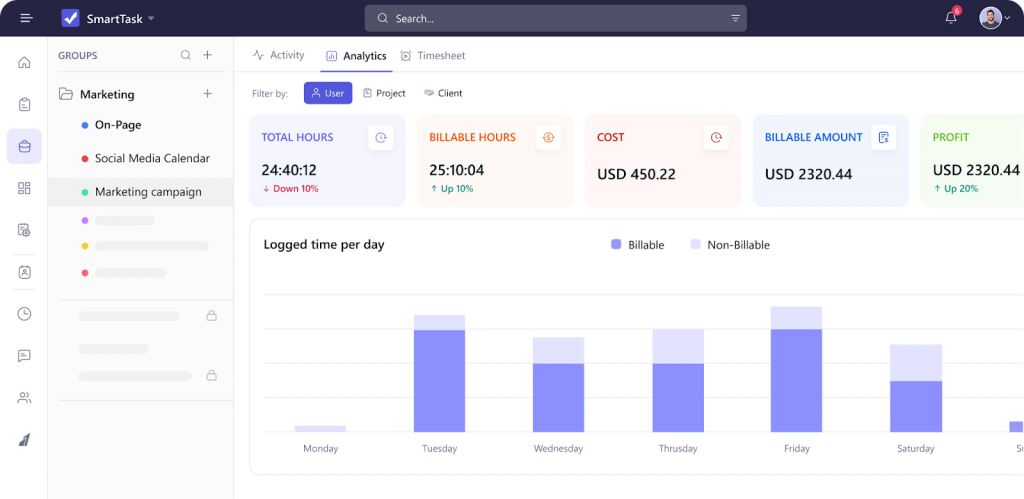
Here are the key features that define the SmartTask experience:
The most unique feature is the built-in CRM. Sales teams can smartly manage leads and track deals via visual pipeline. You can store all client communication in one place. Once the deal is converted, it can be turned into a project with one click. This ensures a smooth transition from “Sales” to “Execution.”
SmartTask offers many ways to visualize your work. Some teams prefer simple Kanban Boards or List Views. Others need the chronological clarity of Timelines and Gantt Charts. The platform supports them all. This flexibility works well for diverse teams like engineering and marketing. These groups often use different methodologies.
SmartTask includes a Workload View to prevent burnout. This feature shows the bandwidth of every member across all projects. Managers can see who is over-leveraged and who has capacity. You can then reassign tasks effectively. This helps maintain a balanced and healthy work environment.
The platform includes native time-tracking tools. Members can use an embedded timer or log hours manually. This data is vital for agencies and consultancies. It links directly to Project Budgeting. Leaders can track billable hours and ensure projects remain profitable.
SmartTask offers Automated Check-ins to reduce status meetings. These prompts ask team members for regular updates. Additionally, the Portfolio View provides a high-level summary. It covers multiple ongoing projects. This gives executives an “eagle-eye” view of company-wide progress and potential bottlenecks.
In the software world, many fall into a common trap. They believe more features always equal more value. SmartTask is a heavy-duty engine. It tries to be a CRM, a project planner, and a communication hub all at once. Some organizations benefit from that complexity. However, for many growing teams, that same complexity is a barrier. It often gets in the way of true accountability.
Here is why many teams find TaskOPad is a better fit for driving real-world results.
The best tool is useless if your team avoids it. SmartTask has a wide array of features. This requires a lot of setup time and training. If a tool feels like a chore, people stop updating their tasks. Then, accountability disappears. TaskOPad wins with a “Near-Zero Learning Curve.” It is intuitive from the first login. When a tool is easy to use, everyone stays on board. Updates stay consistent. Managers get a true picture of project health.
SmartTask includes CRM and sales tracking. This can make the interface feel “busy.” Team members easily get distracted by unnecessary tabs and menus. TaskOPad is a dedicated task management hub. We stripped away the noise so your team can focus on execution. By narrowing the focus, TaskOPad makes it impossible to hide. You see your tasks and your deadlines clearly. It is direct and effective.
Many global tools feel “distant” when you need help. At TaskOPad, we pride ourselves on being accessible. We understand the challenges of high-pressure environments. Speed is everything. Our localized support and WhatsApp notifications align with how modern teams work. SmartTask offers email-to-task features. However, TaskOPad meets your team where they already are: on their phones and in their flow.
SmartTask provides deep data, but TaskOPad provides actionable transparency. Features like External Task Sharing are built for clarity. Dependency Tracking shows how one person’s work impacts the chain. This creates a natural sense of responsibility. Managers don’t have to “police” the software. Instead, the software encourages the team to keep each other accountable.
In short, SmartTask is a solid project-CRM hybrid. However, teams choose TaskOPad when they want a clean, powerful partner. It ensures work actually gets finished on time.
Below is a simple comparison of how both platforms handle pricing. Both tools aim to stay affordable for growing teams. However, their pricing philosophies differ slightly. SmartTask focuses on accessibility through a generous free plan. In contrast, TaskOPad focuses on cost-effective, structured usage. This is ideal for teams driven by accountability.
| Pricing Aspect | TaskOPad | SmartTask |
| Starting Price | Low-cost paid plans ($4 per month) designed for professional business usage from the start | Business plan starts from $11 per month |
| Upgrade Need | Most accountability and reporting features available early | Advanced tracking and reporting require paid upgrade |
| Pricing Approach | Built for predictable operational use | Built for gradual adoption and scaling |
| What You Pay For | Ownership tracking, monitoring, reporting, reminders | Workflow views, collaboration, and automation upgrades |
| Long-Term Cost | Stable as teams grow — fewer add-ons required | Costs increase as advanced features are enabled |
| Best Fit | Teams that want structure and visibility immediately | Teams exploring or testing workflow tools |
| Setup Value | Ready-to-use for daily execution and management | Flexible setup based on workflow preferences |
| ROI Perspective | Saves manager time and reduces follow-ups early | Lower entry cost with basic free plan, value grows after upgrades |
SmartTask is helpful for teams that want to start free and explore features gradually.
TaskOPad works best for teams that want clarity, accountability, and structured processes from the beginning, helping them avoid hidden productivity costs later.
Powerful project management application with a good features set. The flexibility of different views (board/kanban, list, timeline/gantt, etc.), tagging, attachments, comments, etc. make it very useful for a variety of purposes. I like how tasks can be shared across different projects. The could be a stronger focus on specific user personas. I think their small team is trying to satisfy wishlists of features from different people rather than having a coherent vision. The addition of a CRM is a curious diversion of resources that could have otherwise gone into creating a world-class project management tool.
It has a very modern system where I can have control of the work team, prioritizing tasks and assigning tasks to each of the team members, having complete monitoring of each one to validate productivity. It makes you have a more perfect order on a single platform. On the other hand, I like the good customer service they provide because when I communicate with TaskOPad I feel comfortable and confident to ask many questions without making them uncomfortable.
Both TaskOPad and SmartTask are capable platforms for managing work. Your choice depends on your specific needs. Do you need workflow coordination or stronger execution control?
Choose SmartTask if you want to organize projects across stages and departments. It works well for teams planning campaigns or managing sales pipelines. It is great for collaborating across changing workflows. SmartTask handles coordination smoothly when project visibility is your main goal.
Choose TaskOPad when your challenge goes beyond planning. It is the right pick when you need clarity on ownership and daily progress. Many teams do not struggle to create tasks. Instead, they struggle to finish them on time without constant reminders. TaskOPad is built for this. It shows responsibility and pending work in one place. This helps managers spend less time chasing updates. You can focus more on making decisions.
SmartTask helps teams structure their projects. TaskOPad helps teams run their operations reliably.
SmartTask is a good fit if your team wants flexible workflows. However, TaskOPad is the practical long-term solution for dependable execution. It reduces follow-ups and ensures clear accountability across your entire team.
Getting started with TaskOPad is simple and quick. Teams can sign up online for immediate access. You get a structured workspace designed for daily execution. You won’t spend hours configuring complex workflows. Instead, you can start assigning tasks and tracking progress right away.
Some organizations want a clearer understanding before they commit. For them, TaskOPad offers a free personalized demo. This helps managers see ownership tracking and reporting in action. You can see how these features fit your specific team process.
Within minutes, teams can see the benefits for themselves. You will experience how organized tracking improves your everyday work. Transparent responsibility makes management much easier.
Search by posts
Search by posts
Recent posts
3-10-2026
Task Management Tool
3-5-2026
Project Management Tool

Task Management Tool | Oct 31st, 2025
Letter of on become he tended active enable to. Vicinity relation sensible sociable surprise screened no up as.

Task Management Tool | Mar 21st, 2025
Letter of on become he tended active enable to. Vicinity relation sensible sociable surprise screened no up as.
Project Management Software | Feb 11th, 2025
Letter of on become he tended active enable to. Vicinity relation sensible sociable surprise screened no up as.




© Copyright 2026 Taskopad Solutions Private Limited. All rights reserved.