
☰
Task Management Software
Mar 11th, 2026
Choosing a task management tool usually starts with a checklist. Managers look for advanced automations, deep reporting, and every possible “bell and whistle.” But there is a silent productivity killer, learning curve, that most people ignore until it’s too late. Even the most sophisticated and best-in-class software fails if your team finds it intimidating.
When a tool feels like a chore, you should stop using it. They eventually revert to sticky notes, messy WhatsApp pings, and “lost” emails. This is the “Shelfware Trap.” You aren’t just losing money on a subscription; you are actively draining your team’s energy.
Real ROI isn’t found in a feature list. It is found in User Adoption. High-growth teams are realizing that a “perfect” system no one uses is worthless. On the other hand, a simple system that everyone embraces becomes a powerhouse. Here is why prioritizing adoption is the smartest bet you can make for your bottom line.
In the SaaS world, managers often choose tools based on a “feature checklist.” They hunt for advanced automations and complex reporting. But there is a silent productivity killer: The Learning Curve. Sophisticated software fails if your team finds it intimidating. They will eventually revert to sticky notes, messy WhatsApp pings, and “lost” emails. When this happens, your investment stalls. It actively drains your resources.
Think of it this way: ROI isn’t in the specs. It is in User Adoption.
If you buy a complex platform that only 10% of your team uses, you haven’t bought a solution. You have bought a bottleneck. A few “power users” might be happy. However, the rest of the team will struggle. This makes the overall workflow slower and less productive.
On the other hand, imagine if your entire team uses 60% of a tool’s features daily. That is when you hit the jackpot. Widespread consistency is what actually moves the needle. Real productivity doesn’t come from a few people using a “perfect” system. It comes from everyone using a “simple” one.
Imagine a mid-sized agency that signed up for a high-end Work Management System. It had every bell and whistle imaginable. The manager spent 20 hours configuring “perfect” workflows.
However, the creative team felt overwhelmed. They had to fill out 15 different fields just to upload one graphic. The result was predictable:
The agency paid for a premium tool but still operated in chaos. They had the power, but they lacked the adoption.
When you prioritize Faster Adoption, you should choose a tool that feels intuitive from day one. You need a platform that resonates with how people naturally work. It should be simple, collaborative, and direct.
The faster your team says, “I get it,” the faster you see a real impact on your bottom line.
Both TaskOPad and Monday.com help teams manage tasks. They also track progress and allow collaboration in one place. However, they approach work management differently. TaskOPad focuses on simplicity. It uses structured task management to help teams start quickly. Monday.com offers a highly customizable system. It is designed to support complex workflows across many departments. The table below highlights the key differences between these two platforms.
| Comparison Factor | TaskOPad | Monday.com |
| Platform Focus | Task and project management with built-in productivity tools | Work operating system designed to manage workflows and processes |
| Ease of Adoption | Simple interface designed for quick team adoption | Flexible system that may require onboarding and configuration |
| User Interface | Clean, structured, and easy to navigate | Highly visual with customizable boards and layouts |
| Setup Process | Minimal setup required to start managing tasks | Requires board creation, column setup, and workflow configuration |
| Customization | Focused features designed for structured task management | Extensive customization for workflows, automations, and dashboards |
| Time Tracking | Built-in time tracking included | Available through integrations or advanced plans |
| Collaboration | Task comments, notes, and file sharing within projects | Collaboration through updates, mentions, and shared boards |
| Learning Curve | Low — teams can adopt it quickly | Moderate — flexibility can require some training |
| Best Suited For | Growing teams looking for clarity and faster adoption | Teams needing highly customizable workflow management |
| Typical Use Cases | Task tracking, project coordination, time tracking, productivity monitoring | Project management, workflow automation, cross-department collaboration |
TaskOPad is a robust task management tool built for efficiency. It helps teams organize, track, and complete work. It removes unnecessary friction from the workday. Many platforms offer endless customization. However, TaskOPad focuses on what actually matters: getting things done. It is a centralized hub for all your daily operations. You can assign tasks and set deadlines easily. You can also monitor progress in real-time.
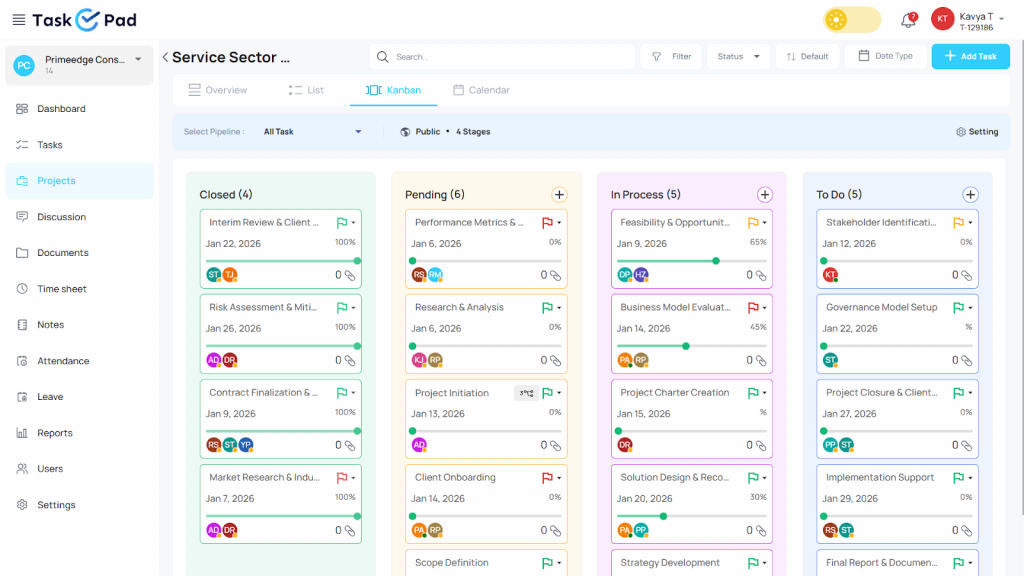
The platform is designed for teams that value speed. It balances powerful features with a familiar interface. You won’t need weeks of training to understand it. Instead, you get a “Plug-and-Play” experience from day one. It even includes smart features like Leave management, attendance management and WhatsApp notifications. These tools are built specifically for modern professional workflows.
TaskOPad is more than just a digital to-do list. It is a collaborative workspace that bridges the gap between managers and on-ground teams. Everyone stays on the same page. No task falls through the cracks. It is the ideal choice for growing businesses. They need a tool that scales with them. They don’t need a tool that slows them down with complexity.
Faster adoption starts with removing fear. Complex tools often feel like cockpits. Employees hesitate. They avoid what they don’t understand. TaskOPad is built differently. It feels familiar from the first click. It mirrors tools people already use daily. Here are the features that help teams get started fast.Faster adoption starts with removing fear.
WhatsApp Integration Most employees live on WhatsApp. TaskOPad meets them there. With TaskOPad’s WhatsApp integration, task updates land directly on their phone. No need to keep the app open all day. Work and WhatsApp stay connected. Nothing important gets missed.
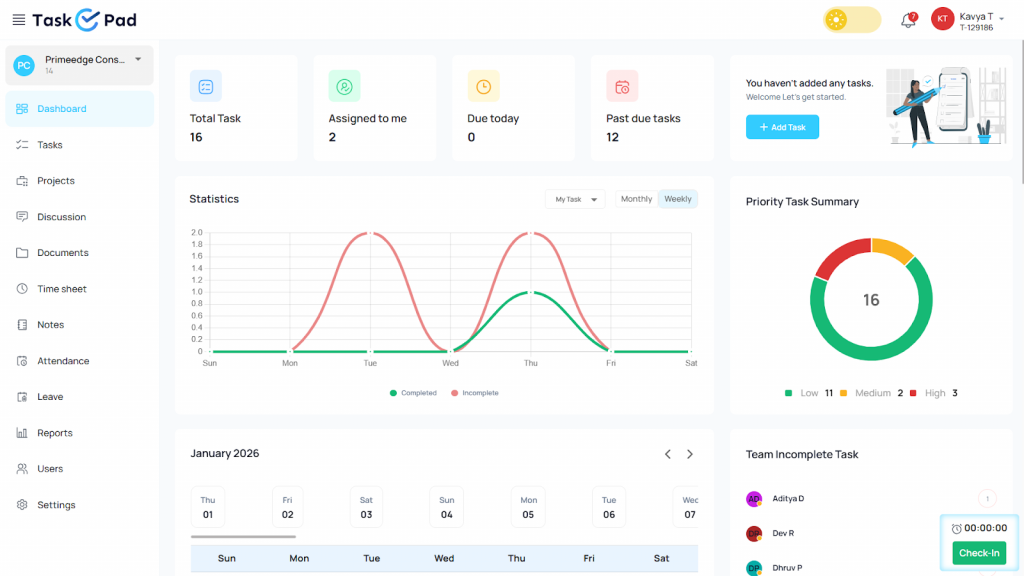
Unified Dashboard Complexity slows adoption down. TaskOPad keeps things simple. The dashboard shows only what matters. Tasks, deadlines, team progress — all visible at once. No digging through multiple boards. New users feel in control immediately.
Built-in Attendance & Leave Management Most companies separate task management from HR. That creates unnecessary friction. TaskOPad brings both into one place. Employees mark attendance here. They apply for leave here too. One tool handles work and admin together. That convenience drives faster adoption.
Real-Time Team Chat Switching between apps breaks focus. It also loses context. TaskOPad has chat built right in. Conversations happen where the work is. Nothing gets lost across platforms. The “where did we discuss this?” problem simply disappears.
Simplified Task Assignment Assigning tasks should take seconds. In TaskOPad, it does. Add a description. Set a deadline. Pick an assignee. Done. The interface needs almost no training. It is truly plug-and-play. Teams focus on work, not on figuring out software.
Deadline Tracking & Reminders Missed deadlines hurt team momentum. They shake confidence. They derail projects. TaskOPad solves this with smart reminders. They nudge at the right moment. They never feel annoying. Projects keep moving without constant check-ins. Managers save hours every week. Stress drops across the team. Everyone knows what is due and when.
Monday.com is a well-known “Work OS.” It is designed for maximum flexibility. It goes beyond simple task lists. The platform uses a building-block approach. This allows users to create custom dashboards and complex workflows. It is highly visual and uses colorful boards. This makes it popular with large creative and corporate teams.
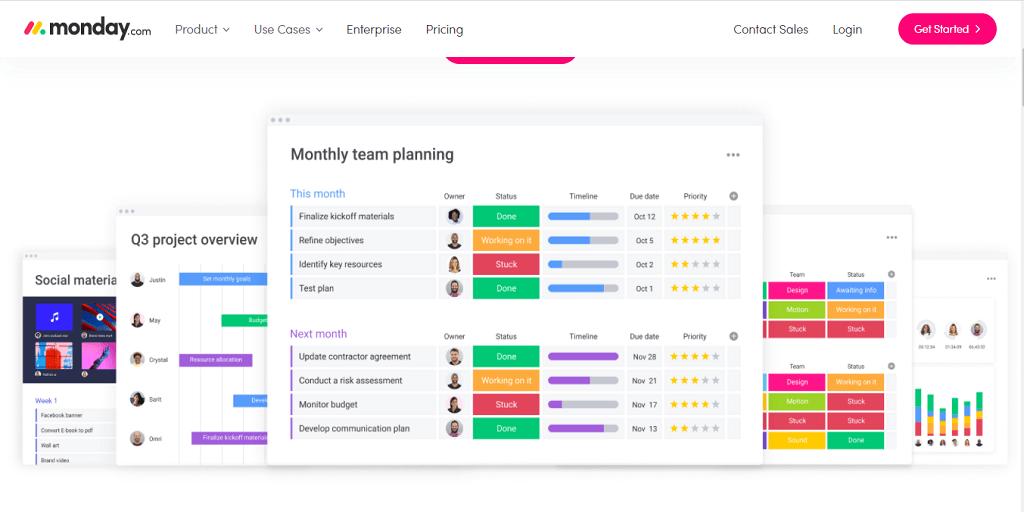
The tool excels at handling big data and intricate projects. It offers a massive library of integrations and automations. This is great for organizations with specialized needs. However, this power often requires a “Tool Champion” to set things up. It is a premium, feature-rich ecosystem. It suits those who want to customize every single detail of their work life. Monday.com isn’t just a tool; it is a complete digital workspace for the enterprise level.
Highly Visual Boards The heart of Monday.com is its colorful boards. You can customize almost every column. You can track status, priority, and dates. It is very visual. Team leaders can see a high-level view of their department.
Advanced Automations “If this, then that” is one of the best features of Monday.com. For example, you can set a rule. “If a status changes to Done, move it to the Archive board.” This saves time on manual tasks. It is great for teams with very rigid workflows.
Massive Integration Marketplace The platform connects with a wide range of third-party tools. It syncs with Slack, Salesforce, and Adobe. This is suitable for enterprise teams. They often use dozens of different software tools. Monday.com acts as the central hub for all of them.
Multiple Data Views You aren’t stuck with just a list. You can view work as a Timeline, Gantt chart, or Workload view. These views are helpful for resource planning. They show who is busy and who has free time. It is a data-driven approach to management.
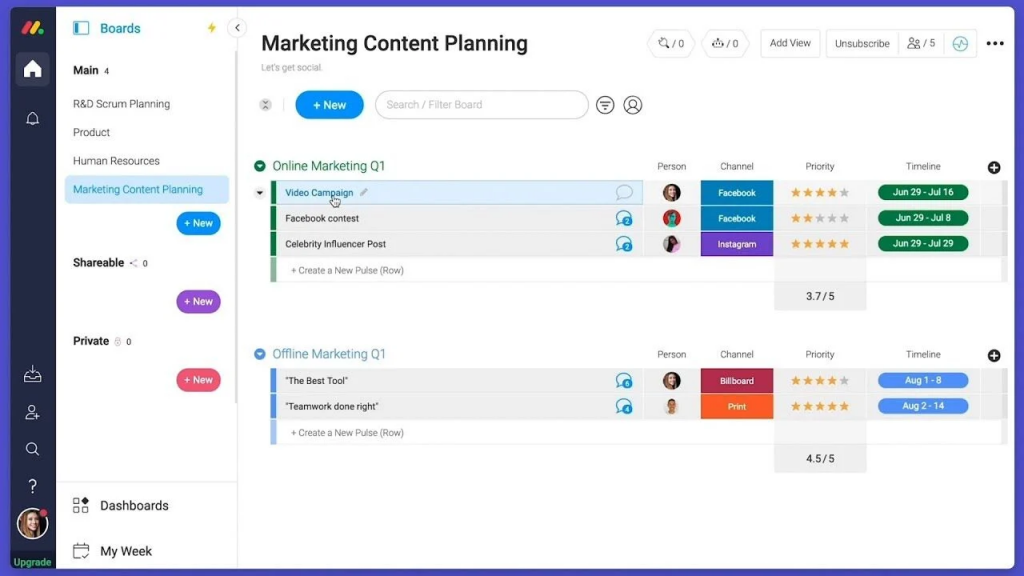
The “Building Block” Approach Everything in Monday.com is a widget or a block. You can build your own private dashboard. You can add charts, maps, and even YouTube videos. This level of customization is its biggest strength. It allows you to create a workspace that fits your exact brand.
Guest Access and Permissions For large agencies, guest access is a key feature. You can invite clients to view specific boards. You have granular control over what they see. This keeps professional boundaries while maintaining transparency.
For high-growth teams, speed is everything. While Monday.com is an incredible “Work OS” with infinite possibilities, many fast-moving companies are pivoting toward TaskOPad. The reason isn’t that Monday lacks power—it’s that TaskOPad provides “Power without the Complexity.”
Here is why teams are making the switch to ensure faster adoption:
Monday.com is like a box of Legos; you can build anything, but you have to build it first. High-growth teams often don’t have weeks to spend configuring boards and automations. TaskOPad offers a structured, “Plug-and-Play” environment. You can sign up in the morning and have your entire team tracking tasks by lunch.
To get the most out of Monday, you often need to integrate third-party apps or buy higher-tier plans for specific needs. TaskOPad builds essential business tools directly into the core platform. Having Attendance Management and Internal Chat in the same place where you manage tasks removes the “tool fatigue” that slows teams down.
In many regions, WhatsApp is the primary mode of communication. TaskOPad’s native integration allows team members to receive updates where they are already active. This drastically lowers the barrier to entry. Employees don’t feel like they are learning a “heavy” new corporate system; they feel like they are just improving their existing chat-based workflow.
When a tool is too complex, employees only use the bare minimum, or worse, they stop using it entirely. TaskOPad is designed to be intuitive for everyone—from the tech-savvy manager to the on-ground executive. By focusing on a clean, direct interface, TaskOPad ensures that 100% of your team actually uses the software.
Monday.com is great for massive enterprises with dedicated admins. TaskOPad is for the builders who need a reliable, simple, and effective hub to scale their business right now.
If you want a deeper look at how it helps teams stay organized, read our article on why TaskOPad is the best cloud-based project management software.
When evaluating a task management platform, pricing is only one part of the decision. Prices are always considered based on the values teams receive for the price.
TaskOPad focuses on offering essential productivity tools in a single platform. Teams get a bunch of features like task management, time tracking, and reporting by default without relying on multiple integrations. Whereas, Monday.com, provides a flexible work management system with extensive customization and automation capabilities.
The table below compares pricing and practical value for growing teams.
| Feature | TaskOPad | Monday.com Standard Plan |
| Price (Annual) | $4.00 /user/month | ~$12 /user/month |
| Price (Monthly) | $6.00 /user/month | ~$14 /user/month |
| Seat Policy | Pay per user. No bundled seat requirements. | Seats typically purchased in minimum user blocks |
| Native Time Tracking | Included | Available in higher plans or via integrations |
| Task & Project Management | Included | Included |
| Workflow Customization | Structured workflows ready to use | Highly customizable workflows |
| Integrations | Essential integrations available | Large integration marketplace |
| Best Value For | Growing teams seeking quick adoption and built-in productivity tools | Teams needing extensive workflow automation and customization |
I like that Asana keeps my team on track and ensures they have steady capacities. It really helps solve that problem for me. I also appreciate the task templates because we have a lot of repetitive work, and they make it easy to execute. The Asana trainings were really helpful during the initial setup, even though there was a bit of a learning curve. I find the capacity management in the day view dropdown is always inaccurate for us. There was a bit of a learning curve, but the Asana trainings helped a lot.
We are into Forwarding Business, in our team we have 10 team members, we were using notepad to manage our and our team member day to day tasks but it is very pathetic for us to follow up and not get perfect results of work, once we started using TaskOPad our all work can track and get more productivity in our all team members work. Highly recommended application to increase productivity in the organization. Any time customer support available.
Monday Work Management is a modern solution for managing work that fits companies of any size, thanks to its affordability and reliability. Using this tool, we can monitor the progress of each project in real time, which has noticeably enhanced our teamwork and overall productivity. The platform’s built-in AI-driven features address work-related challenges as they arise, making our workflows more efficient. I particularly appreciate how easy it is to use and the straightforward design of its interface. Monday Work Management also automates many of our repetitive tasks, helping us consistently achieve excellent results. I find the mobile app for monday Work Management to be inconsistent and often dysfunctional, which makes using it frustrating. Additionally, as a beginner, I have found it difficult to integrate monday Work Management with third-party apps.
I like the friendly and easy-to-use user interface of monday Work Management. It’s appealing and accessible from any device. A good user interface really helps me navigate workflows and projects faster and easily see the status of different tasks and projects at a glance. This visibility is vital to avoid wasting time and helps me prioritize what needs to be done. The initial setup was also very easy. The UX can always still be refined. Sometimes the interface seems a bit cluttered, which affects my experience by making it harder to locate things and less pleasant to use.
Deciding between TaskOPad and Monday.com depends on one question. Do you want to build a tool, or do you want to use one? Both platforms are excellent. However, they serve different team structures. Neither is a “bad” choice. But choosing the wrong one for your team stage can lead to frustration. It can also cause low adoption.
If you want to build a massive, customized digital ecosystem, Monday.com is a world-class choice. However, suppose you want to eliminate chaos. You want 100% of your team tracking tasks by tomorrow morning. In that case, TaskOPad is the better bet for faster adoption. The best tool isn’t the one with the most features. It’s the one your team actually enjoys using.
Ready to stop chasing updates? It’s time to start crushing goals. Transitioning to a new tool shouldn’t feel like a second job. With TaskOPad, you can skip weeks of configuration. Move straight to productivity instead. Our platform is built for teams that value their time. It is for those who need results now.
Don’t let complex software slow your growth. Experience easy work management. Use a tool that actually works for you. Join thousands of teams already using TaskOPad. They have found a simpler, faster way of working.
Take the first step today. Sign up for a Free Trial and explore the features at your own pace. Book a Free Personalized Demo and our experts will show how TaskOPad fits your unique workflow.Your team deserves a tool they will actually use. Bet on faster adoption. Watch your efficiency soar. Sign up now and see the difference for yourself!
Search by posts
Search by posts
Recent posts
3-10-2026
Task Management Tool
3-5-2026
Project Management Tool
Task Management Software | Mar 9th, 2026
Letter of on become he tended active enable to. Vicinity relation sensible sociable surprise screened no up as.

Task Management Software | Dec 30th, 2025
Letter of on become he tended active enable to. Vicinity relation sensible sociable surprise screened no up as.

Task Management For Education Sector | Dec 29th, 2025
Letter of on become he tended active enable to. Vicinity relation sensible sociable surprise screened no up as.




© Copyright 2026 Taskopad Solutions Private Limited. All rights reserved.