
☰
Task Management Software
Mar 9th, 2026
In 2026, project management is about results, not features. Success means your team finishes productive work by EOD. Hybrid models are now the standard. Complex platforms often create “digital noise” that distracts users. You need a tool that simplifies chaos. Don’t add an administrative layer to your morning.
Scaling a startup? Managing a high-output agency? Choosing between TaskOPad and GoodDay is simple. Do you want to plan work or execute it? In this blog post, we compared both the tools with pricing and real-world sentiment. We also looked at daily “micro-efficiencies.” Find the platform that fits your team’s pulse.
The way we work has shifted. Today, the “office” is a digital ecosystem. Over 60% of global firms use a hybrid model. The challenge is no longer just finishing projects. It is about managing the daily grind.
Our “always-on” culture creates a paradox. We have many tools, but productivity lags. This is due to digital noise. Professionals face frequent interruptions. It takes 23 minutes to regain deep focus after one notification. Daily work management is now a survival skill. It is no longer just an administrative task. Here are three key reasons why:
In short, new-age business demands clarity over complexity. Are you a startup or an enterprise? Mastering your daily workflow is essential. It is the only way to turn effort into results.
| Aspect | TaskOPad | Goodday |
| Core Focus | Designed around daily work execution like tasks, priorities, follow-ups, and team accountability. | Built as a broad work management suite, covering planning, projects, and workflows. |
| Primary Use Case | Ideal for teams that care about what needs to be done today and how work moves forward daily. | Well-suited for teams that want complex project planning. |
| Ease of Use | Clean, intuitive, and quick to adopt with minimal setup, low learning curve. | Feature-rich but may feel complex for teams that don’t need advanced configurations. |
| Daily Visibility | Strong emphasis on daily task lists, ownership, and progress tracking. | Focuses more on project timelines, hierarchies, and planning layers. |
| Team Alignment | Keeps everyone aligned around execution and outcomes, not just plans. | Helps align teams around processes and structured workflows. |
| Flexibility | Lightweight and adaptable to changing priorities and fast-moving teams. | More rigid by design, favoring predefined workflows and structures. |
| Best Fit For | Teams that operate in execution mode like startups, agencies, growing teams, hospitals, hospitality sector, IT, and operations-heavy roles. | Teams that need deep planning, reporting, and multi-layered project control. |
TaskOPad is a modern work management platform. It is built for teams focused on real, everyday execution. It goes beyond simple plans on a timeline. The tool helps teams stay focused on immediate tasks. This includes what is due today, this week, and next. It avoids unnecessary features and complicated setups.
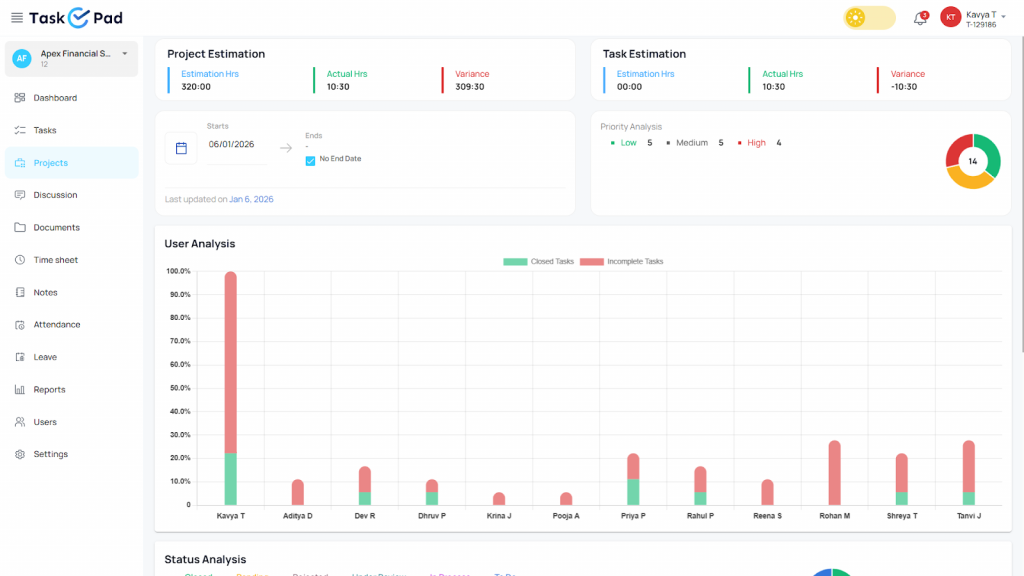
At its core, TaskOPad brings clarity to daily work. Tasks, priorities, and responsibilities remain visible. Teams do not waste time chasing updates. They don’t have to figure out who owns what. Managers get a clear view of ongoing work. Team members know exactly where to focus their effort. There is no guesswork or constant follow-up.
TaskOPad keeps things practical. It differs from tools with heavy structures or rigid workflows. It adapts easily to changing priorities. This is useful for fast-moving teams with evolving work. It supports client deliverables and internal operations. It also helps with cross-functional collaboration. TaskOPad supports the actual flow of work.
Another key strength is the quick start time. The platform feels familiar from day one. Teams can organize work without extensive training. There is no need for long onboarding. This makes it a great fit for growing teams. They gain control over execution without losing momentum.
In simple terms, TaskOPad values action over administration. It keeps daily work organized and visible. It also ensures accountability. Teams move from planning to progress with less friction. They work with more confidence.
A project management tool must keep a team moving. Many platforms feel like digital filing cabinets. Tasks go there to be forgotten. TaskOPad is different. It is a high-velocity engine. It focuses on reducing “friction.” This prevents small delays from app-switching or digging for data.
Here are the key features for daily efficiency:
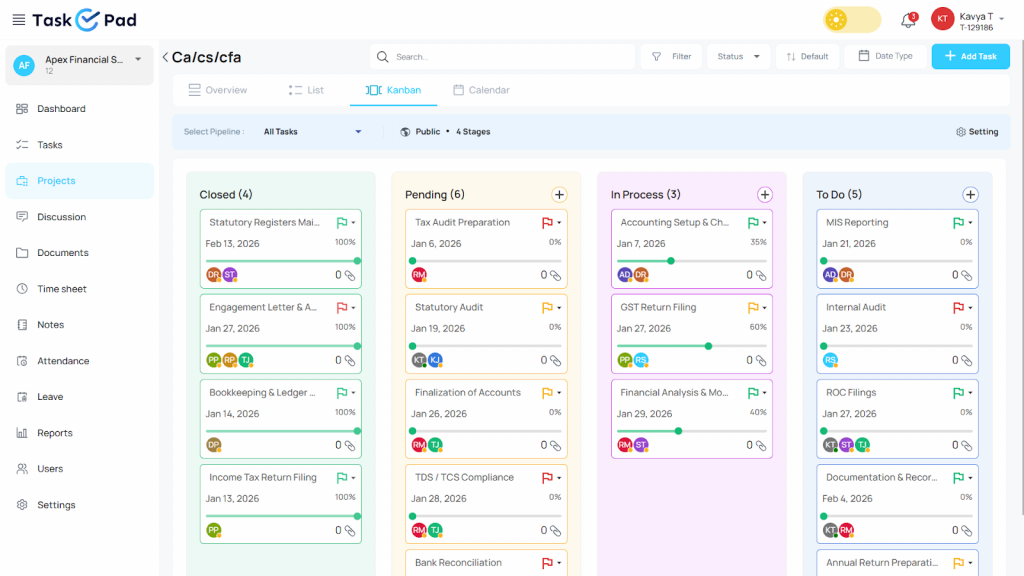
TaskOPad focuses on these “micro-efficiencies.” Your team spends less time organizing. They spend more time actually working.
GoodDay is a famous work management and productivity software. The platform helps various teams plan, organize, and track work across various projects. It is considered an all-in-one platform. Goodday has task management, project planning, goal tracking, and reporting in one dedicated software.
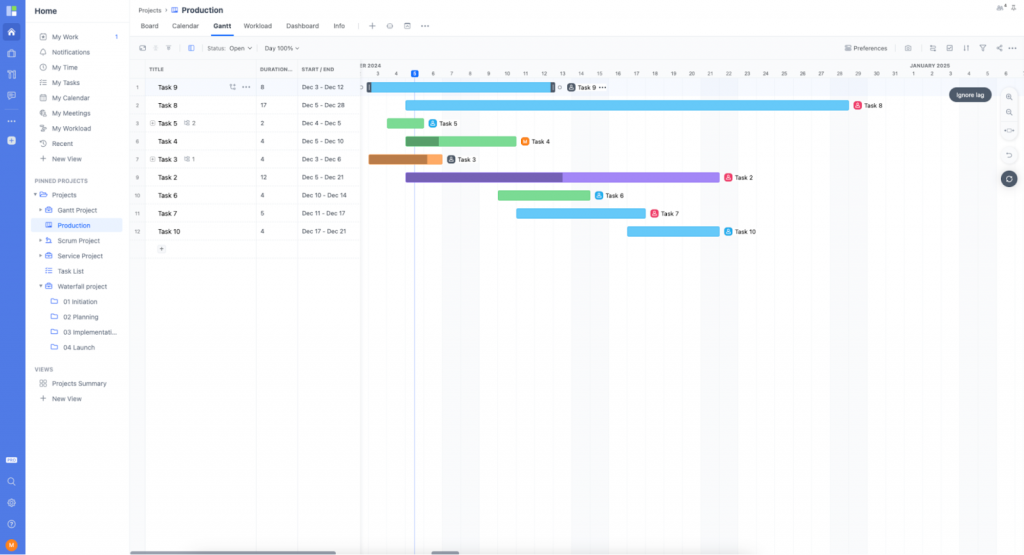
At a high level, GoodDay focuses on structure and planning. Teams break work into projects and define custom workflows. They visualize progress through timelines and detailed dashboards. This makes it a good choice for organizations with clearly defined processes. It provides visibility into long-term goals alongside day-to-day tasks.
GoodDay also supports collaboration. Teams can comment on tasks and share updates. They monitor progress from individual tasks up to company-wide objectives. Managers benefit from detailed reporting and performance insights. These are useful for tracking productivity trends and project health over time.
The platform is flexible. It offers multiple views and many configuration options. Teams can tailor the platform to their specific working style. For teams that enjoy customizing workflows, this is a big advantage. Setting up these processes does require time.
GoodDay’s broad feature set can feel like more than some teams need. It is not always ideal for pure daily execution. It works best for teams that prioritize planning and reporting as much as task completion.
Overall, GoodDay is a capable and well-rounded platform. It suits teams that want a structured approach to work. It places a strong emphasis on planning, visibility, and long-term organization.
GoodDay is known for its immense depth and structural flexibility. In 2026, it remains a favorite for organizations managing complex data. It handles multi-departmental projects within a single ecosystem.
GoodDay’s strength is its “360-degree view.” This is delivered through several advanced features:
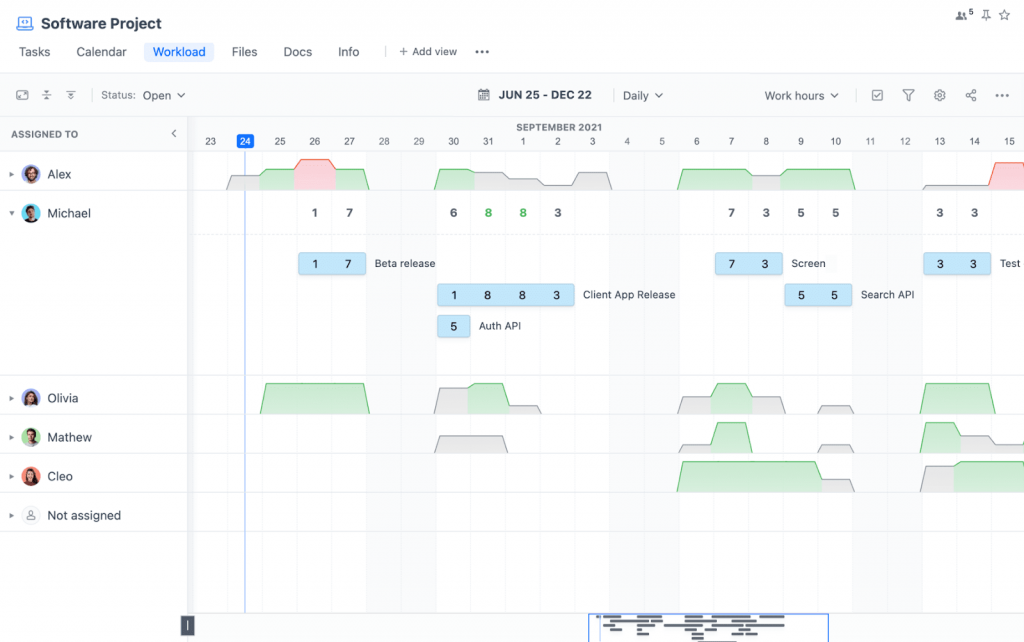
GoodDay is an enterprise-grade toolkit. It rewards teams who take the time to configure it. It is a powerful solution for high-level project intelligence. It ensures strategic alignment across a large organization.
The choice between TaskOPad and GoodDay depends on daily friction. GoodDay offers a massive library of features and strategic depth. However, many teams do not need a “spaceship” for a short trip. They need a reliable, agile vehicle. They want to reach their destination without a complex manual.
High-growth sectors like IT, Law, and Marketing often prefer TaskOPad. Here is why:
Teams choose TaskOPad to bridge a specific gap. It sits between a simple list and a complex project suite. It provides the exact tools needed for daily success. It removes the “fat” of unused features.
You can also explore how TaskOPad simplifies multi-project management for teams handling multiple workflows at the same time.
Choosing between TaskOPad and GoodDay is a balance of needs. You must weigh high-end project architecture against daily execution. GoodDay is praised for its deep customization and “all-in-one” management. However, users often find its mobile experience lagging. TaskOPad wins on simplicity and rapid adoption. Its pricing structure also does not penalize small teams.
| Feature | TaskOPad | GoodDay (Business) |
| Annual Price | $4.00 /user/mo | $7.00 /user/mo |
| Monthly Price | $6.00 /user/mo | $10.00 /user/mo |
| Minimum Users | 1 User (True flexibility) | 15 Users (Billed in bundles) |
| Time Tracking | Included | Included |
| Resource Management | Included | Not included in Professional Plan |
| HR & Leave Management | Included | Not included in Professional Plan |
| Customer Support | WhatsApp & Direct Call | Ticket-based |
Simplified teamwork with improved transparency We started using it on free trial and we realized the first week that this is the software we wanted. One of the best factors is that it is updated regularly to add new features without an additional fee on us. With our team we are able to set goals and divide them into smaller goals that are distributed among team members in the software and we are able to track easily progress on each goal based on deadlines. We are able to track workloads and monitor portfolios on a single dashboard with a few clicks which makes it very user friendly. When we rolled it out we did not need special training as it is very easy to use. We automated all routine tasks in the software to save time and reduce errors. In addition, another feature I enjoy is the use of forms that are user friendly to submit work requests. They are very easy to fill.
TaskOPad provides end to end solution to manage my team and workers from one place and having a bird eye view on many sites which are running at different locations in city. I can track the progress easily of task/work given to managers and employee of my firm and thanks to the features like Project management , service and clients which helps to sort out the things conveniently at single click.
The easy and intuitive interface that also adoption is realy quick for new developers. Along with this we use slack for complete package of work experience. You can manage the process of any size of project. Mobile view of goodday work is bit slow as compared todesktop view. The interface is really good but its lack simplicity that a non- technical person can easily understand.
GoodDay is very easy to use despite a sheer amount of functionality, tools and cutomization options. Many of our teams and departments have had great success in implementing GoodDay in their everyday work and processes. Sharing tasks, information, files and keeping eye on resource usage, including work time, is very simple, yet powerful enough for any project management flow. The constant, high quality flow of product updates and new features makes it very difficult to want to move away from it.
Getting started with TaskOPad is refreshingly straightforward. The platform is built for speed. Teams can begin working without lengthy onboarding sessions. There is no need for technical setup or complex configurations. From day one, the interface feels intuitive. It is very easy to navigate.
TaskOPad fits naturally into modern workflows. It does not force rigid structures. It avoids overwhelming users with too many options. Instead, it provides a clear workspace. Tasks, priorities, and responsibilities are instantly visible. Adoption is smooth for all teams. This includes those moving from spreadsheets or complex systems.
The platform centers on daily execution. Teams quickly experience better clarity and alignment. Managers gain real-time visibility into progress. Team members know exactly where to focus. There is no more constant follow-up or confusion.
TaskOPad is a practical and scalable solution. It is perfect for growing teams that want structure. It ensures you never lose momentum.Is your team ready to simplify daily work? Do you want to improve accountability? Sign up for a free trial today. You can also book a personalized demo. See how TaskOPad supports your execution goals.
Search by posts
Search by posts
Recent posts
3-10-2026
Task Management Tool
3-5-2026
Project Management Tool
Task Management Software | Mar 11th, 2026
Letter of on become he tended active enable to. Vicinity relation sensible sociable surprise screened no up as.

Task Management Software | Dec 30th, 2025
Letter of on become he tended active enable to. Vicinity relation sensible sociable surprise screened no up as.

Task Management For Education Sector | Dec 29th, 2025
Letter of on become he tended active enable to. Vicinity relation sensible sociable surprise screened no up as.




© Copyright 2026 Taskopad Solutions Private Limited. All rights reserved.