10 Common Mistakes Teams Make When Using a Work Management Tool
Nov 27th, 2025
This is a common issue. Many business owners face it regularly. They make the investment. The software gets installed. Yet, the chaos persists.
Adopting a Work Management Tool is a commitment to efficiency. This applies to business owners, startup founders, and project managers. It promises clear communication, strict accountability, and predictable project delivery. However, many teams accidentally sabotage this potential. They turn powerful Work Management Software into an underutilized expense.
Deadlines still slip. Teams still feel confused. If this is happening, the problem likely isn’t the tool. It’s how you are using it. This article breaks down the 10 most critical, productivity-killing mistakes teams make. These errors happen with their Work Management System. We offer direct, actionable fixes. Use them to get your system back on track.
The Mistakes Sabotaging Your Work Management
1. No Standardized Workflow
The Mistake: Every department invents its own process. Project managers do the same within the tool. Project A might use five statuses. Project B uses only two. Task naming conventions become arbitrary.
The Impact: When the data is inconsistent, it makes reporting useless. Teams cannot seamlessly transition between projects. The Work Management Tool becomes incompatible silos of information.
The Fix: Define a universal, mandatory workflow, and document it clearly. Agree on standardized task naming (e.g., [Client Initials] – [Deliverable Type] – Task Description). Define required fields (Assignee, Due Date, Priority). Lock in the exact status change sequence.
2. Communication Disjointedness
The Mistake: Teams hold critical discussions externally. This includes approvals and context-setting chats. They use email, Slack, or WhatsApp. They only update the status in the Office Management Tool.
The Impact: Task history becomes incomplete. Managers waste time hunting for “the last email.” They need this to understand why a decision was made. Accountability breaks down when context is scattered.
The Fix: Enforce a strict “communicate in context” rule. All dialogue related to a task must happen in the task comments. Tools like TaskOPad help centralize this. They offer in-task discussions and strong notification features. This eliminates the need to jump between systems.
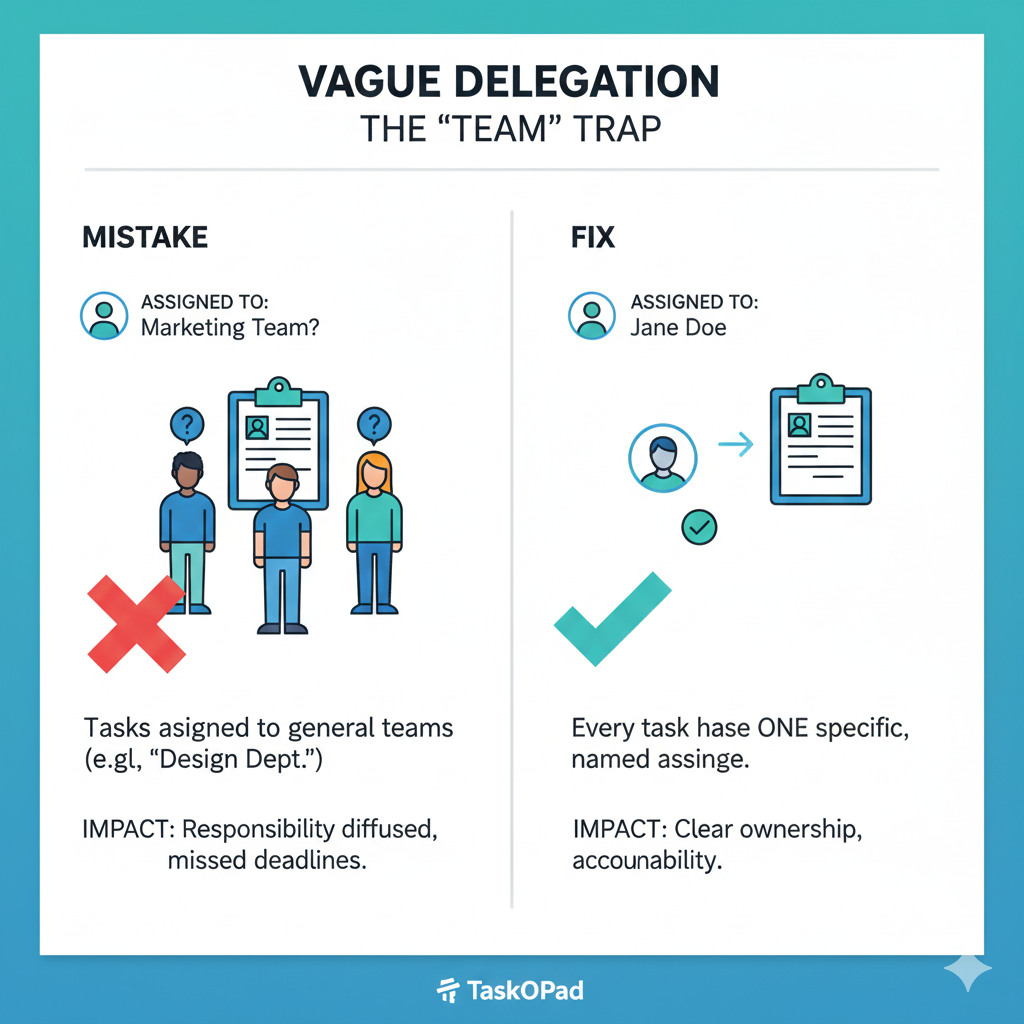
The Mistake: Tasks get assigned to a general entity. Examples include “Marketing Team,” “Design Department,” or a project role. They are not assigned to one specific individual.
The Impact: Responsibility is diffused. Everyone assumes someone else is handling the task. This leads to missed deadlines or duplicated work. Clarity of ownership simply disappears.
The Fix: Every single task must have one specific, named assignee. This person is ultimately accountable for completion. Use subtasks or collaborator fields for support roles. But the primary owner must be singular. TaskOPad’s focus on streamlined Task Delegation enforces this clarity.
4. Treating it Like a Dumping Ground
The Mistake: The system becomes an unorganized list. Teams dump everything that could be done here. It lacks proper categorization, prioritization, or project linkage.
The Impact: The sheer volume of tasks causes immediate overwhelm. Users develop “tool fatigue.” They stop trusting the system. It feels cluttered and irrelevant to current priorities.
The Fix: Introduce a mandatory intake process. Every task needs a priority assigned. It must link to a parent project. It also needs clear acceptance criteria. Only then can it enter the main workflow.
5. Ignoring the Data
The Mistake: Teams only focus on “Done” or “Not Done” statuses. They ignore the wealth of performance data. This includes time tracking, time in review, and individual capacity.
The Impact: Critical bottlenecks remain invisible. Managers cannot objectively identify problems. They miss which workflow stage slows delivery. They don’t know who is consistently overloaded.
The Fix: Regularly review the system’s Reporting & Analytics features. Use the data to spot process problems. High time-in-review suggests slow approvals. Low individual utilization suggests poor resource allocation. Comprehensive productivity reports, like those in a robust Work Management Tool, are essential here.
The Mistake: The tool functions as a disconnected operational system. Tasks are not clearly tied to broader business goals. This includes OKRs or quarterly objectives.
The Impact: Teams become efficient at low-value work. Resources are deployed against minor, urgent tasks. They should be focused on major, high-impact strategic projects.
The Fix: Ensure every major project is linked to a company objective. Use task priority features provided in Work Management Tool. They must reflect strategic importance, not just perceived urgency.
7. Insufficient Training
The Mistake: Teams assume the tool is intuitive. They think employees can onboard themselves. They might provide only a brief, one-time walkthrough.
The Impact: Users develop inconsistent, inefficient habits. Low adoption rates result. Managers constantly chase updates. This defeats the tool’s core purpose.
The Fix: Mandatory, role-specific training sessions are required. Focus training not just on button clicks. Teach how the new, standardized workflow operates within the system.
8. Forgetting Time Management
The Mistake: Teams create tasks without mandatory due dates. They also skip estimates of effort.
The Impact: Work is driven by urgency, leading to firefighting. Project timelines become unpredictable. Resource planning becomes impossible.
The Fix: Enforce clear deadlines for every task. Utilize the system’s time tracking features. Or, implement mandatory effort estimation. This turns your Office Management System into a predictable project scheduler.
9. Failure to Close the Loop
The Mistake: Tasks are marked as “Done.” Yet, no mandatory final check or approval step exists before closure.
The Impact: Sub-par work is delivered. The final quality gate is skipped. Managers lack confidence in the “Done” status. This forces them to manually re-check tasks.
The Fix: Implement a “Review” or “Approval” status. It must require a designated reviewer to sign off. This is usually the manager or client. Only then can the status change to “Closed” or “Done.” This builds essential quality accountability.
10. Over-Customization
The Mistake: The team is overwhelmed on day one. They use too many custom fields, complex forms, and integrations. They chase the “perfect” setup too soon.
The Impact: The system feels rigid, slow, and too complicated. Users resist adoption. They prefer simpler, external methods instead.
The Fix: Start with a simple MVP (Minimum Viable Process) setup. Master core features like Task Management and Task Tracker first. Introduce complex features slowly. Add reporting or workflow automations after high, consistent usage is achieved. Focus on tools like TaskOPad. They balance powerful Workflow Management Tool features with initial simplicity.
For business owners and project managers, overcoming these 10 mistakes is the key to unlocking the true potential of your investment. It requires process discipline, consistent training, and a culture of accountability.
TaskOPad is designed to simplify task management and project delivery, helping teams naturally avoid these pitfalls. Its intuitive interface, focus on clear delegation, and robust reporting empower you to maintain control and drive strategic alignment without unnecessary complexity.
Are you ready to stop fighting your Work Management Tool and start managing your work flawlessly?