
☰
Office Management Software
Dec 27th, 2025
Discipline in an organization isn’t about strictness. It’s about consistent, predictable processes that let people do good work without friction. An Office Management System (OMS) gives that structure. It turns messy habits into repeatable workflows. It makes accountability clear. And it helps leaders measure the things that matter.
Below I explain why discipline matters, how an Office Management Software creates it, what features actually drive results, and how you can roll it out without drama. I’ll also point to a practical option at the end so you can try this stuff for yourself.
Discipline in an organization is what turns effort into outcomes. When processes are informal, teams spend an unhealthy amount of time coordinating instead of executing. Decisions move slowly because ownership is unclear. Tasks get duplicated. Important updates live in inboxes or chat threads, forcing people to constantly chase information. Over time, these small inefficiencies compound into missed deadlines, unhappy clients, and higher employee churn.
This is why businesses are increasingly investing in office management software. The goal isn’t control, it’s predictability. Leaders want systems that make work visible, measurable, and repeatable, so results don’t depend on individual memory or constant follow-ups.
Automation plays a big role here. Studies show that nearly two-thirds of knowledge workers feel significantly more productive when routine work is automated. When processes are disciplined and supported by the right tools, teams waste less mental energy on coordination and can focus on doing meaningful work. That productivity gain is the real value of discipline.
An Office Management System brings discipline through four simple moves:
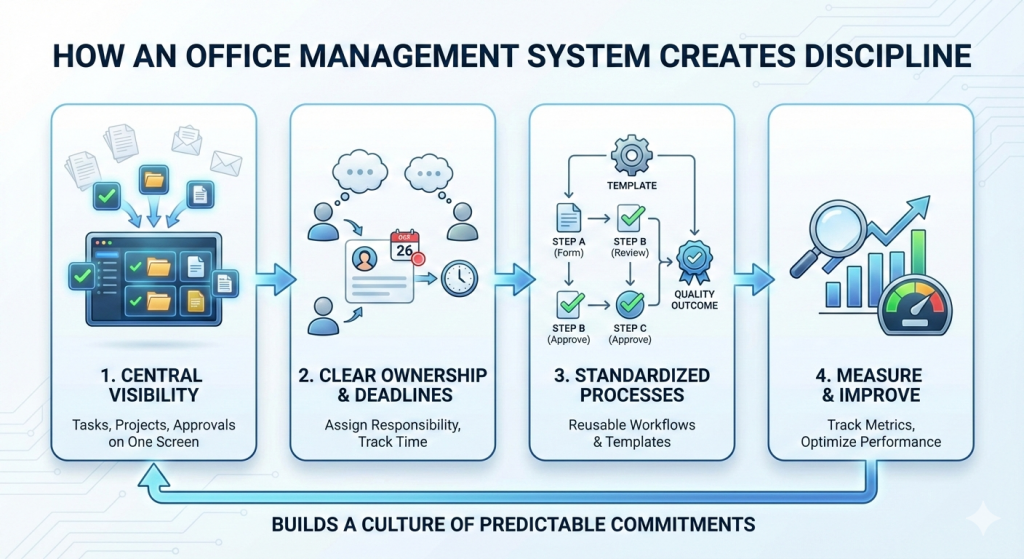
When tasks, projects, and approvals live in one place, nothing hides in inboxes or private notes. Visibility reduces guesswork. It removes “who’s doing this?” from daily standups.
Discipline needs clear owners. The right Office Management Software attaches responsibility to every task and flags overdue items. That single change of assigning ownership reduces slippage dramatically.
Reusable templates (for onboarding, procurement, campaign launches) make each repeatable task behave the same way. That shrinks variation, improves quality, and makes it easy to audit work.
Good systems log time, completion rates, and cycle times. Those metrics let managers replace opinions with decisions: which process needs attention, where bottlenecks live, and who needs support.
Together, these moves reduce friction and build a culture that treats commitments as predictable events instead of hopeful guesses.
Not all office management tools are equal. If discipline is your goal, look for these features:
These features turn rules into small defaults people can follow without effort.
Real organizations get measurable gains when they use structured systems. Hybrid and flexible work arrangements are here to stay, and they demand better coordination tools. Teams working partly remote need more predictable handoffs and clearer ownership. A notable study on hybrid work showed that employees who split time between home and office reported higher productivity and job satisfaction, making structured systems more valuable than ever for keeping hybrid teams aligned.
On the technology side, analysts expect the broader office software market to keep expanding as companies digitize workflows and adopt task/project systems. Investing in an Office Management System is not just a short-term fix. It’s part of a larger shift toward systems that make knowledge work measurable and scalable.
Imagine a marketing team launching a campaign. Without a system, the project manager chases approvals by email, designers wait on vague feedback, and the launch date slides. With an OMS:
The result: fewer meetings, clearer timelines, predictable launches. That’s discipline reducing chaos.
Discipline delivers soft and hard ROI:
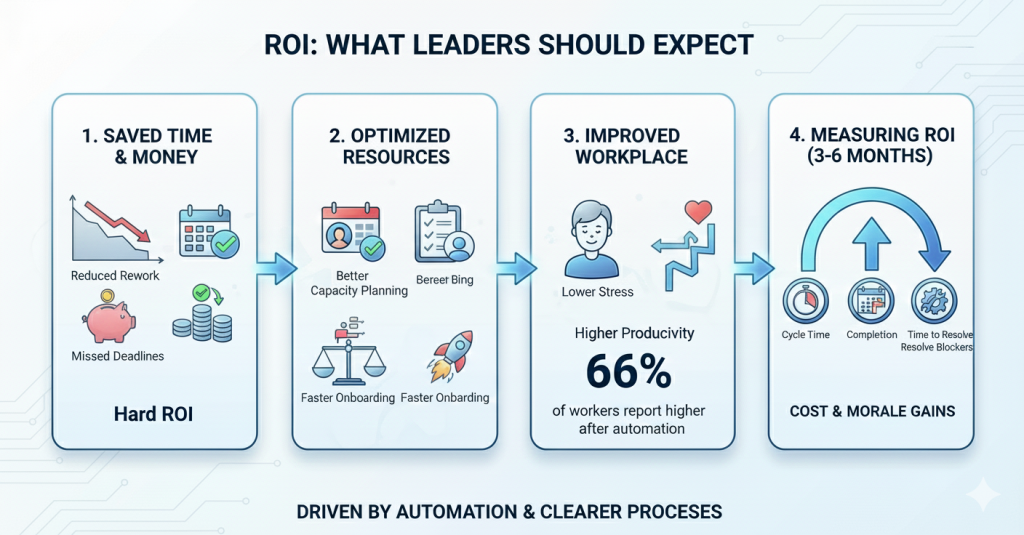
You can measure ROI by tracking cycle time, on-time completion rate, and the average time to resolve blocked tasks. Over three to six months, improvements in these numbers usually translate to visible cost and morale gains. Automation and clearer processes are drivers here, two-thirds of workers report higher productivity after adopting automation tools.
Rolling out a new system often fails because people see it as “more work.” Avoid that by:
Small wins create momentum. Discipline becomes a visible benefit, not a mandate.
When selecting the office management software, score each option against three questions:
Price matters, but usability and adoption matter more. Look for platforms with proven templates, easy automation, and clean reporting.
An office management system is not a silver bullet. Culture, leadership, and clear expectations matter too. But office management software is the tool that turns intent into repeatable practice. It makes discipline lightweight, and accountability simple. It gives leaders the data they need to improve.
If you want a practical system to try, TaskOPad is designed for teams that want a clean, practical tool for task and project discipline. It supports templates, approvals, automation, and simple reports that help teams move from chaos to consistent delivery. Book your free demo now to bring next-level discipline to your organization.
Search by posts
Search by posts
Recent posts
3-31-2026
Project Management Software
3-20-2026
Project Management Tool
Office Management Software | Nov 29th, 2025
Letter of on become he tended active enable to. Vicinity relation sensible sociable surprise screened no up as.

Office Management Software | Nov 26th, 2025
Letter of on become he tended active enable to. Vicinity relation sensible sociable surprise screened no up as.

Office Management Software | Jul 25th, 2025
Letter of on become he tended active enable to. Vicinity relation sensible sociable surprise screened no up as.




© Copyright 2026 Taskopad Solutions Private Limited. All rights reserved.