
☰

Construction Project Management
Nov 25th, 2025
Real estate development is complex, especially in India. Projects here involve massive teams, multiple contractors, strict regulatory compliance, and the constant pressure of field-to-office communication. To succeed, developers need more than spreadsheets and email. They need a robust Project Management Software for Real Estate Development.
This article breaks down the top Construction Project Management Software options available today. These tools are designed to streamline everything from task allocation and financial tracking to on-site updates and document control. We’ve assessed them on their features, strengths (Pros), and limitations (Cons) to help you pick the right Construction Project Management Tool for your firm.
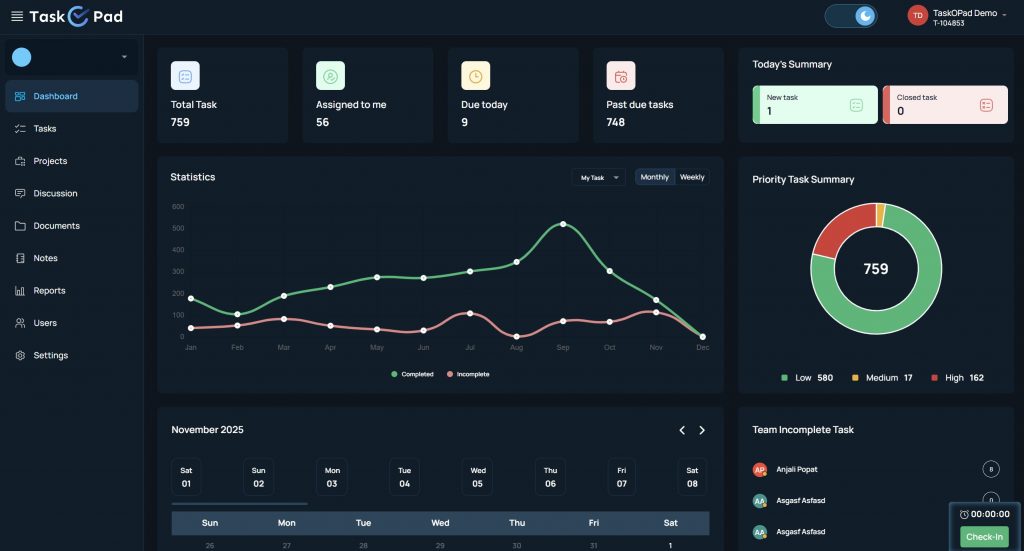
TaskOPad is an end-to-end task management solution that is particularly well-suited for the demanding real estate and construction sectors. Its focus is on providing complete visibility and control, connecting the corporate office directly to the active construction site.
| Pros | Cons |
| Designed for Construction/Real Estate: Features like geo-fencing and proof-of-work are purpose-built for field teams. | Less known globally than some competitors, which might affect partner integration availability. |
| Traceable Communication: Task-wise chat eliminates hunting through WhatsApp or email for updates. | |
| Audit-Ready: Maintains a clear, centralized history of every task, approval, and document change. | |
| Reasonable Pricing: A full-fledge system costs extremely reasonable compared to competitors. |
Monday.com is a highly visual and flexible Work OS. It stands out for its beautiful interface and adaptability, making it suitable for managing diverse workflows—from marketing campaigns to construction projects.
| Pros | Cons |
| Exceptional User Interface: The visual design makes it quick to pick up and easy to monitor project status at a glance. | Core feature set is broad, meaning construction-specific needs (like detailed safety forms) might require extensive customization. |
| High Customization: Workflows can be tailored to match almost any project process. | Pricing can scale up quickly as teams grow and require more advanced features and automation actions. |
| Versatile: Excellent for managing not just the construction, but also the business-side of real estate (sales, asset management). |
ClickUp markets itself as the “everything app for work,” aiming to replace multiple collaboration and project management tools. It offers an enormous breadth of features and customization, often at a highly competitive price point.
| Pros | Cons |
| Feature-Rich & Customizable: Offers unparalleled flexibility for complex project structures and agile workflows. | The sheer volume of features can be overwhelming for new users or teams looking for a simple tool. |
| Centralized Platform: Aims to bring tasks, docs, chat, and wikis into a single workspace. | Users often report performance lags or a “clunky” feel when dealing with extremely large projects or datasets. |
Procore is a heavyweight, purpose-built Construction Project Management Software. It is specifically designed for the complexities of large-scale commercial and residential development, making it a globally recognized industry standard.
| Pros | Cons |
| Industry Standard: Unmatched depth in construction-specific processes, forms, and compliance features. | High upfront and recurring costs, which can be prohibitive for small to mid-sized Indian developers. |
| Field-to-Office Connectivity: Strong mobile app and tools designed to capture data and activity directly from the job site. | Despite its power, some users report that specific actions can be less intuitive or “clunky” compared to simpler mobile-first apps. |
| Robust Financial Control: Sophisticated tools for budget tracking, change orders, and invoice management. | The system requires a dedicated administrator or “Procore Champion” to handle configuration, complex permission settings, and ongoing management, which adds to operational costs. |
Asana is a highly popular work management platform focused on improving team collaboration and clarity. While it’s often used for marketing or internal operations, its flexible structure makes it adaptable for construction task tracking.
| Pros | Cons |
| Exceptional Ease of Use: Very intuitive interface and minimal learning curve, leading to high team adoption. | Lacks native construction-specific features like field reporting, geo-tagging, or deep financial management. |
| Scalable Task Management: Ideal for organizing the vast number of tasks and dependencies in pre-construction and finishing phases. | Native time tracking is a feature often missing, and multiple users cannot be assigned to a single task simultaneously. |
Smartsheet combines the familiarity of a spreadsheet with the power of project management software. It’s an excellent tool for real estate professionals who are used to Excel but need advanced collaboration, automation, and reporting capabilities.
| Pros | Cons |
| Data-Centric & Familiar: Ideal for users who manage projects through detailed data and are comfortable with spreadsheet logic. | The sheer depth of the software can still present a learning curve for mastering advanced features like formulas and reports. |
| Powerful Reporting: Excellent for creating high-level, data-rich dashboards for stakeholders and senior management. | Does not offer a free plan, which can limit the ability of small firms to test it thoroughly. |
| Security & Compliance: Offers enterprise-grade security and governance, suitable for large corporate developers. |
ProofHub is an all-in-one project management and collaboration solution that operates on a simplified, fixed-rate pricing model. It’s designed to bring all your project communication and planning tools under a single roof, avoiding the need for separate chats, notes, and task lists.
| Pros | Cons |
| Unified Workspace: Excellent for centralizing communication, making it a great hub for collaboration with subcontractors and clients. | The feature set is less specialized for construction-specific field activities compared to platforms like TaskOPad or Procore. |
| Simple, Unlimited Users Pricing: Predictable, flat-rate pricing makes budgeting easier for large, multi-project development firms. | Integrations with third-party, specialized construction tools might be more limited than with larger, open-platform competitors. |
Choosing the right construction project management software is crucial. It’s not just a new tool. It defines your projects’ future efficiency and profit. These platforms offer unique strengths. They range from highly specialized to broadly collaborative. Your decision must align with your Indian operations. Consider your workflow, complexity, scale, and budget.
Is your main challenge real-time accountability? Do you need streamlined communication? This is especially true between the construction site and the central office. Then a field-focused tool is essential. Developers must prioritize verifiable progress. They need secure documentation and easy site management features. TaskOPad is a robust choice for these needs. It is reliable and designed for the unique Indian real estate landscape. Book your free demo now and choose wisely to build better.
Search by posts
Search by posts
Recent posts

12-31-2025
Cloud Based Project Management Software

12-30-2025
Task Management Software

12-29-2025
Project Management For Managers
12-29-2025
Project Management

12-27-2025
Office Management Software
Cloud Based Project Management Software | Dec 31st, 2025
Letter of on become he tended active enable to. Vicinity relation sensible sociable surprise screened no up as.

Project Management Software | Dec 26th, 2025
Letter of on become he tended active enable to. Vicinity relation sensible sociable surprise screened no up as.
Construction Project Management | Dec 24th, 2025
Letter of on become he tended active enable to. Vicinity relation sensible sociable surprise screened no up as.




© Copyright 2026 Taskopad Solutions Private Limited. All rights reserved.